.svg)
AGI Connector 4.22.1
New Features
-
Codec-Matched Voice for IVR Text-to-Speech Streaming - When IVR TTS streaming is enabled, the connector now selects the correct codec-matched voice profile for synthesis automatically. Streamed voice prompts play with audio that matches the call's codec, preventing silent or failed audio on streaming environments where no matching default profile was configured.
CoPilot 1.9.1
New Features
-
NLU Specialist Agent - Copilot now includes a dedicated NLU Specialist. When NLU-related tasks are needed, the main assistant seamlessly hands off to the specialist, which can manage models, handle training and deployment, run evaluations, and test intent recognition, then returns control when done. No context-switching for the user.
-
Onboarding Agent (US1 Landing Page) - New users can now create their first Conversational AI application through a guided chat session inside Copilot. The agent collects high-level requirements, builds and configures the application, and immediately opens a live test panel, all in one flow. Sessions are saved and can be resumed at any time.
-
Conversation History & Session Resume - Copilot now shows a list of past chat sessions. Users can scroll back through previous conversations and resume any of them from where they left off, without losing context.
For more information go to OCP® CoPilot.
Deployment Service 1.5.0
Improvements
-
Extended Locale Support - Five new locales are now supported: Dutch (Netherlands), Dutch (Belgium), Hebrew (Israel), Danish (Denmark), and French (Belgium).
-
Higher Default File Limit for Applications - The default maximum number of files allowed per application has been raised to 300, reducing the chance of hitting limits when deploying larger or more complex applications.
-
NLU Configuration Validation in Application Flows - The deployment service now validates NLU configuration within application flows at deployment time, catching misconfigurations early and preventing failed deployments caused by invalid language understanding settings.
Dialogs API 3.2.0
Overview
Dialogs API v3.2.0 enhances search and strengthens authentication. This release adds support for searching dialogs by key-value pairs with duplicate keys, introduces Personal Access Tokens for flexible API authentication, and improves rate limiting for greater stability under load. The release remains fully backward compatible, with one field (virtual_agent.kvps) marked for deprecation before a future major release.
New features & improvements
-
Search by key-value pairs with duplicate keys - The /v3/dialogs/search and /v3/dialogs/count endpoints now support the
virtual_agent.multi_kvpsrequest field, allowing searches using key-value pairs where the same key appears multiple times. This enables more precise filtering of dialog data.
Deprecation notice
The existing virtual_agent.kvps field is deprecated in favor of virtual_agent.multi_kvps and will be removed in a future major release. The two fields are mutually exclusive. Requests including both will be rejected. Please migrate to multi_kvps promptly.
-
Personal Access Tokens (PAT) - Added support for Personal Access Tokens, providing an additional, manageable authentication method for accessing the Dialogs API.
-
Improved rate limiting - Rate limiting now offers more consistent and reliable request throttling, enhancing service stability under load.
For more information go to API Authentication.
Environments Manager 1.27.1
New Features
-
Agent A/B Model Testing Admin Panel - Administrators can now set up A/B model testing for agents from a new Agent Models page in the console admin area. The page lists your agents (searchable and paginated) and lets you add or remove model configurations for each one, choosing the model, backend, and provider from dropdown and setting how traffic is split between them. The traffic shares must add up to 100% before the configuration can be saved, and clearing an agent's configurations asks for confirmation first. The feature is enabled per environment.
Security Improvements
-
Internal dependencies were updated to address reported security vulnerabilities. These are hardening updates with no change to how the product works.
IAM 3.11.0
New Features
-
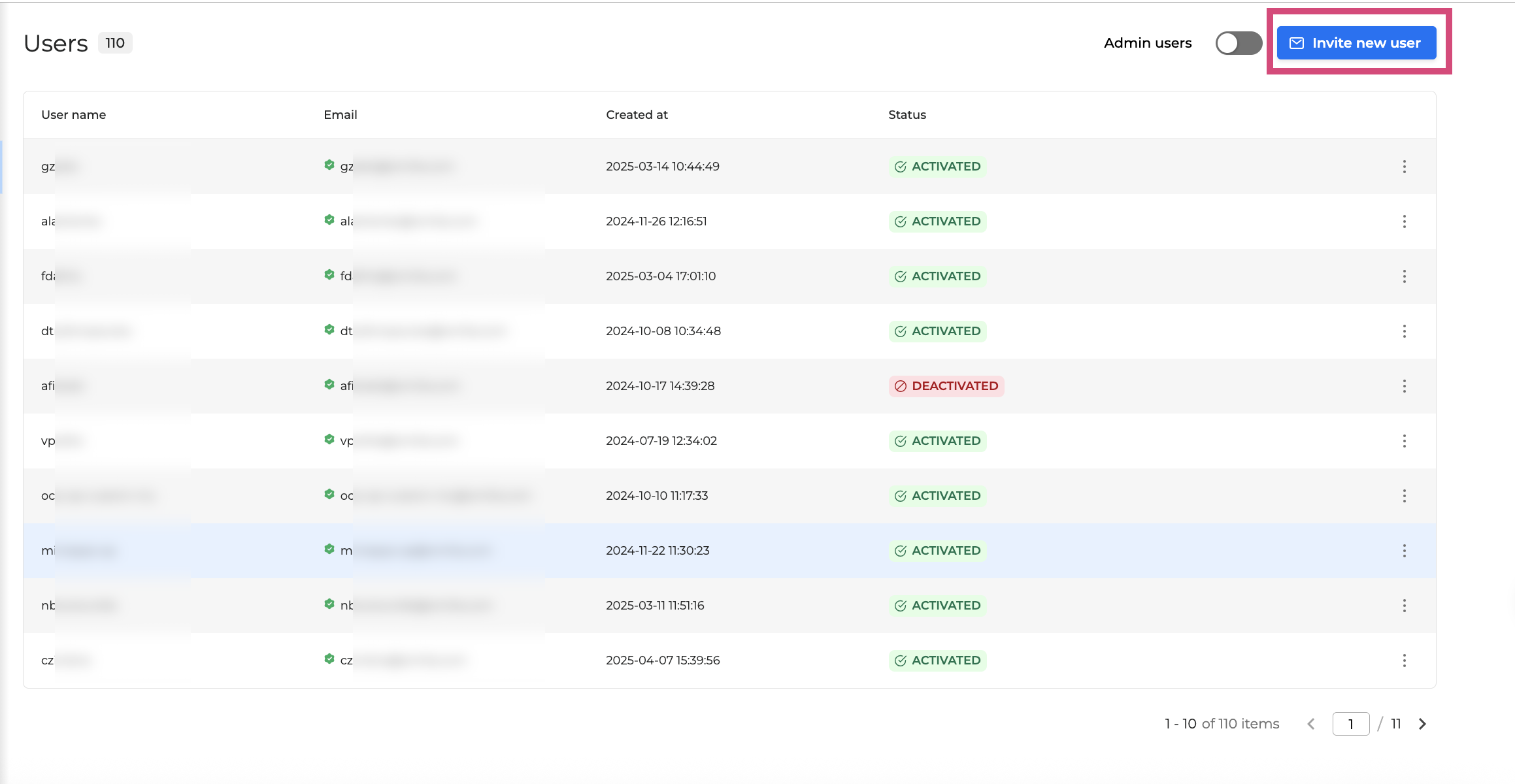
Invite New Users by Email - Organization admins can now invite new users directly by email from OCP Console. The invited user receives a time-limited link to set their own password and is logged in immediately after. Public self-registration can be disabled as a result, giving administrators tighter control over who joins their organization.
-
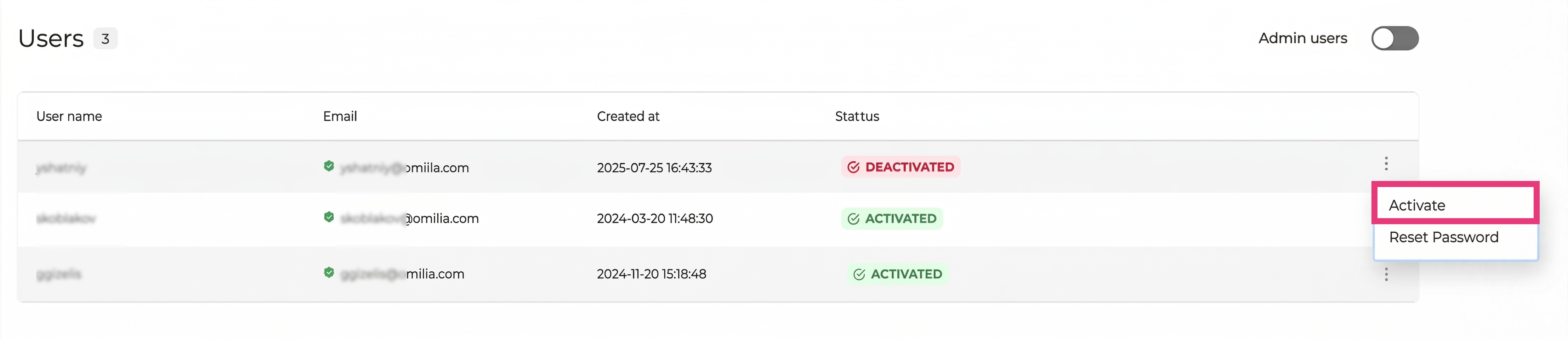
Admin-Initiated Password Reset - OCP Console and organization admins can now reset a user's password directly from the user list or the user's details view. This removes the need for a public "Forgot Password" link, reducing the attack surface for credential abuse while letting admins resolve access issues without involving support.
Improvements
-
User Reactivation by Organization Admins - Organization admins can now reactivate a deactivated user in their organization without raising a support request. This applies even when the user belongs to multiple organizations, and all reactivation actions are logged for audit purposes.
-
Cleaner Email Sender Display - System emails such as password change notifications and inactivity alerts now display a clean, domain-appropriate sender name instead of a raw technical address. On white-label environments, Omilia branding is not shown in the sender field.
-
Earlier Notification Before Personal Access Token Expiry - Users now receive an additional reminder 30 days before their personal access token expires, giving more time to renew tokens before access is interrupted.
-
Automatic Disablement of Inactive Service Accounts - Service accounts that have been inactive for 90 days are now disabled automatically, with an advance alert sent at 60 days. This keeps the platform in line with access-control best practices and reduces the risk from dormant credentials.
-
Refreshed OCP Console Interface - Phase 1 - The OCP® Console user interface has been updated as part of a wider overhaul initiative, delivering a more consistent and refined experience.
Fixes
-
Corrected Wording in System Email Notifications - Grammar errors in account lock and token expiry notification emails have been corrected, ensuring all automated messages read clearly and professionally.
-
This release includes security updates.
For more information go to Access Management Tab.
Insights 1.25.0
New Features
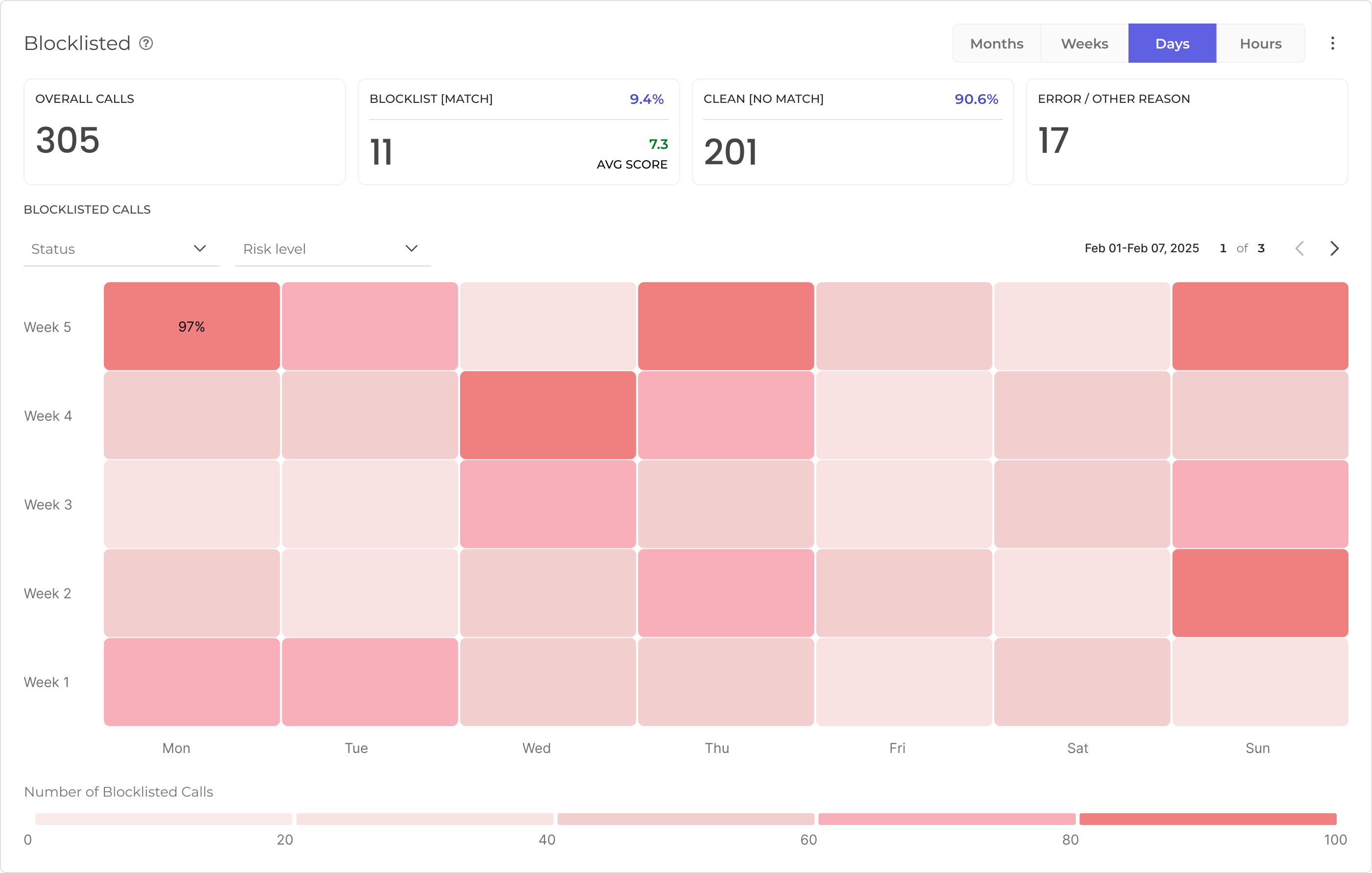
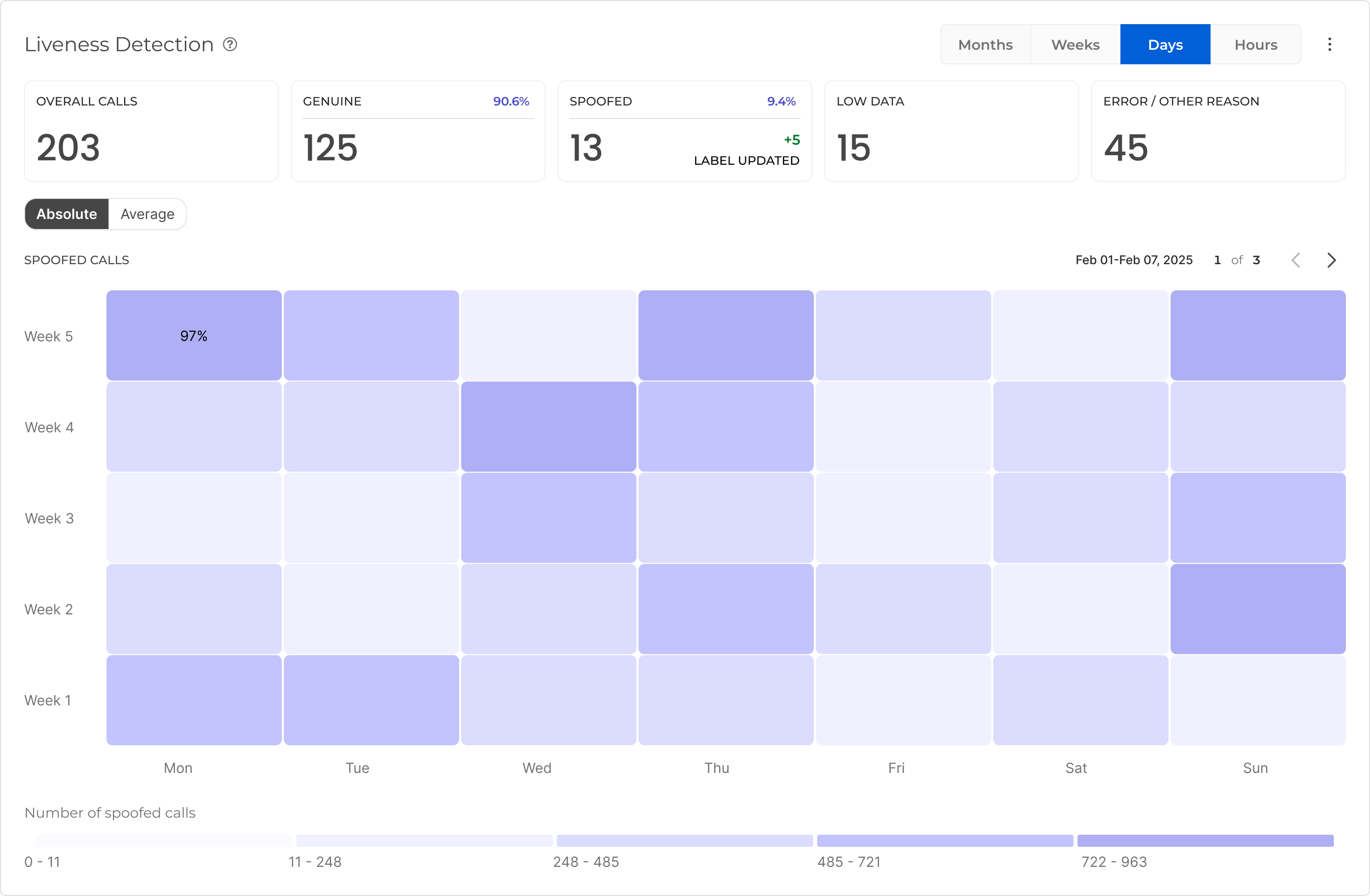
Liveness Detection and Blocklisting Reports - OCP Conversational Insights® now includes dedicated reporting for Liveness Detection and Blocklisting in the Voice Biometrics section. You can track how many spoofed or blocklisted calls reached your applications, view heatmap breakdowns by day or week, and filter by origin and region - giving your fraud operations team a clear, at-a-glance picture of anti-fraud activity across all calls.
-
Timezone-Aware Export Scheduling - When creating a data export, you can now select a timezone offset for your date range, making it easier to align exports with your local business hours. A note is displayed confirming that exported data is always delivered in UTC, regardless of the timezone used for selection. The date and time picker also supports hourly precision for more granular scheduling.
-
Agent Assist Events in Raw Data Exports - Raw data exports now support Agent Assist event types, enabling you to include agent-side interaction data in your export streams for analysis and reporting.
For more information go to Export Service User Guide.
-
Audience Field for Export Authorisation - When configuring an export stream, you can now supply an optional Audience value as part of the authorisation settings, providing greater control over token-based access to your export destinations.
-
Duplicate Key Searches in Monitor - In the Monitor dialog search, you can now search using the same key with different values simultaneously, for example, filtering for two different outcomes under the same call attribute. This makes it easier to find conversations where a particular data point takes any of several values.
For more information go to OCP® Monitor User Guide.
Improvements
-
Configurable Headers for Export Streams - Export stream configurations now support adding custom static HTTP headers, giving you more flexibility when connecting exports to destinations that require specific header values for authentication or routing.
Fixes
-
Reliable Live View in Dialog Monitor - The live dialog view in Monitor now refreshes its time window continuously, so new calls appear without requiring a manual page reload. Previously, the view would freeze at the time the page was first loaded, causing recent conversations to go missing until you refreshed.
-
Consistent Button Labels in Reporting - The button used to load reports in the Agent Assist reporting page has been relabelled to match the label used across all other reporting pages, providing a consistent experience throughout the Reporting section.
Liveness Detection 6.0.1
-
This release addresses high-severity vulnerabilities identified in third-party library dependencies. The affected libraries have been updated to remediate the findings and reduce exposure to potential security risks.
For more information go to Liveness Detection.
Metrics API 3.4.4
Overview
Metrics API 3.4.4 focuses on two themes: making real-time alerting more flexible and accurate, and broadening the range of data available for reporting and analytics.
Highlights
-
More powerful calculations through expression-based calculated metrics (ratios, percentages, and other derived indicators).
-
A single aggregations response that returns both raw and calculated metrics, with built-in validation.
-
Expanded analytics coverage with new data sources for dialogs, agent-assist sentiment, intent distribution, and security detection.
What's New
-
Advanced calculated metrics for alerting - Alerts can now be defined using mathematical expressions such as ratios and percentages. For example, the no-match rate expressed as a percentage of completed sessions. This replaces the previous fixed numerator/denominator approach with a far more flexible model, allowing teams to configure precisely the operational indicators that matter to them. Percentage-based alerts are handled natively, so thresholds and notifications display values in a clear, consistent format.
-
Composite metrics in the aggregations capability - The aggregations API now supports optional calculated expressions alongside standard metric aggregations, returning both raw and derived values in a single response. Input is validated for correctness and security, and edge cases such as division by zero or missing values are handled gracefully. This simplifies dashboard and report creation by reducing the number of separate calls required and ensuring consistent, trustworthy results.
-
Expanded analytics data coverage - This release adds several new data sources that are now available for reporting, monitoring, and analytics:
-
Dialog-level and root-level real-time metrics: richer visibility into conversational performance at multiple levels.
-
Agent-assist sentiment analysis: sentiment insights to support agent-assist use cases.
-
MiniApps intent distribution: aggregated view of how user intents are distributed across MiniApps.
-
Liveness and blocklisting detection: additional security and authentication signals available for monitoring.
-
For more information go to OCP® Metrics API.
miniApps 2.41.0
New Features
-
UK Postcode Validation for Alphanumeric miniApps - Alphanumeric OCP miniApps® now include a built-in UK postcode format validator. Callers entering a UK postcode are validated against the standard format automatically, reducing failed captures and eliminating the need to build custom validation logic.
-
Custom NLU Tag for Hold Escape - The Exit Hold functionality now supports an optional custom NLU tag. When a caller exits hold, the tag is passed downstream so your dialogue logic can react to the escape event with greater precision, enabling more context-aware routing and follow-up prompts.
-
Word Boosting for Speech Recognition - Speech recognition for English and Spanish can now be tuned with a list of words or phrases to prioritise during transcription. When certain terms are critical to your application - product names, account types, or commands. Boosting them improves recognition accuracy for those specific inputs. Configure the feature and the phrase list directly from the miniApp ASR settings.
-
DTMF-to-Intent Mapping - Operators can now assign a specific NLU intent to each keypad key (0–9, *, #) directly from the miniApp configuration. When a caller presses a key during an interaction, the system resolves the mapped intent, allowing downstream dialogue logic to react as if the caller had spoken that intent. Flows designed around voice inputs can now extend seamlessly to DTMF interactions without separate handling.
-
Sensitivity Management from the Console - miniApp data sensitivity settings (None, Irreversible Masking, or Envelope Encryption) can now be updated directly from the OCP Console® without requiring a back-end change. Each change is recorded in the audit log, providing a clear history of who changed the sensitivity level and when.
Improvements
-
Configurable Minimum Speech Duration - A new Minimum Speech Frames slider in the ASR settings lets you set the shortest audio input that triggers recognition, reducing false activations from background noise or very brief sounds. Adjust the value per miniApp to match the pace and context of your callers.
-
Locale List Reflects Actual Environment Capabilities - The list of available languages shown when configuring a miniApp now reflects only the locales that are active and supported in the current environment. Prompt slots and language options for unsupported locales no longer appear, keeping configuration straightforward and preventing prompts from being set up for languages the deployment cannot serve.
-
Smarter Data Privacy Defaults on miniApp Creation - When creating or duplicating a miniApp, the Data Privacy field now pre-selects the appropriate protection level based on the miniApp type. Types commonly used to capture sensitive data - such as Numeric, Alphanumeric, and Date - default to Irreversible Masking, reducing the risk of sensitive caller data being stored in plain text. The pre-selection is advisory and can be changed before saving.
-
Instant Configuration Updates and Improved Call Reliability - miniApp configuration changes now take effect immediately at runtime. Previously, updates could take up to five minutes to appear in live calls. At the same time, configuration files are cached to reduce dependency on cloud storage at call start, lowering the risk of call failures during periods of high load.
-
Stricter Prompt Input Validation - Prompt fields now validate SSML syntax more thoroughly, catching invalid characters such as curly quotes that cause speech synthesis to fail silently. An inline error is displayed when the input contains unsupported characters, so issues are caught at configuration time rather than during a live call.
-
User Function Name Validation - Function names in the User Functions editor are now validated against a set of disallowed characters (slashes, backslashes, and other reserved characters). Saving a name containing these characters is blocked with a clear error, preventing export failures and file-system errors that were previously only discovered at deployment time.
-
Deprecated Audio Upload Endpoint Removed - The legacy audio upload endpoint has been removed. Integrations still using it need to switch to the current Audio Hub integration. Refer to the updated API documentation for details.
-
Filter Panel Usability - Opening a filter dropdown in the miniApps list now automatically collapses the previously open one, keeping the filter panel tidy and reducing the need to manually close each dropdown before opening another.
-
Improved Chat Rich Content Button Configuration - The entity and intent selectors in the Chat Rich Content button editor now use a searchable dropdown, replacing the previous checkbox list. The updated design reduces visual clutter when many options are available and clearly indicates when no intents have been created yet.
Fixes
-
Wildcard Condition Handling in Announcement miniApps - Setting the condition field to "any" in an Announcement miniApp no longer requires filling in the operator or value fields. The fields are correctly treated as optional when the wildcard condition is selected, removing a confusing and unnecessary step.
-
This release includes security updates.
For more information go to User Functions Tab, SSML tags support of Omilia TTS, and Announcement OCP miniApps®.
miniApps 2.42.0
Improvements
-
Expanded en-GB Language Support - OCP miniApps® now supports the en-GB locale across additional miniApp types, including Alpha, Amount, DateRange, and Text. Callers interacting with UK-English deployments benefit from consistent and accurate language handling across a wider range of conversation flows.
-
Enhanced JavaScript Isolation for All Scripts - All JavaScript snippets in miniApps now run in a fully isolated execution environment by default, including those that use cryptographic operations. This improves runtime stability and ensures that custom script logic does not interfere with the broader platform, providing a more reliable and secure execution experience for every miniApp. Find more info in the Isolated-Mode Developer Guide for miniApps JavaScript Snippets.
-
Extended DTMF Input Length for Numeric miniApps - The maximum length for DTMF numeric input has been increased from 20 to 21 digits, enabling callers to enter longer numeric sequences such as IBAN numbers without being cut off.
-
Improved Numeric Recognition Accuracy - The number of speech recognition candidates evaluated during numeric input validation has been increased, improving the ability to correctly identify the caller's intended number when the top result is ambiguous. This reduces recognition failures for numeric inputs in supported environments.
Fixes
-
Accurate Function Output Display in Intelli - The Intelli outputs panel now correctly displays the full JSON result of a function when testing outputs, instead of showing a generic placeholder. Reviewers and designers can now inspect actual function results directly within the panel.
OCP NLU 1.14.1
Improvements
-
Consistent xPack Version Across All Servers After Deployment - After deploying a new OCP deep NLU® xPack, all running servers now automatically refresh to the latest version without requiring a manual restart, ensuring consistent recognition behavior across your deployment from the moment a new xPack goes live.
OCP NLU 1.15.0
New Features
-
K-Fold Cross-Validation for NLU Models - You can now run k-fold cross-validation directly from OCP Conversational Natural Language®, enabling a more statistically robust assessment of model performance before deployment. Initiate a validation run, track its progress in real time, and review a full breakdown of results, including per-intent accuracy summaries, confusion patterns, and downloadable detailed reports, all from within the interface. Only one validation run per group runs at a time, preventing conflicts with active training or evaluation jobs.
-
Model Data Validation - Before training, you can now validate a model's training dataset to check its health and integrity. Results are surfaced directly in the interface, helping you catch data issues early and avoid training a model on a flawed dataset.
-
Belgian French (fr-BE) Language Support - OCP Conversational Natural Language® now supports Belgian French (fr-BE) as a new language option, extending coverage for French-speaking users in Belgium.
Improvements
-
Alphabetically Sorted Language List with Human-Readable Names - The language selection dropdown now lists all available languages in alphabetical order and displays them as readable names (for example, "French (Belgium)" instead of "fr-BE"), making it faster and easier to find the right language when creating or configuring a model.
-
Accurate Training Results for Mixed-Case Entity References - Models whose training data includes entity references written in mixed case now train and annotate correctly. Previously, these references were silently excluded from training, causing the deployed model to miss matching phrases. Retraining existing affected models is recommended to pick up the fix.
-
Deployed Snapshot Indicator - The snapshot list now shows a visual indicator next to the snapshot that is currently deployed, making it immediately clear which version is active without needing to navigate away.
-
Configurable Resource Allocation for xPack Deployments - Administrators can now configure CPU limits, CPU reservations, replica counts, and workflow maximums for xPack applications based on their domain and language, providing finer control over resource allocation and performance during deployment.
-
Uninterrupted Annotations During Service Restarts - Annotation requests no longer return errors during the brief window following a service restart or redeployment. The service now completes its internal configuration before accepting traffic, ensuring a smooth experience.
For more information go to Evaluating a model, Training an NLU model, Managing Snapshots of an NLU Model, Deploying a model, and OCP Conversational Natural Language® User Guide.
Fixes
-
This release includes security updates.
Orchestrator 1.35.1
New Features
-
A/B Model Testing on Agents - Agents can now split their traffic across several model backends at once, so you can A/B test models in production. Each agent can carry a list of model configurations, each with a traffic weight (the shares must add up to 100%) and its own model, backend, and generation settings. Agents that don't use this feature keep working exactly as before with their single model.
-
Manage A/B Models from the Console - Console administrators can manage these configurations for any agent from a dedicated admin area. You can view the configurations for each agent, replace them, or clear them, with validation that traffic shares add up to 100% before anything is saved.
-
Automatic Redeployment - When you change an agent's model configurations, the agent is automatically redeployed so the change takes effect immediately. If the redeployment fails, the change is safely rolled back and an error is reported, so an agent is never left in a half-updated state.
Security Improvements
-
UI dependencies were updated to address reported security vulnerabilities, including an upgrade of the
axiosHTTP library to a patched version. These are internal hardening updates with no change to UI behavior.
For more information go to Orchestrator User Guide.
Pathfinder 1.9.0
What's New
-
Faster, more reliable project exports. Exporting a project no longer blocks or times out on large knowledge bases - exports run in the background. Track progress and download when ready, with a real download progress bar, and re-download the archive anytime until it expires. You'll be notified when your export is ready. Exports now also include the knowledge-base metadata-field schema.
-
Personal Access Token (PAT) authentication. Authenticate API requests with a Personal Access Token, in addition to standard bearer tokens.
-
Filter knowledge-base documents by filename. Quickly find documents by searching on their filename.
Improvements & fixes
-
Knowledge-base search now reflects paraphrase edits immediately instead of after a delay.
-
Clearer, safer error messages during document ingestion.
-
Reliability and security hardening across export and authentication.
-
Import ZIP file size limit increased to 200 MB. For more information go to Pathfinder User Guide.
Pathfinder 1.9.1
-
Compatibility fix
Pathfinder 1.9.2
New Features
-
Plain-Text Document Support in Knowledge Base Projects - Knowledge base document-retrieval projects now accept plain-text (.txt) files in addition to JSON. You can upload .txt documents directly to your project, and retrieval results include the text content alongside a content type indicator, making it easier to work with a wider range of document formats without manual conversion.
Fixes
-
Reliable Project Import - The Import button is now disabled immediately after you click it when creating a project from an exported file, preventing accidental duplicate imports.
-
Clearer, safer error messages when uploading invalid or corrupt documents.
-
Security and dependency hardening, including an updated authz-sidecar.
Redaction Service 0.3.0
New Features
-
Automatic Language Detection for Redaction - The redaction service now automatically identifies the language of a transcription before processing it, enabling accurate redaction across multilingual call centers without manual configuration. When language detection is enabled, the detected language is also returned to you in the API response, so downstream systems always know which language was recognized.
-
Direct Redaction Configuration per Request - You can now pass redaction settings directly when submitting audio for redaction, bypassing the need for a pre-configured group profile. This lets authorized users run redaction jobs on demand with custom parameters, accelerating testing, integration, and ad-hoc processing workflows.
-
Spoken Number Normalization Before Redaction - The redaction engine can now convert spoken numbers in transcriptions (for example, "one two three four") into their digit form before scanning for sensitive terms, improving detection accuracy for account numbers, card numbers, and similar PII spoken aloud.
Fixes
-
Reliable Request Handling Under High Load - Redaction requests no longer queue up multiple times when the transcription backend is slow to respond, preventing queue overflow and ensuring requests are processed correctly even during periods of high traffic.
Redaction Service 0.2.2
New Features
-
Cancellation of Pending Batch Transcription Jobs - You can now cancel a batch transcription job that is still pending, giving you control over long-running or unwanted jobs without waiting for them to complete or time out.
-
Redaction Status in API Response - The redaction API now returns a clear indicator of whether audio was actually modified. When no sensitive data is detected and the file is left unchanged, you can skip downloading the redacted audio and continue using the original, reducing unnecessary data transfer. For single-call integrations, a new streamlined response option returns either the redacted audio or a compact confirmation, all in one request.
Improvements
-
Faster Processing When Redaction Is Disabled - When redaction is turned off for a group, audio is now returned immediately without running the transcription step, reducing latency and processing overhead.
-
Improved Transcription Accuracy for Sensitive Data - Recognition accuracy for alphanumeric PCI and PII entities, such as credit card numbers, CVVs, and account identifiers has been improved, reducing transcription errors for sensitive financial data.
-
Personal Access Token support and enhanced background authentication to manage user permissions more efficiently, keeping your data secure and accessible only to authorized users.
Fixes
-
Consistent and Accurate Error Responses - Error messages returned by the API now consistently describe what went wrong, replacing generic service-level titles with clear, actionable descriptions. Async redaction jobs are now reliably retrievable after submission, resolving intermittent cases where a submitted job could not be found on follow-up requests. Unknown response format values are now correctly rejected with a validation error instead of silently falling back to a default.
STT 8.7.2
Fixes
-
In depth metrics for hybrid turn detection
-
Performance improvement in step audio redaction feature
-
This release includes security updates.
Testing Studio 1.18.1
-
Security Updates
Testing Studio 1.19.0
Improvements
-
Agentic Step Control in Test Runs - You can now choose to assert or skip agentic steps within a dialog during test execution. This gives you finer control over which parts of an agentic flow are validated, making it easier to focus test runs on the steps that matter.
Fixes
-
Reliable Goldenize Action on Failed Tests - Goldenizing a failed test case now completes successfully. Previously, attempting to goldenize a failed test returned an error, preventing the expected result from being saved.
-
Persistent Banner Dismissal Across Tab Switches - Dismissing the run-summary banner in Agents Unit Testing now stays dismissed when switching between the Scenarios and Results tabs. Previously, the banner reappeared every time you navigated back to the Scenarios tab.
-
This release includes security updates.
For more information go to Testing Studio+™ User Guide.
Voice Biometrics 1.17.0
Cross-Group VB Operations
Enrollment, verification, and opt-out operations can now be triggered across multiple groups within the same organization. This enables deployments where a single user is enrolled under different groups, using a profile-based group resolution model.
New API Endpoints
Three new versioned endpoints have been added to support multi-group operations:
-
POST /api/v2/enrolments- supports group-specific audio download via a newapplication_groupfield. -
POST /api/v3/users/optout- supports profile-based group resolution via a newprofile_idfield. -
POST /api/v3/users/info/search- supports profile-based group resolution via a newprofile_idfield.
All endpoints remain backward compatible - existing fields continue to work unchanged.
Improvements
-
Error handling: TokenService errors are now correctly propagated with the original HTTP status code instead of returning a generic 500.
-
Resilience: Voiceprints with missing or empty vector data are now gracefully skipped during processing instead of causing failures.
-
Accessibility: The Voice Biometrics Console now supports full keyboard navigation (ARIA/WCAG compliant).
Bug Fixes
|
Component |
Description |
|---|---|
|
BioService |
Fixed verification failures occurring at high concurrency (~70 concurrent calls per replica). |
|
BioStore |
Fixed enrollment migration errors caused by sessions with no associated profile. |
|
BioStore |
Opt-Out V3 now correctly returns 404 for non-existent users instead of 204. |
|
Console |
Fixed BioKeys table resizing unexpectedly when pressing Space on the "is bioUser ID" toggle. |
Security
This release includes dependency and container image updates to address known high and medium severity vulnerabilities across all components.
For more information go to Voice Biometrics API and Voice Biometrics Blocklists.
Upgrade Notes
BioStore - Auth Config: AUTHORISATION_ENABLED now defaults to true when not explicitly set. Verify your environment configuration before upgrading to avoid unexpected traffic rejection.
Component Versions
|
Component |
Version |
|---|---|
|
BioStore |
6.22.0 |
|
BioBuilder |
6.22.0 |
|
BioService |
1.0.1 |
|
Console-VB (middleware) |
1.17.0 |
Voice Biometrics 1.17.1
This release addresses high-severity vulnerabilities identified in third-party library dependencies. The affected libraries have been updated to remediate the findings and reduce exposure to potential security risks. Also contains a bug fix regarding the handling of large audio files by enrollment server.
xPacks 1.18.2
New OCP xPacks
-
nl-BE Universal deepNLU® xPack v3.0.0 -
nl-NL Universal deepNLU® xPack v3.0.0
Fixed OCP xPacks
-
en-US Universal deepNLU® xPack v3.17.1-
Improved recognition accuracy for ACCEPT, Agree, Alphanumeric, CardNumber, CONVENTIONAL, DIALOGACT, Exit, Hour, Numeric, REJECT, SentimentDescriptor, and YesNo entities.
-
The Numeric entity now returns all candidate interpretations of composite spoken numerals (e.g. "twenty nine" → 29, 20, 9) when the caller is interacting with Numeric or Alphanumeric miniApps.
-
The Numeric miniApp now correctly interprets the spoken letter "oh" (or "o") as the digit 0.
-
Phrases such as "it is", "it does" (ACCEPT) and "it is not", "it does not" (REJECT) are now reliably mapped to the correct dialog act entities. Previously these were missed or only partially triggered.
-
Several Hour entity misrecognition cases have been addressed, including false Hour annotations triggered by numeric ordinals (e.g. "one time", "two times") and incorrect value assignments for expressions like "all night and all morning" and "three o’clock this morning".
-
Improved recognition of card numbers provided as compound spoken numerals. Previously, such inputs were truncated to partial values due to incorrect numeral decomposition.
-
Improved recognition of dates provided digit-by-digit (e.g. "one zero zero five one nine seven six" for date of birth), which previously resulted in no-match.
-
-
en-US Universal+ deepNLU® xPack v3.17.1-
Improved recognition accuracy for ACCEPT, Agree, Alphanumeric, CardNumber, CONVENTIONAL, DIALOGACT, Exit, Hour, Numeric, REJECT, SentimentDescriptor, and YesNo entities.
-
The Numeric entity now returns all candidate interpretations of composite spoken numerals (e.g. "twenty nine" → 29, 20, 9) when the caller is interacting with Numeric or Alphanumeric miniApps.
-
The Numeric miniApp now correctly interprets the spoken letter "oh" (or "o") as the digit 0.
-
Phrases such as "it is", "it does" (ACCEPT) and "it is not", "it does not" (REJECT) are now reliably mapped to the correct dialog act entities. Previously these were missed or only partially triggered.
-
Several Hour entity misrecognition cases have been addressed, including false Hour annotations triggered by numeric ordinals (e.g. "one time", "two times") and incorrect value assignments for expressions like "all night and all morning" and "three o’clock this morning".
-
Improved recognition of card numbers provided as compound spoken numerals. Previously, such inputs were truncated to partial values due to incorrect numeral decomposition.
-
Improved recognition of dates provided digit-by-digit (e.g. "one zero zero five one nine seven six" for date of birth), which previously resulted in no-match.
-
-
es-US Universal deepNLU® xPack v3.10.3-
Fixed missing Year entity extraction for Spanish date utterances. Year values spoken as part of a full date or in isolation were not captured; the date defaulted to the current year. Now resolved for both TEXT and SPEECH modes.
-
-
pt-BR Universal deepNLU® xPack v3.7.0-
Improved recognition accuracy for DIALOGACT and CONVENTIONAL entities.
-
Improved recognition accuracy and hypothesis coverage for spoken numeric expressions.
-
-
pt-PT Universal deepNLU® xPack v3.14.0-
Improved recognition accuracy for DIALOGACT and CONVENTIONAL entities.
-
Improved recognition accuracy and hypothesis coverage for spoken numeric expressions.
-