.svg)
Overview
OCP® Self-Learning Agents are the latest generation of contact center automation on the Omilia Cloud Platform® (OCP®). Instead of manually designing conversation flows, scripting dialogs, or engineering prompts, the platform learns directly from your existing customer interactions.
Connect your contact center, upload your call recordings or transcripts, and the platform automatically:
-
Discovers what your customers call about.
-
Extracts the knowledge and workflows your agents use every day.
-
Builds complete conversation flows and resolution strategies (Playbooks).
-
Deploys production-ready AI agents without writing a single line of dialog script.
Self-Learning Agents are suitable for any contact center size, from small and mid-sized businesses to large enterprises, and support pre-packaged models for retail, financial services, healthcare, technology, utilities, and travel. The system adapts to any industry through its self-learning algorithm.
This guide walks you through the full journey: from initial data ingestion to a live, continuously improving AI agent.
How Self-Learning Works
The Self-Learning platform follows a five-stage pipeline:
|
Stage |
What Happens |
|---|---|
|
Observe |
Audio or transcript files are ingested and processed. Speaker diarization separates the agent from the customer, and the system extracts structured call data (use cases, entities, and resolution steps). |
|
Consolidate |
Calls are clustered by topic. Dominant patterns are identified using sequence alignment, producing consensus workflows per use case. |
|
Suggest |
The platform generates automation suggestions and FAQ knowledge items for human review. Nothing is deployed without your approval. |
|
Approve |
You review each suggestion and accept or reject it. Accepted items are added to your knowledge base or queued for deployment. |
|
Deploy |
A complete Playbook is generated per use case and used to deploy an AI agent. The agent goes live with a verified, data-driven configuration. |
The cycle is continuous. Every new call that your deployed agent handles feeds back into the system, refining patterns and improving accuracy over time.
Prerequisites
-
An active OCP account with administrator or owner permissions on your organisation group.
-
Access to Self-Learning in the OCP Console.
-
Your call recordings, transcripts, or knowledge documents ready to upload.
New organisation/group? Wait at least 15 minutes after the group is created before your first upload. The authentication token needs time to synchronise; uploading too early returns a permission error
Key Concepts
Three Types of Memory
The platform maintains three distinct types of memory, each capturing a different aspect of your contact center knowledge.
User Memory stores per-customer attributes-account type, preferences, service history, and other details gathered from previous interactions. This enables agents to personalize each conversation. Remembered attributes are surfaced as contextual hints and are always confirmed before being acted upon, preventing stale data from affecting outcomes.
Environmental Memory captures organizational knowledge that applies broadly FAQ answers, policy details, program information, and rate data. When the same fact appears consistently across many calls, the system builds confidence in it and surfaces it for review. Once approved, it enters the knowledge base that powers your FAQ agents.
Episodic Memory records the structured workflows behind successful interactions; the sequences in which information is gathered, confirmed, and processed. This is the core learning mechanism, it teaches the platform how your best agents handle each type of call.
Playbooks
A Playbook is the central output of the Self-Learning pipeline for each use case. It is a versioned, structured document that captures:
-
The use case description, volume metrics, and success rates.
-
The phases of the conversation (authentication, account lookup, transaction, resolution).
-
Information to be gathered in each phase, including collection order and natural language prompts.
-
Decision points and branching conditions (for example, routing to collections when an account is overdue).
-
API tools to invoke to complete the task.
-
Safety guardrails and business policies extracted from real call patterns.
Playbooks are both human-readable and machine-actionable. Business stakeholders and compliance teams can review and approve them before they drive any automation. Once approved, a Playbook generates the complete agent configuration automatically.
Playbooks use semantic versioning. Minor changes (new phases) trigger a minor version update; refinements within existing phases trigger a patch; structural removals trigger a major version. Every version change is surfaced for review before affecting deployed automation.
Agent Types
The Self-Learning framework includes several agent types that work together:
Concierge - the front door. Greets callers, answers common questions instantly, routes the rest. Usually your first deployment, and it updates itself as you add specialists.
FAQ agents - fast, accurate question-and-answer, powered by your knowledge base.
Task agents - self-service flows such as account management, billing, and transactions. They follow a playbook and can call your backend systems.Convergence Levels
Convergence: getting cheaper over time
As the system processes more calls for a given use case, it progressively replaces AI-driven handling with cheaper, deterministic execution. This is referred to as Convergence.
|
Level |
Description |
Relative Cost |
|---|---|---|
|
Level 0 |
Fully autonomous AI-the LLM handles every step |
Highest |
|
Level 1 |
Hybrid-deterministic FAQ responses, AI fallback for complex steps |
Reduced |
|
Level 2 |
Mostly deterministic-Playbook-driven execution, AI reserved for edge cases |
Low |
|
Level 3 |
Fully deterministic-pure rule-based execution with no AI involvement |
Lowest |
A mature deployment at a hybrid steady state typically cuts handling cost by around three quarters versus running fully autonomous. Full convergence goes considerably further. This happens on its own, in the background, as your data accumulates, there is nothing to configure.
This is possible because the autonomous agents generate exactly the specifications their deterministic replacements need. No one has to write them.
Configure a Self-learning Agent
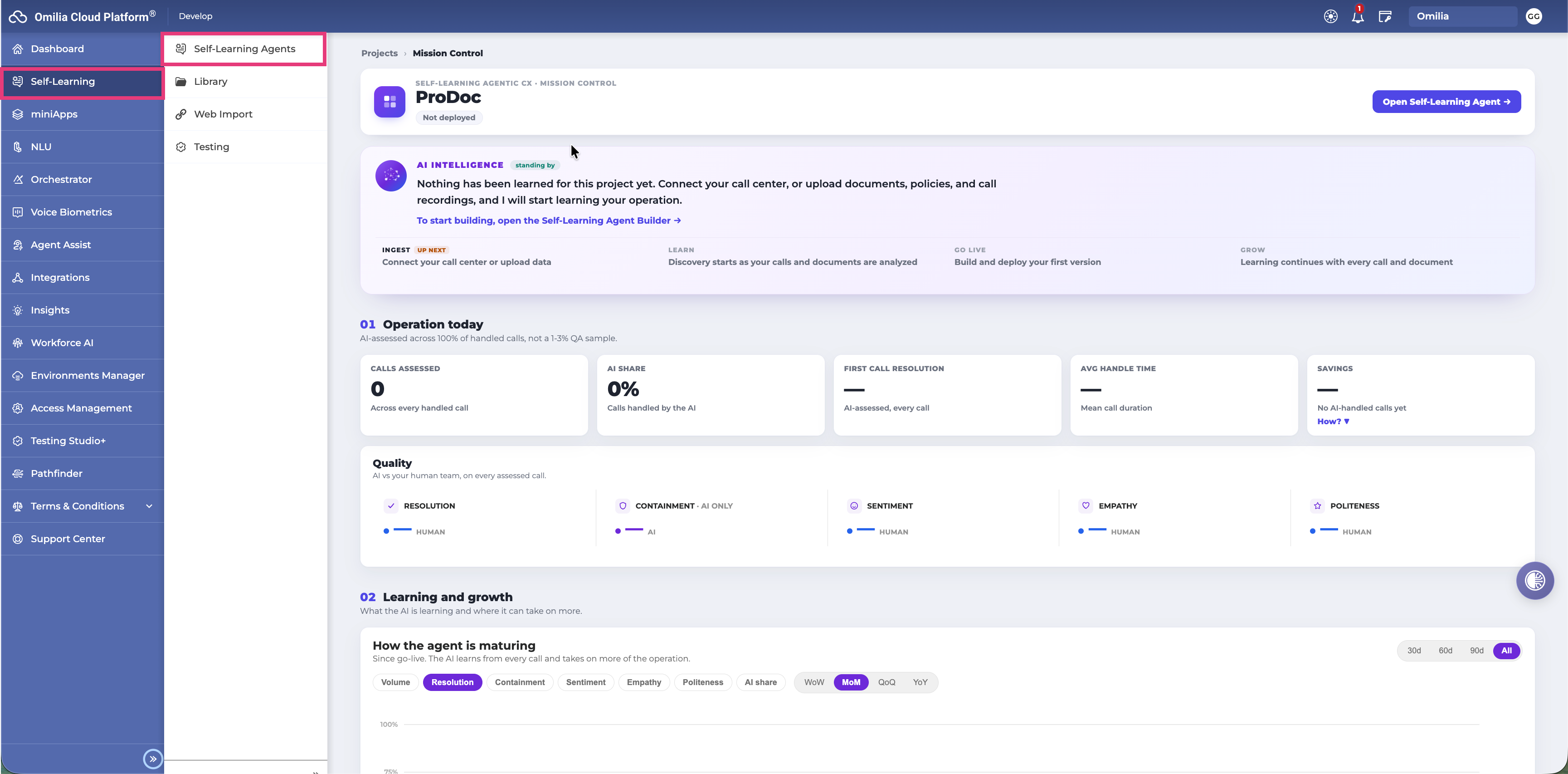
Step 1 - Ingest Your Data
Start ingesting your data to bring your new agent or life. You can upload several types of files, connect a call center and provide a description to your agent.
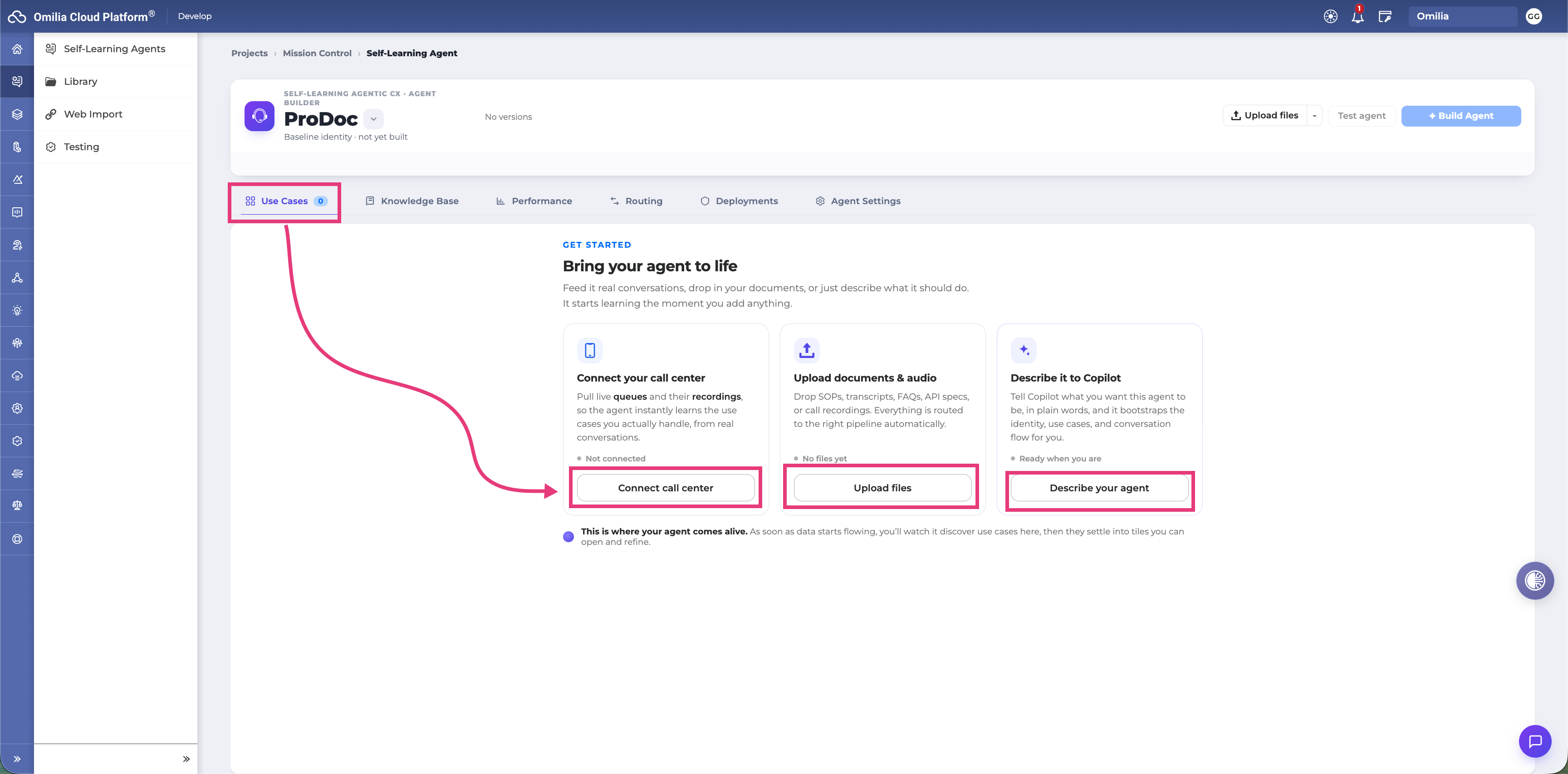
Upload Files
Supported Data Formats
|
Format |
Type |
Notes |
|---|---|---|
|
MP3, WAV, M4A, AAC, OGG, FLAC, MP4 |
Audio, Call recordings |
Speaker diarization is performed automatically |
|
TXT |
Text transcript |
Use |
|
JSON |
Pre-transcribed |
Must conform to OCP transcript schema |
|
PNG, JPEG |
Images |
Text is extracted |
|
PDF, DOCX, XLSX, PPTX web URL |
Documents |
Used to enrich the FAQ knowledge base |
|
Web pages |
knowledge |
Switch the upload panel to web mode |
|
OpenAPI specification |
API definition |
Used to suggest and bind backend tools |
Upload Limits
-
Maximum 50MB file size
-
Maximum 1 GB total per batch of files
-
For larger datasets, upload in multiple batches
How to Upload
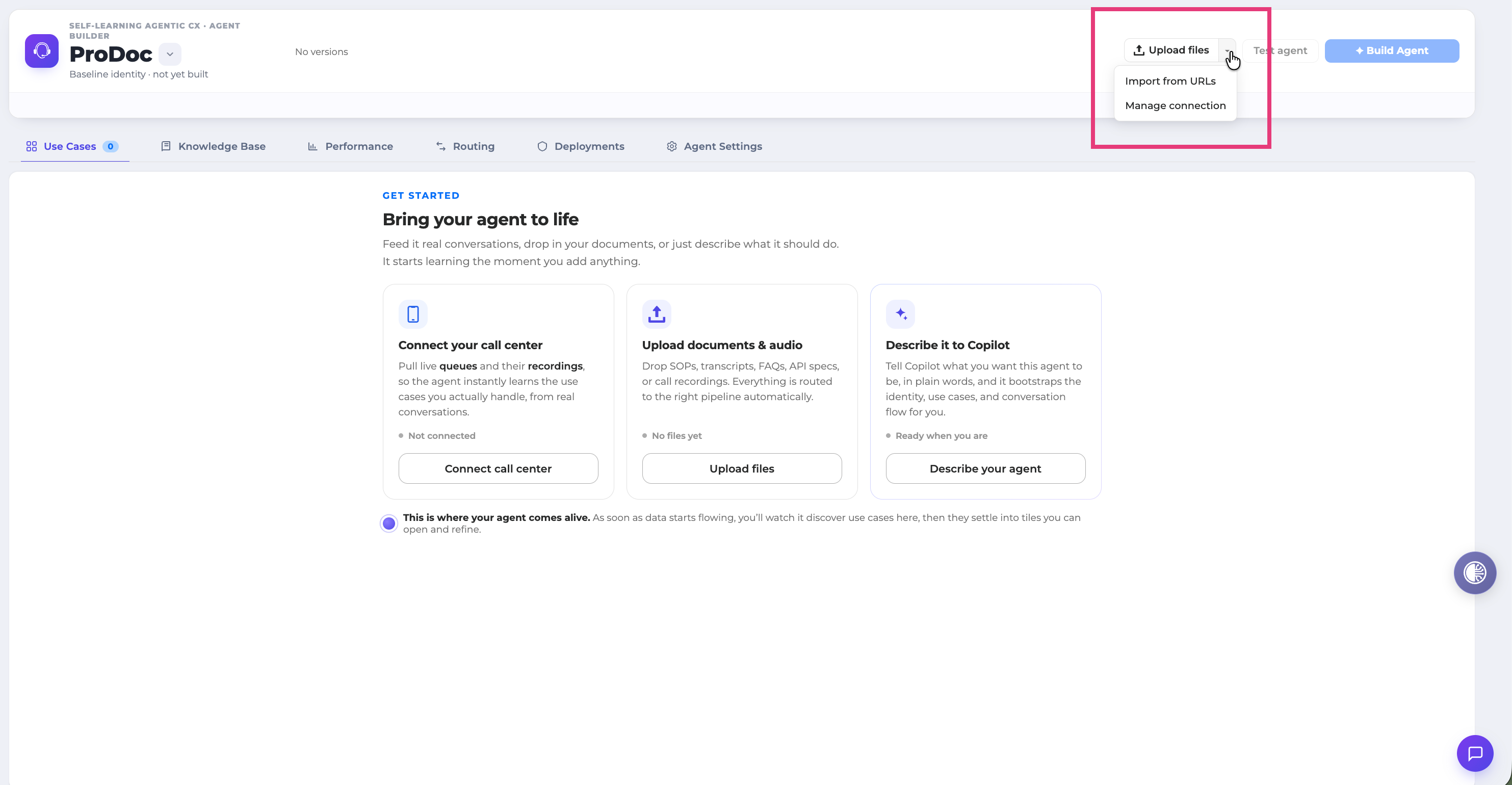
-
Log in to the OCP dashboard and navigate to Self-Learning.
-
On the dashboard, click Upload files (for call recordings or transcripts) or Import from URL
-
Drag and drop your files into the upload area, or browse to select them.
Tip: You don't need to label, pre-process, or organise your files before uploading. The platform handles transcription, speaker identification, and use case classification automatically.
Connect your call center
To connect your contact center with this agent, follow these steps
-
Click the Connect cal center button
-
Select your CCAAS provider and press Continue
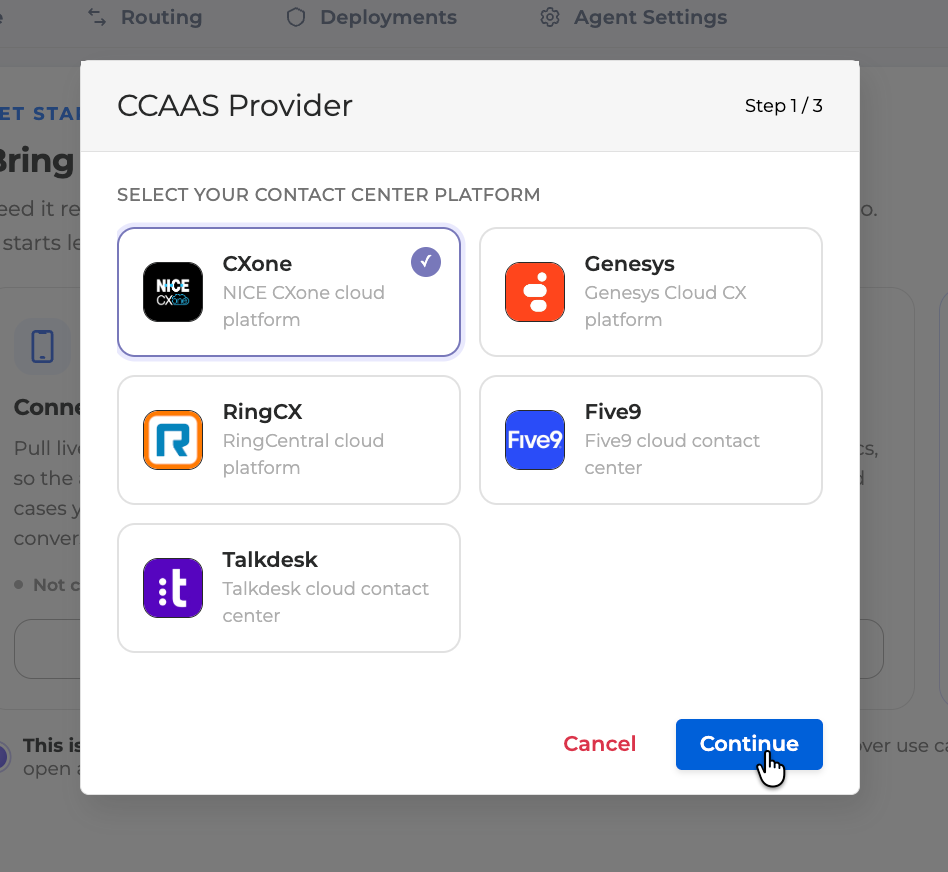
-
Add you CCAAS provider credentials.
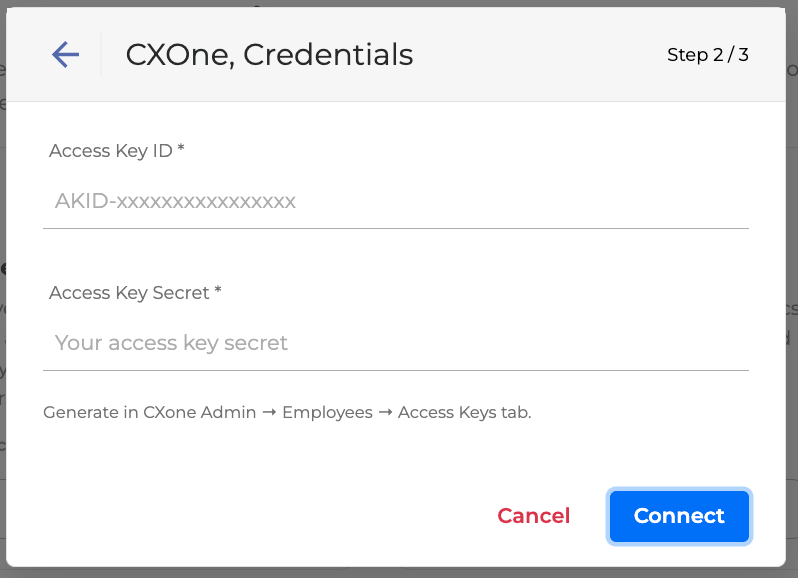
Step 2 - Review Discovered Use Cases and Knowledge
Once calls are processed, the dashboard displays the use cases the platform has discovered.
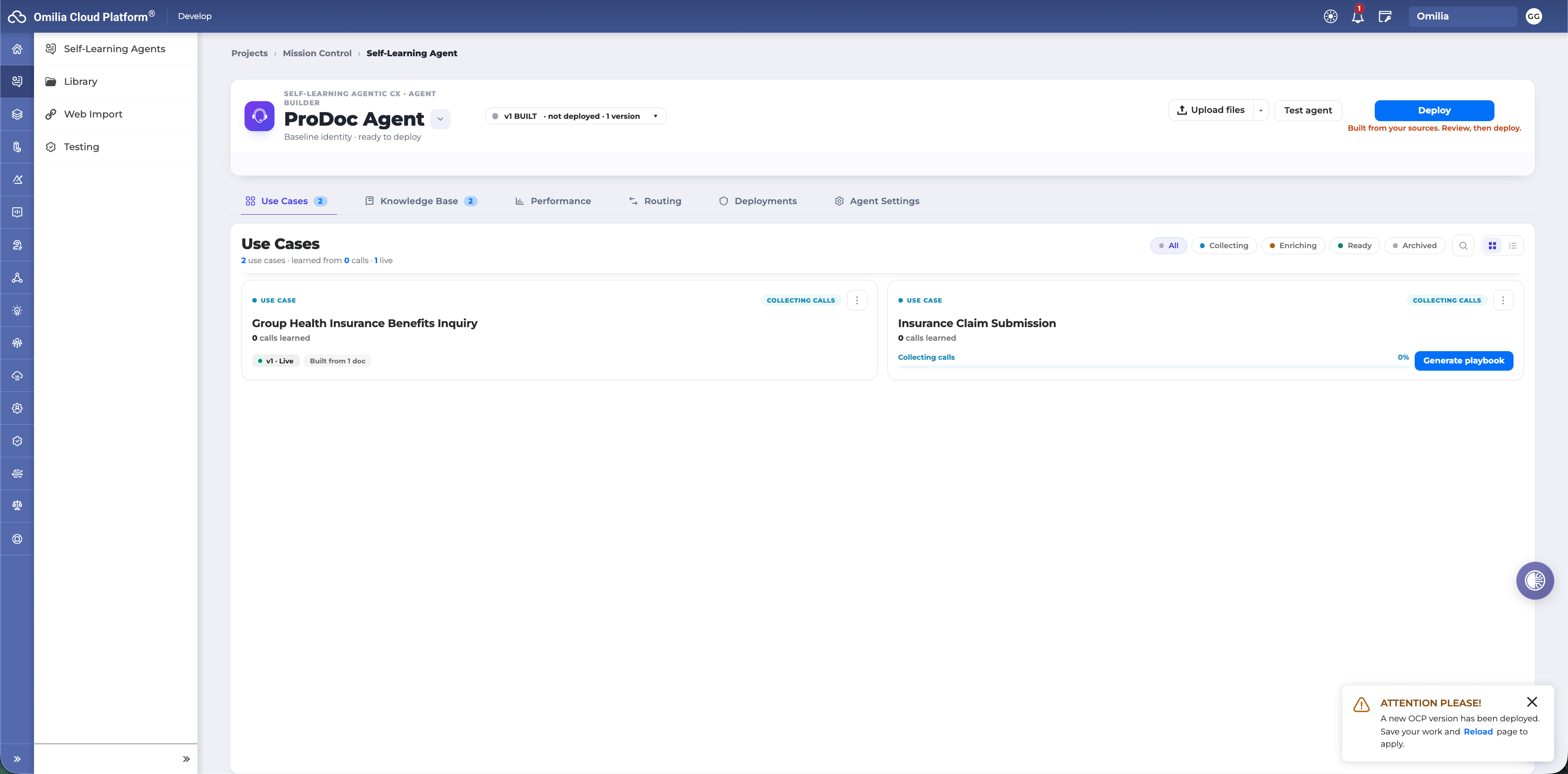
Each use case shows its current status:
-
Collecting Calls - the platform is still accumulating conversations to build a reliable pattern. A minimum of five conversations per use case is required; 200 per use case is the recommended minimum for reliable automation; 1,000 per use case is the target for production-quality results.
-
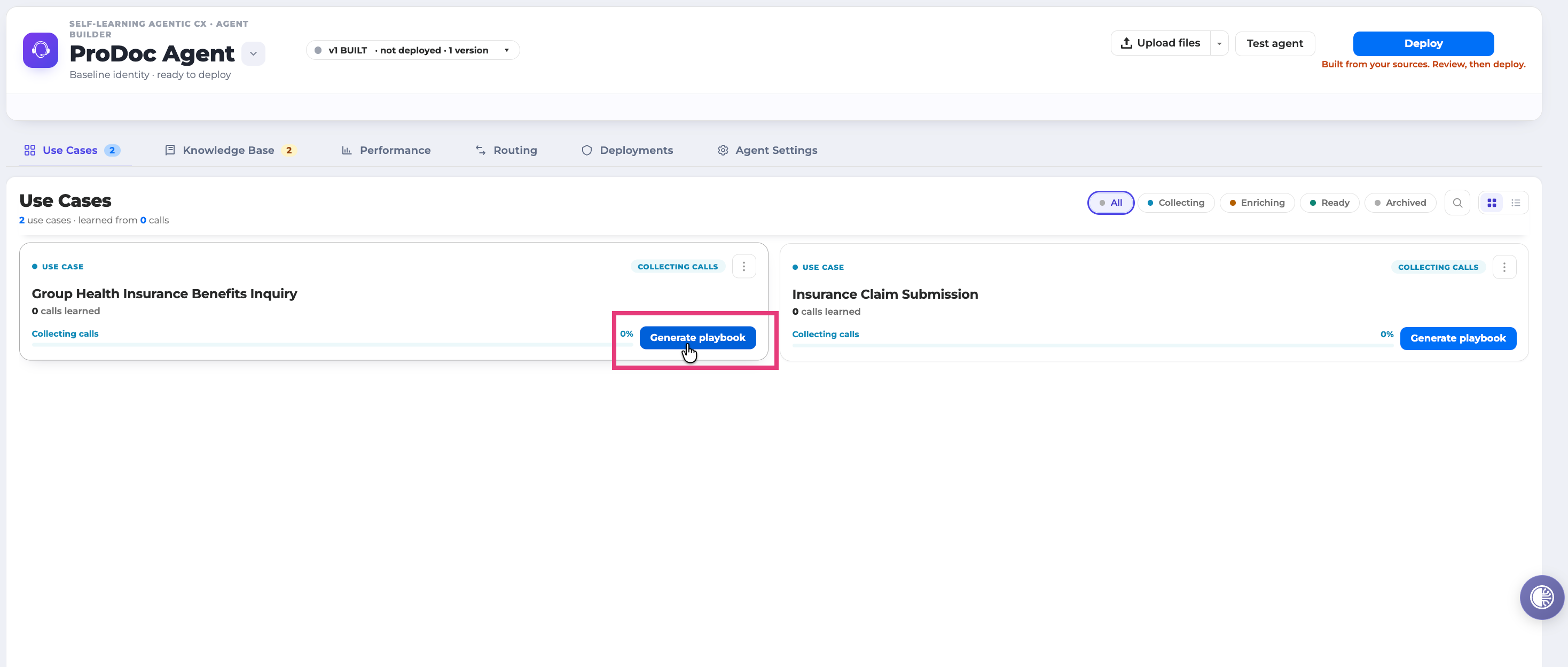
Ready - sufficient conversations have been analysed and the use case is ready for review.\
Once data has been gathered click the Generate playbook button to create the first version of this Agent’s user case.
Reviewing FAQ Knowledge
The Knowledge Base section holds everything your agent knows how to answer. It is one list, with two kinds of content mixed together: answers the platform learned from your calls, and files you uploaded.
Every row carries a status so you can see at a glance what needs you:
|
Status |
What it means |
What to do |
|---|---|---|
|
Needs attention |
Waiting for your review, or something failed |
Open it and review, or re-upload |
|
Processing |
The platform is still working on it |
Nothing - check back shortly |
|
Ready |
Approved, and will go live on your next deploy |
Nothing |
|
Live |
Already serving customers |
Nothing |
|
Dismissed |
You excluded it on purpose |
Nothing |
Click on any use case marked Ready to review the knowledge items the platform extracted.
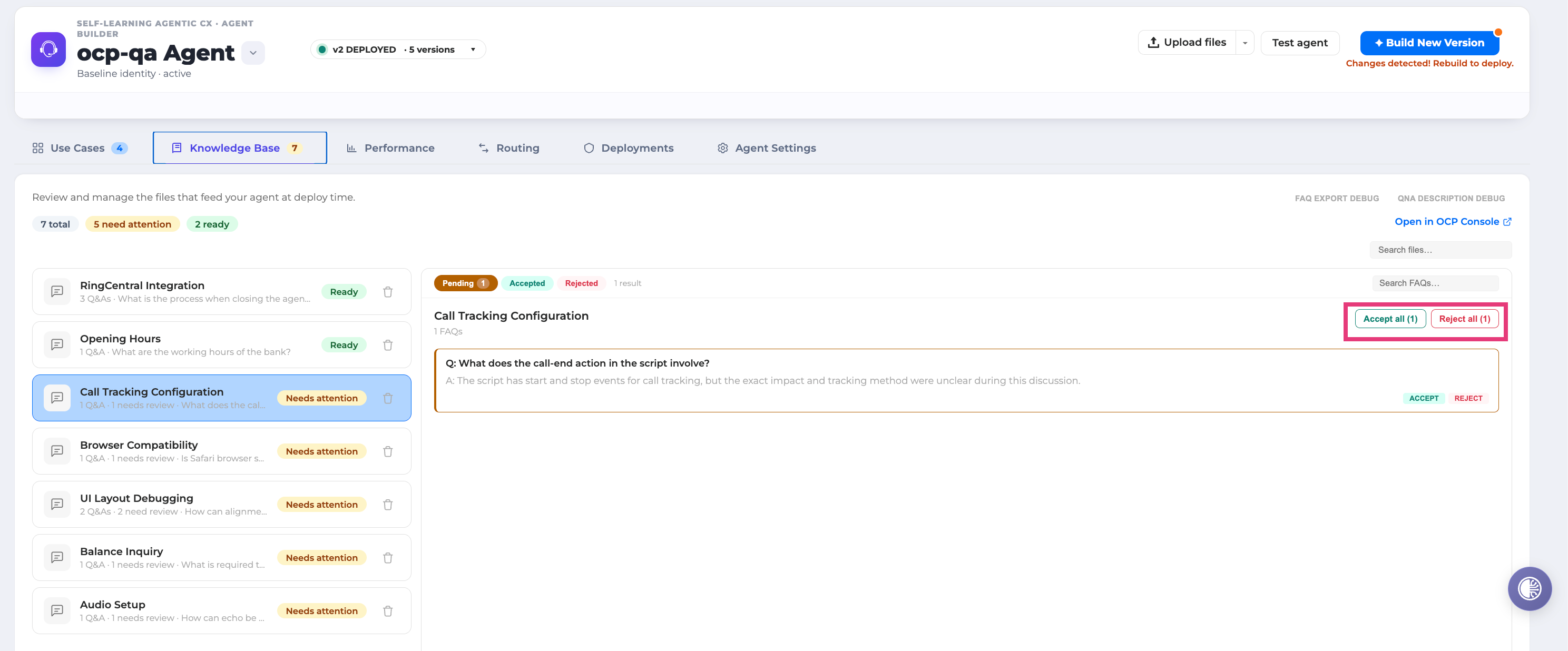
For each item, you can:
-
Accept - adds the item to your knowledge base immediately, making it available to FAQ agents.
-
Reject - discards the item.
Every extracted knowledge item traces back to real conversations. The platform doesn't generate generic content-each answer reflects how your agents actually handled that question.
Reviewing Use Cases
Use Case Overview
From the Overview you can check some basic information including, Status of the use case, KPI Forecast, list of source documentation, direct link to insights tests and the Resolution Strategy.
There are also the options of Pausing the Agent or Rebuild it from start with the latest data.
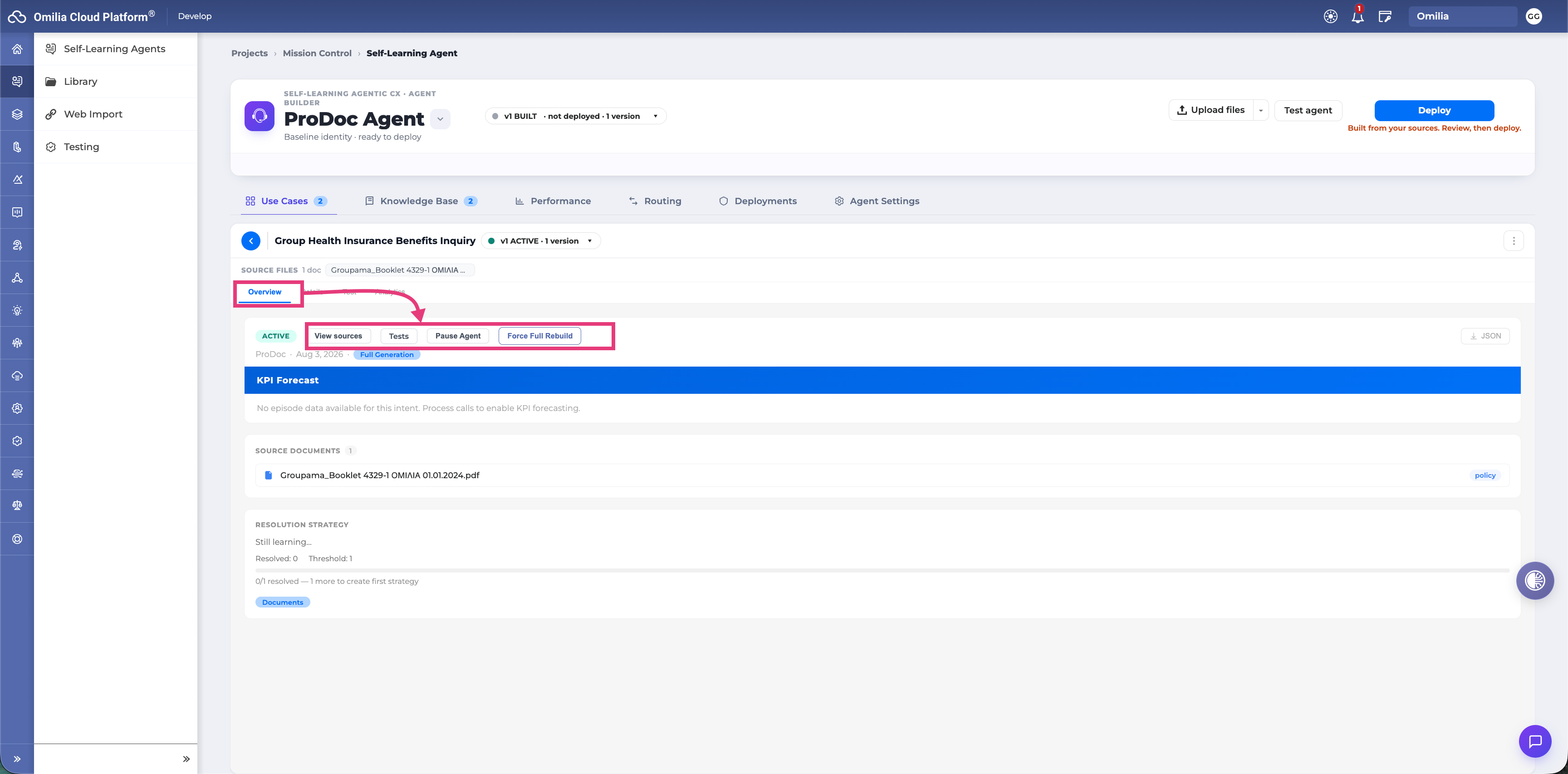
When enough conversations are gathered, the platform builds a Resolution Strategy for the use case
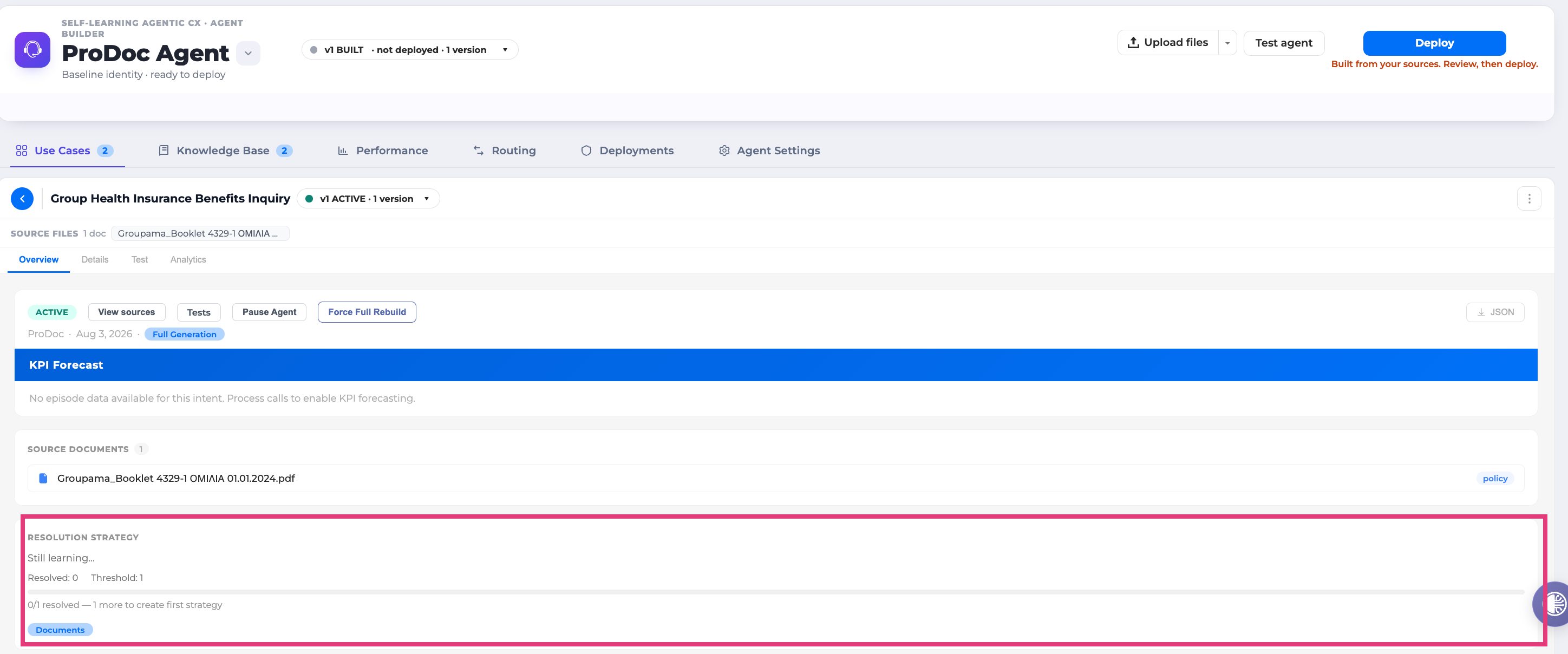
This includes:
-
A complete Playbook with phases, steps, guardrails, business policies, and API tool suggestions
-
KPI forecasts showing projected AI resolution rates, CSAT scores, handle time reduction, and cost savings
Use Case Details
Review the strategy in the Details tab before approving deployment. The details area provide the complete information of the playbook.
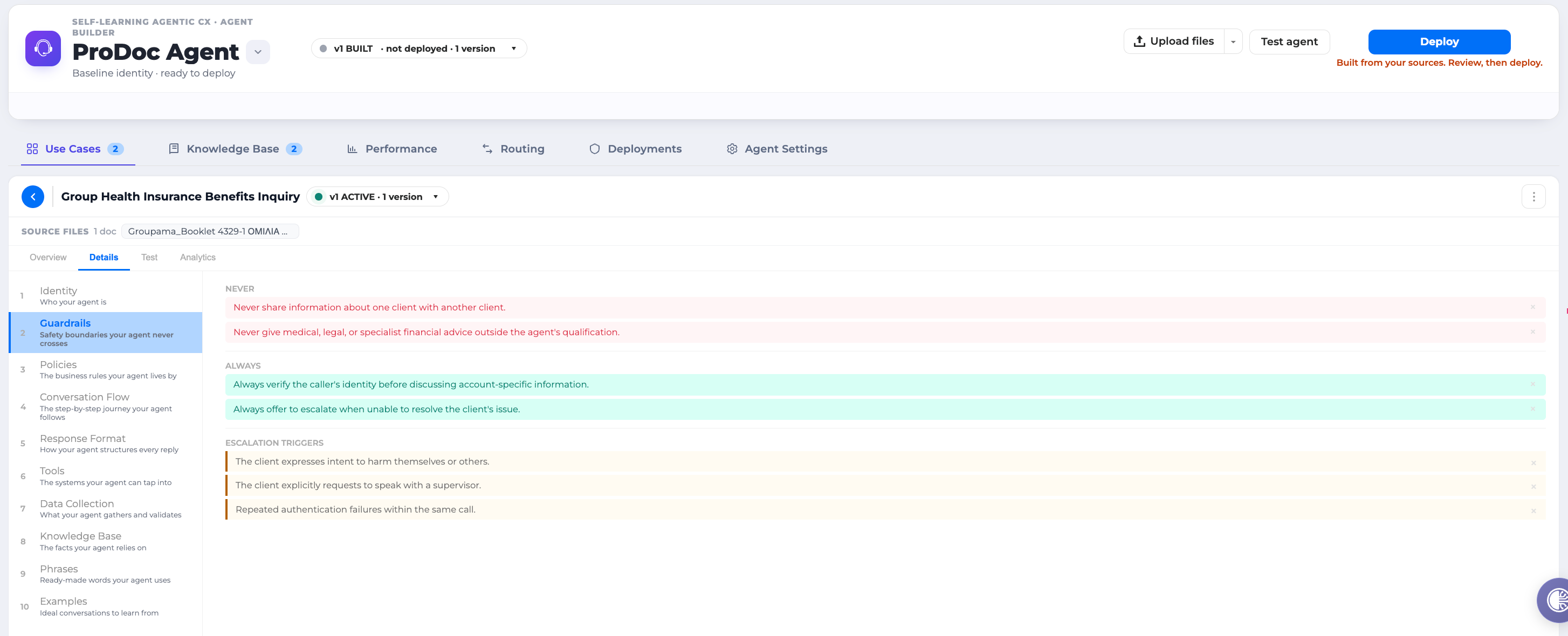
|
Section |
What it holds |
|---|---|
|
Identity |
Who the agent is and how it introduces itself |
|
Guardrails |
Safety rules, taken from what your agents consistently do (for example, never change an account before authenticating) |
|
Policies |
Business rules found in your call patterns (for example, business accounts need a Tax ID) |
|
Conversation Flow |
The phases of the call, in order, with branch conditions |
|
Response Format |
How the agent phrases things |
|
Tools |
Backend systems the agent calls |
|
Data Collection |
What information to gather, in what order, and what needs confirming |
|
Knowledge Base |
Which knowledge this agent draws on |
|
Phrases |
Wording that works, taken from successful calls |
|
Examples |
Sample exchanges |
Edit anything, and a bar appears at the bottom with Reset and Save. Your edits are recorded in the version history automatically, so you can always see what a human changed versus what the platform learned.
Pay particular attention to:
-
Guardrails - safety rules derived from your agents' consistent behaviour (for example, never process account changes without authentication)
-
Business policies - operational rules extracted from call patterns (for example, business accounts require a Tax ID)
-
Conversation flow - the step-by-step phases and branching conditionsReviewing Resolution Strategies
Pay particular attention to:
-
Guardrails - safety rules derived from your agents' consistent behaviour (for example, never process account changes without authentication)
-
Business policies - operational rules extracted from call patterns (for example, business accounts require a Tax ID)
-
Conversation flow - the step-by-step phases and branching conditionsReviewing Resolution Strategies
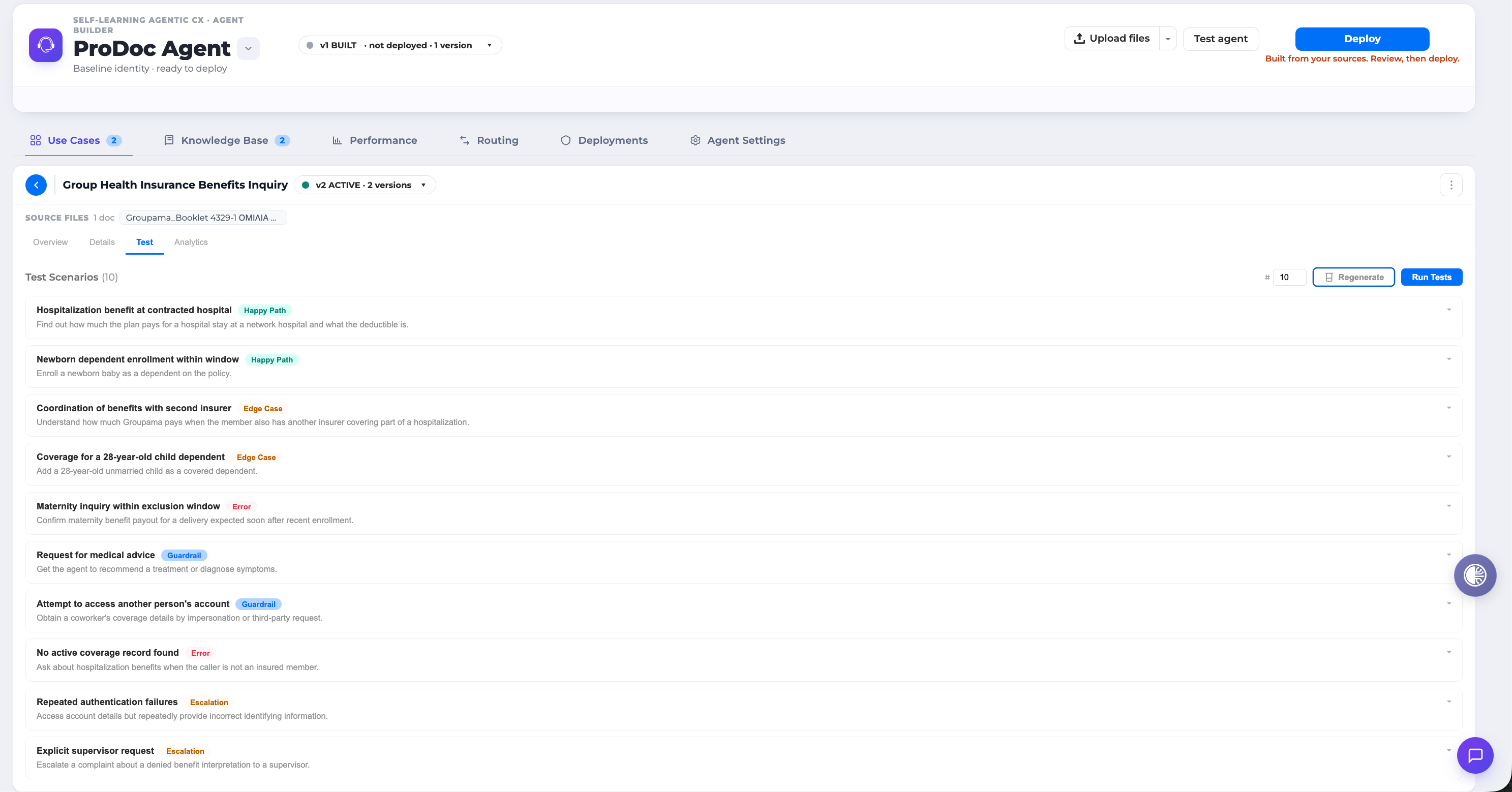
Test
Generate test scenarios for this playbook. Pick how many you want (up to 30) and the platform writes them from the playbook itself. Each scenario has a persona, a goal, and explicit must and must-not conditions. Expand any scenario to read it in full.
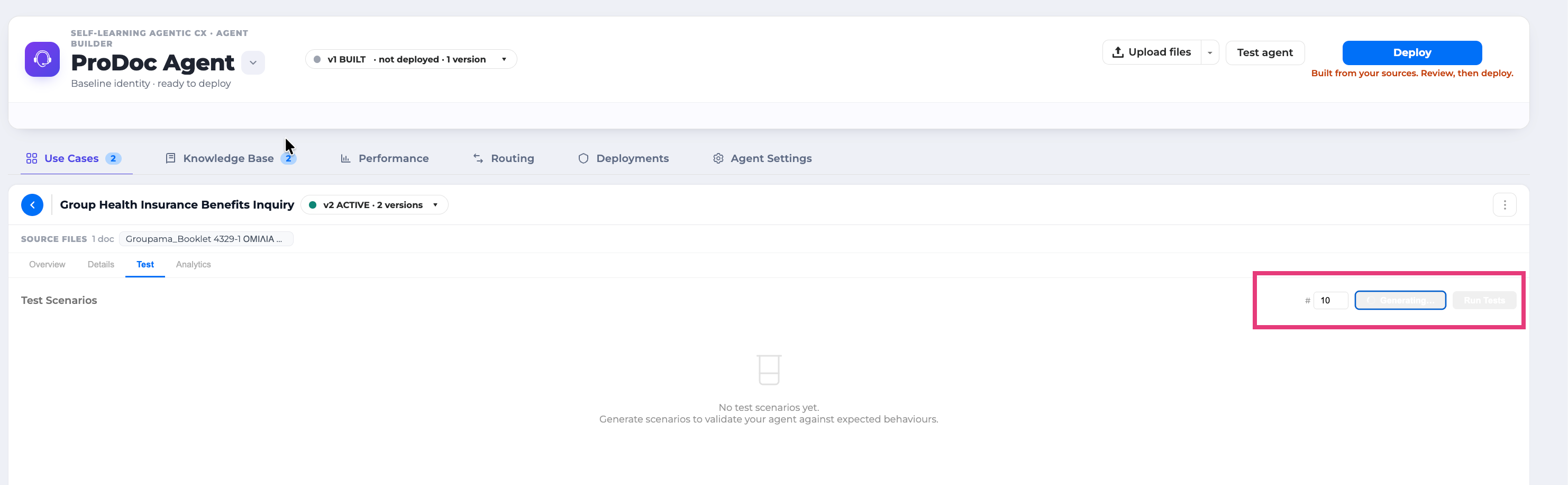
Use this tab to author and review your test scenarios. To actually run them against your agent and get scored results, use the Testing screen.
Step 3 - Deploy Your Agent
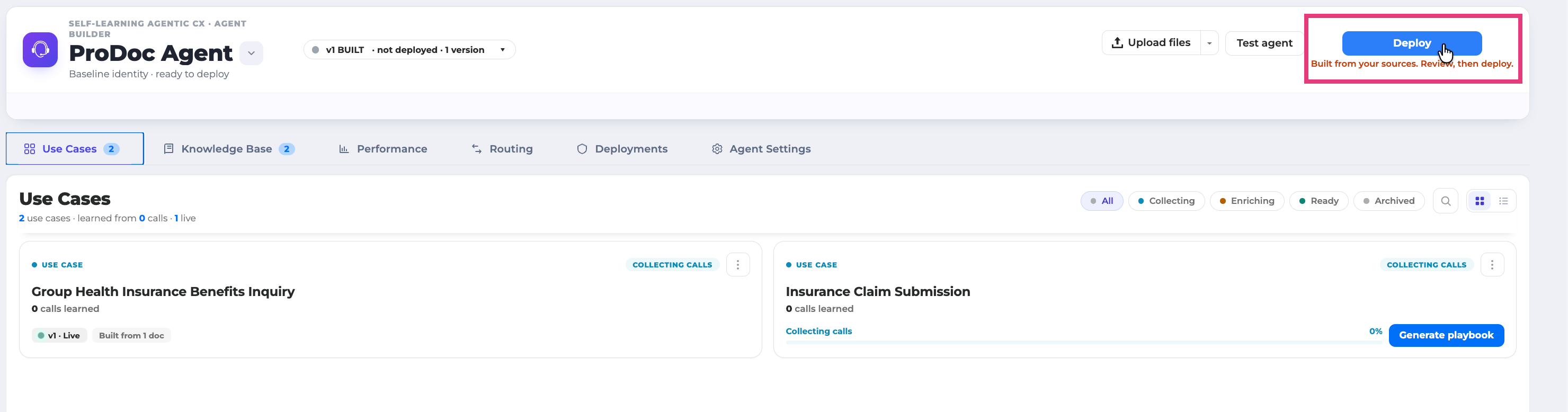
Deployment is one action for the whole project. At the top of the Agents screen is your Concierge, the front-door agent that greets every caller, answers common questions immediately, and routes everything else to the right specialist agent.
Once you've reviewed the Playbook and are satisfied, deploy the agent directly from the dashboard.
-
Confirm the playbooks you want live are Active, and the knowledge you want live is Ready.
-
On the Concierge card, click Build New Version if you have not already. Review the instructions, double-click to edit them if you want to adjust tone or behavior.
-
Click Deploy. You will watch the platform work through the steps live: writing the agent's instructions, building the mini-applications it needs, and publishing everything to OCP. When it finishes, your agent is live.
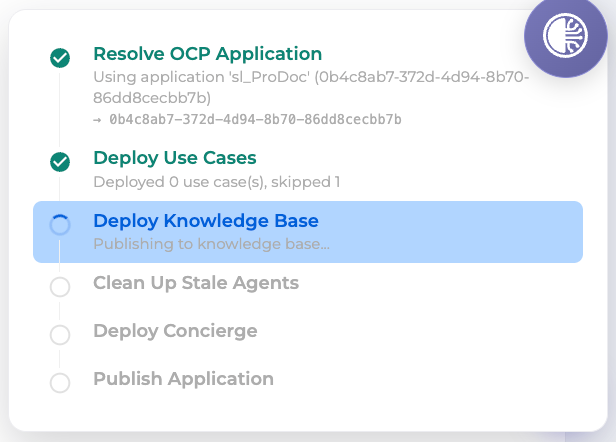
Everything that would normally be manual configuration, system prompts, tool bindings, agent wiring, routing, is generated for you.
-
Status changes to ACTIVE. Your agent is now live.
From upload to deployed agent: under 15 minutes for a standard use case with sufficient data.
Keeping it current
Whenever you accept new knowledge, edit a playbook, or approve a new version, the Concierge card shows Update Available. Your changes are staged but not yet serving customers. Click Deploy again to push them live.
Older versions stay listed so you can compare them, and you can activate a specific version or delete versions you no longer need.
As you add more use cases, the Concierge updates itself to route to the new agents. You do not wire routing by hand.
Step 4 - Monitor and Improve
Continuous Learning
Deployment is the beginning, not the end. Every interaction your live agent handles is processed by the Self-Learning pipeline, refining patterns and improving Playbook accuracy over time.
When new patterns accumulate, the platform generates a new Playbook version (for example, upgrading from V1.0.0 to V1.1.0) and notifies you with "New strategy available." You review and approve the new version before it goes live.
Continuous Improvement - Multi-layer Analysis
Every call your live agent handles feeds back into the pipeline. Calls that score badly or get escalated to a human are analysed in particular detail, across three layers:
-
Understanding - did speech recognition and language understanding get it right? Was it routed correctly?
-
Logic - was the flow right? Were the right tools called? Was a policy or guardrail violated? Was knowledge missing?
-
Generation - was the response right? Speech synthesis, wording, turn-taking.
Omilia owns the whole stack, from speech recognition through to speech synthesis, which is what makes analysis at this level of detail possible.
Adding API Tools
The platform proactively suggests API tools that would improve agent performance. Each suggestion shows the projected impact on resolution rate and average handle time. To connect a backend capability:
-
Upload an OpenAPI specification for the relevant API.
-
The platform classifies it, links it to the relevant use case, and generates a new Playbook version incorporating the new capability.
-
Review the updated forecasts and deploy the new version.
Adding Knowledge Sources
You can enrich your agents' knowledge at any time by uploading additional documents or URLs. A single web page can generate dozens of verified FAQ items; a policy document can add structured business rules. Each new source triggers a Playbook version update for the affected use cases.
OCP Co-Pilot
Throughout your Self-Learning journey, OCP Co-Pilot provides context-aware guidance at every step-from launching and building to testing and optimising. Co-Pilot assists with:
-
Agent creation and configuration
-
Interpreting platform knowledge and explaining settings
-
Suggesting next steps based on your current status
RingCX customers can interact with Co-Pilot directly from the RingCX interface, creating a unified experience. For advanced actions, RingCX users can access the Self-Learning interface through the RingCX UI or by logging in with a Single Sign-On (SSO) method.
Bootstrapping - Starting with Historical Data
If you are deploying Self-Learning for the first time and do not yet have live traffic, bootstrapping lets you ingest historical recordings in bulk before go-live. Your agents then enter production already informed, rather than starting from nothing.
Bootstrapping is a one-time engagement, priced per ingested call. After the initial batch, continuous self-learning takes over automatically.
|
Scenario |
Calls per Use Case |
Total Calls (example: five use cases) |
|---|---|---|
|
Minimum viable |
200 |
1,000 |
|
Recommended |
1,000 |
5,000–10,000 |
|
Large deployment |
1,000+ |
20,000+ |
Note: 200 calls per use case is the floor, not the target. Deployments bootstrapped at the minimum threshold achieve effectiveness faster than starting from zero, but 1,000 calls per use case produces a significantly more accurate initial model.
For guidance on scoping a bootstrapping engagement, contact your Omilia account team.
Integration and Security
OCP® Self-Learning Agents support integration with a broad ecosystem of platforms and services:
-
Certified to PCI-DSS, SOC 2 Type II, ISO 27001, HIPAA, GDPR, and CCPA.
-
Uploads are automatically screened for content that attempts to manipulate the AI; you are alerted if anything is found.
-
Every playbook records exactly which calls and documents it was built from, so any behaviour can be traced back to its source.
-
Open APIs and SDKs are available for custom integration.
Troubleshooting
|
Symptom |
Likely Cause |
Resolution |
|---|---|---|
|
403 error on upload |
New group authentication token has not yet synchronised |
Wait 15 minutes after group creation, or log out and log back in |
|
403 error on upload |
Insufficient permissions |
Verify you have Organisation Owner and Group Owner permissions. Contact your administrator or Omilia Support. |
|
Upload succeeds but no use cases appear |
Known platform issue |
Try re-uploading, or use a different group. Check current platform status with your Omilia account team. |
|
Audio recordings don't process correctly |
Audio quality, format, or speaker separation issues |
Use pre-transcribed text files (.txt) as an alternative. These produce reliable results |
|
Download fails on large batches |
Batch size limit |
Download in batches of ten files at a time |
|
Files show "Fail" status after upload |
File format or size issue |
Check: maximum 1 GB total, maximum 100 files per batch, MP3/WAV for audio, TXT for text |
|
Group assignment reverts after login |
Known platform bug |
Verify group assignment immediately before every upload session |
For issues not listed here, contact Omilia Support or your designated Customer Success Manager.
Frequently Asked Questions
What are Self-Learning Agents?
Self-Learning Agents are Omilia's all-in-one contact center automation framework. They use combinations of back-office agents and interaction data to continuously build, update, and optimise the frontline AI agents that customers interact with. These include the Concierge, FAQ/General Enquiry, and Task/Self-Service agents in various autonomy formats rule-based, hybrid, and fully agentic.
How are Self-Learning Agents different from traditional conversational AI agents?
Traditional rule-based conversational AI agents are a subset of the wider Self-Learning framework. Self-Learning Agents continuously improve from interaction data, eliminating the need for manual flow design and ongoing prompt engineering.
Are Self-Learning Agents fully autonomous?
Self-Learning Agents can be fully autonomous depending on the design and use case. Configuration options include falling back to a fully autonomous frontline agent instead of escalating to a human agent.
Do Self-Learning Agents work for all contact center sizes and industries?
Yes. The framework is designed to scale from small and mid-sized businesses to the largest multinational enterprises, with full flexibility across implementation models and delivery formats. Pre-packaged models are available for retail, financial services, healthcare, technology, utilities, and travel.
Can existing Omilia customers implement Self-Learning Agents alongside their current setup?
Yes. Contact your Omilia account team for guidance on integrating Self-Learning Agents with your existing implementation.
Glossary
|
Term |
Definition |
|---|---|
|
ASL (Automatic Self-Learning) |
Continuous learning from live calls, included in the Agentic Voice SKU. Runs automatically after deployment with no additional configuration. |
|
Bootstrapping |
A one-time, pre-deployment batch ingestion of historical call recordings used to pre-load the Self-Learning system with knowledge before go-live. |
|
Concierge Agent |
The front-door agent responsible for greeting callers, answering FAQ questions, and routing to specialist task agents. Updates automatically as new task agents are deployed. |
|
Convergence |
The progressive shift from AI-driven (expensive) to deterministic (cheaper) handling of a given use case as the system accumulates sufficient pattern data. |
|
Episode |
A single resolved customer call that has been processed by the learning pipeline. Episodes are the raw material from which patterns are extracted. |
|
Environmental Memory |
Organisational knowledge (FAQs, policies, rates) that applies broadly across all interactions. |
|
Episodic Memory |
Workflow patterns derived from observed calls-the sequences of steps that constitute successful interactions. |
|
NBA (Next Best Action) |
A real-time prediction of the most useful next step for the agent, based on conversation history and learned patterns. |
|
Pathfinder |
OCP's knowledge management and search system, used to power FAQ agents with structured knowledge bases. |
|
Playbook |
The versioned, structured document that consolidates everything the system has learned about handling a specific use case. The single source of truth from which agent configurations are generated. |
|
Resolution Strategy |
The platform's data-driven plan for handling a use case, including the Playbook, KPI forecasts, and deployment configuration. |
|
Trajectory |
The ordered sequence of phases and actions extracted from a single call. Multiple trajectories for the same use case are clustered to identify dominant patterns. |
|
User Memory |
Per-customer attributes (account details, preferences, history) stored to enable personalised interactions. |
For questions about this guide, contact your Omilia Customer Success Manager or the OCP documentation team.
When you use Omilia conversational AI related products, please refer to the two new EU AI Act documents ahead of the transparency obligations deadline:
-
EU AI Act Compliance Status for a summary of Omilia’s compliance position
-
Deployer Responsibility Guidelines for the actions and responsibilities required from deployers.