.svg)
Agent VB Middleware v6.20.7
Improvements
-
Event Timestamps - Stream start timestamps are now correctly initialized for voice bot events, ensuring accurate session timing and downstream reporting.
-
File Enrollment - Action Buttons - Resolved an issue where action buttons remained disabled after successfully completing a file enrollment. Buttons now become interactive immediately upon completion.
Security
-
WebSocket Authentication Hardening - JWT authentication tokens are no longer passed via URL query parameters. They are now transmitted via a secure request header, reducing exposure in server logs and browser history. Browser clients authenticate via a first-message AUTH command.
Reliability
-
Genesys Multi-Pause Stability - A race condition affecting multi-pause scenarios in Genesys integrations has been resolved. Three safeguards have been added to prevent dialog counter drift, improving session consistency under concurrent operations.
-
DeepASR Recording Uploads - Recording data is now correctly submitted to the DeepASR API after each final recognition step, ensuring complete and accurate transcription data capture throughout a session.
AGI Connector 4.22.0
New Features
-
Selective Text-to-Speech Streaming per Group - Text-to-speech streaming can now be enabled for individual groups rather than toggled on or off for the entire environment. This allows new streaming behavior to be rolled out gradually to specific customer groups, reducing risk and giving you finer control over which calls use the streaming path.
-
System Prompt Support for Hybrid Turn Detection - The connector now passes a system prompt to the speech recognition engine during voice interactions, enabling the Hybrid Turn Detection feature. This improves how the system determines when a caller has finished speaking, resulting in more natural and accurate conversation flow.
Improvements
-
Whole Call Recording for NICE CCaaS V2 Customers on SIP-Header Routing - Whole Call Recording now works correctly for NICE CCaaS V2 deployments where calls are routed via SIP headers without a number assignment in the configuration. Previously, recording was silently disabled for these customers even when configured. Calls are now recorded as expected once recording is enabled for the group.
Audio Hub 7.2.0
Added
-
Support for audio streaming.
Fixed
-
Allow namespace prefixes in SSML parser
Chat-Connector 8.17.0
New Features
-
Chatter IP Address Visibility - Chat sessions can now expose the end user's IP address in Conversational Insights®, enabling fraud detection and geographic analysis without requiring additional infrastructure. This capability is configured at the application level via the
send_caller_ip_to_diamantsetting, allowing you to selectively enable IP tracking for conversations where compliance and privacy requirements permit. The IP address appears in the ANI field, making it immediately available alongside other call metadata for your analytics and antifraud workflows. For more information, go to Advanced OCP Conversational Insights®. -
Hold and DTMF Testing in Chat - Developers testing dialog flows in the Orchestrator chat simulator can now trigger hold by typing
_[hold]_and send DTMF tones by typing_[dtmf]_followed by digits (for example,_[dtmf] 1234_), streamlining validation of IVR-style interactions without requiring a phone line. For more information, go to Test Dialog Application.
Improvements
-
Clearer Authentication Documentation - The Chat Connector REST API documentation now provides comprehensive guidance on all supported authentication methods, including clarified examples and endpoint-specific requirements, reducing integration confusion and accelerating customer onboarding. Chat API (REST API)
-
Personal Access Token Support for Dialog History - The Dialogs API (
_/dialogs/historyendpoint_) now documents support for Personal Access Token (PAT) authentication via the_X-OCP-PERSONAL-ACCESS-TOKEN_header, offering extended token lifetime and eliminating password expiration issues for programmatic access to conversation history. For more information, go to Chat API (REST API). -
Accurate Text Input Handling - Customer text input now preserves all non-ASCII characters and special symbols exactly as typed, improving password capture accuracy and supporting international character sets. Previously, overly aggressive sanitization was altering customer input before it reached the dialog application; input is now passed through with only minimal HTML safety escaping.
Fixes
-
Salesforce Agent Links Displayed Correctly - Links sent by Salesforce agents now appear correctly on the customer's side of the chat instead of showing as null, ensuring customers can access shared resources and reference materials during assisted conversations.
DiaMant 10.42.0
New Features
-
Concierge in OCP Flows
DiaManT now supports a Concierge Agent that can act as the entry point of an OCP flow. The Concierge agent routes the conversation to the appropriate target or flow by returning a route tag, enabling dynamic, AI-driven call routing from the very first dialog step. For more information, go to Concierge Agent as Flow and Agentic Flows. -
Secrets Fields handling in Agents
Fields marked as sensitive (secret) are now correctly flagged, ensuring sensitive data is handled appropriately throughout the agentic execution pipeline.
Bug Fixes
-
BioUser info not fetched on NO_USER_FOUND
Fixed an issue where Voice Biometrics user info was not being retrieved when aNO_USER_FOUNDsearch result was returned. The fix ensures the user's info is fetched correctly when the bio user ID changes, without redundant calls.
DiaMant 10.42.1
-
Reduced thread and resource usage in encryption.
DiaMant 10.43.0
New Features
-
Agentic Call Detail Records - DiaManT® now captures detailed records for each AI agent involved in a call, including the agent type, the model used, routing context, and the outcome. This gives you full visibility into how agentic applications handled each interaction, enabling richer reporting and quality analysis across AI-driven conversations.
-
Per-Application and Per-Flow NLU Configuration - NLU models can now be assigned at the application level and overridden individually for each dialog flow within that application. This replaces a one-size-fits-all setup, giving application designers precise control over which language understanding models are active at each stage of a conversation.
Improvements
-
Dutch (nl-NL) Locale Support - DiaManT now supports Dutch (Netherlands), expanding the range of languages available for voice application deployments.
-
Preserved Voice Biometrics Identity When Search Is Disabled - When voice biometric search is turned off, the caller's enrolled identity is now retained correctly throughout the session
-
Accurate Event Logging for NLU Timeouts - When the language understanding service times out or returns no result, the event is now logged with the correct classification, making call logs and diagnostic reports more accurate and easier to interpret.
DeepASR 8.7.0
New Features
-
Hybrid Turn Detection - deepASR® now combines audio signals and partial speech transcriptions to determine when a caller has finished speaking, replacing the previous text-only approach. This delivers more natural conversation pacing, reducing instances where the system responds too early or waits unnecessarily before handing the turn back to the virtual agent.
-
Multiple Address Assets per Recognition Step - Address recognition now accepts multiple postal-area asset sets in a single step, allowing the system to cover a broader range of addresses without requiring additional dialog turns. This reduces friction in address-collection flows and improves first-attempt recognition rates across complex or overlapping coverage areas.
-
Enhanced Liveness Detection Model Configuration - The Liveness Detection capability now retrieves the active detection model and decision threshold directly from your group configuration at the start of each call, ensuring the correct anti-spoofing parameters are applied automatically without manual intervention.
Improvements
-
More Natural End-of-Turn Recognition - Turn-taking decisions are now deferred until a brief silence is detected, preventing the system from interpreting natural mid-sentence pauses as the end of a caller's response. Callers experience fewer interruptions during extended or complex utterances.
-
Accurate Word Timing with Omilia VAD - Word-level timestamps are now accurate when Omilia's built-in voice activity detection is active alongside the generic transcription model. This improves downstream features that rely on precise timing - such as redaction, analytics, and turn detection, without the higher processing cost of the previous workaround.
-
Automatic Audio Format Correction - Incoming audio that does not match the expected sample rate is now detected and resampled automatically before transcription. This safeguards recognition quality when audio arrives in an unexpected format, preventing silent accuracy degradation.
Fixes
-
This release includes security updates.
Deployment Service 1.4.0
Fixes
-
Mitigate security vulnerabilities.
-
Fix the race condition issue between Liquibase migration and application startup on newly created environments.
Environments Manager 1.27.0
New Features
-
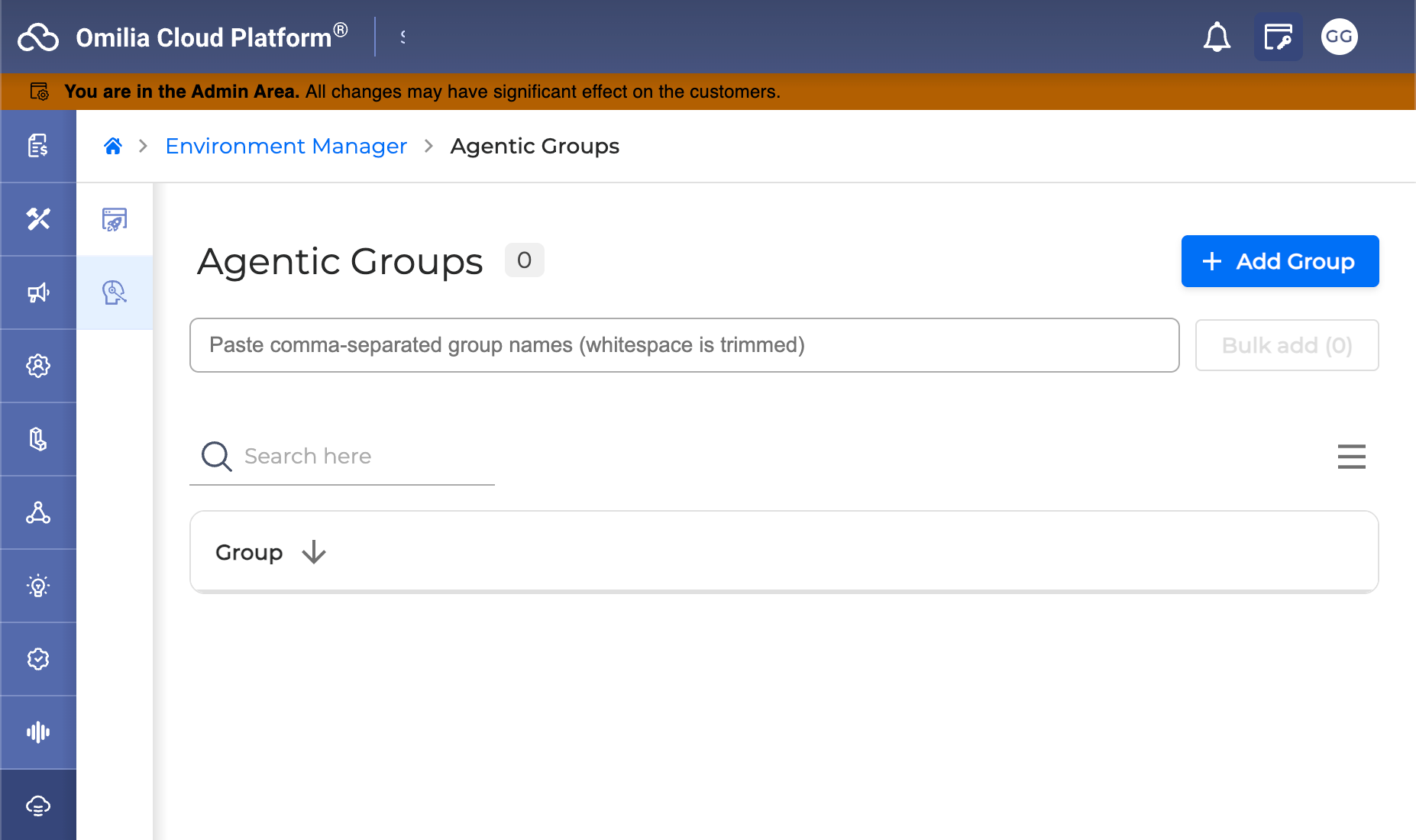
Agentic-Enabled Groups Management - A new Agentic-Enabled Groups section is now available in the Console Admin area, enabling administrators to create, view, edit, and delete agentic-enabled groups for their environment. The section is accessible to users with the Orchestrator Admin role, and all changes take effect immediately without requiring a full page reload.
Improvements
-
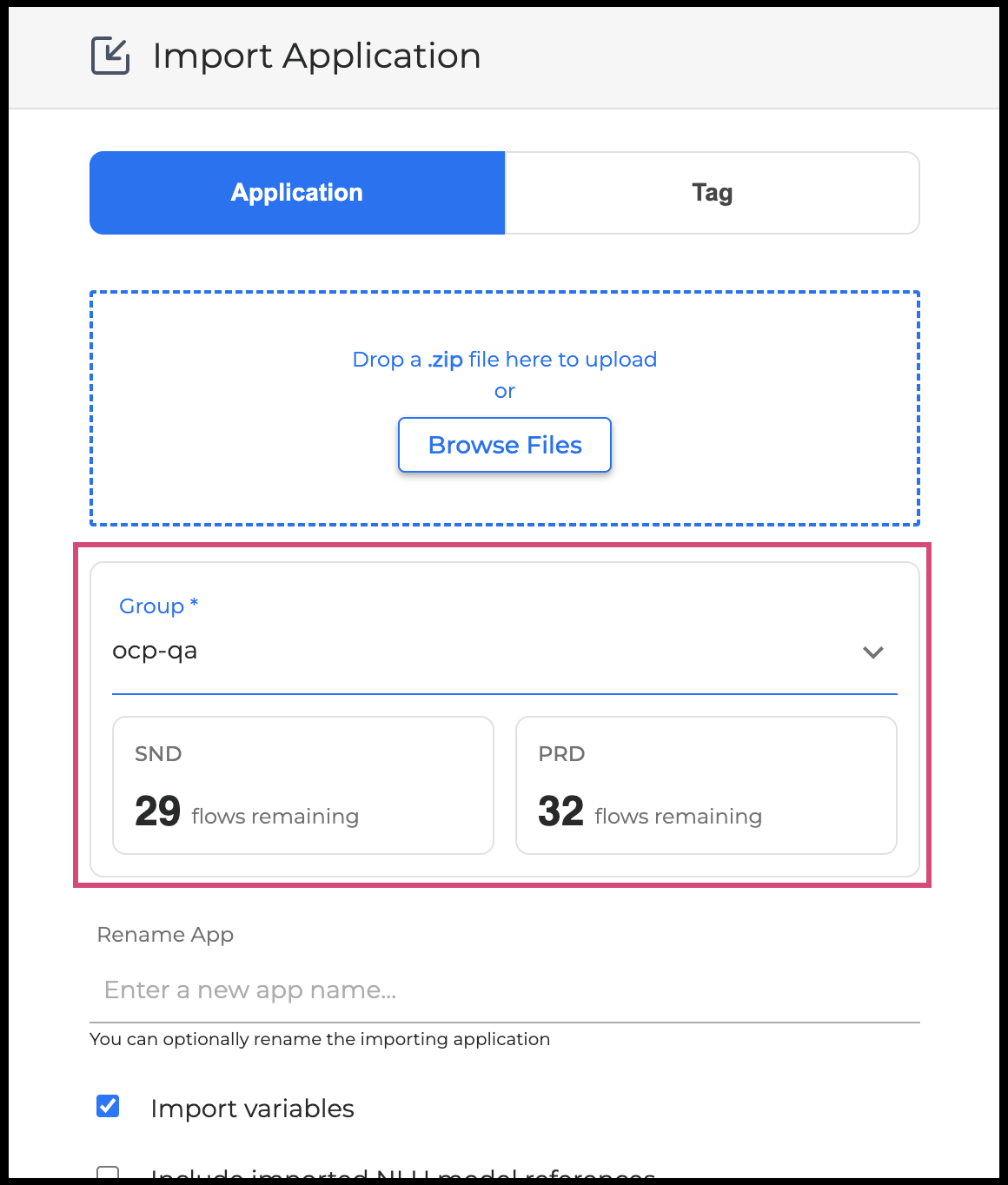
Remaining Flow Slots Visible Before Import - When importing an application, you can now see the number of flow slots remaining in a group before starting the import, helping you decide whether you have enough capacity before committing to the operation. For more information, go to Environments Manager User Guide.
-
Export Support for Agentic Router Applications - Applications that use an orchestrator router agent can now be exported from the Environments Manager, extending full export capability to this category of agentic application.
Fixes
-
Clear Availability Status on Service Errors - When flow availability data cannot be retrieved due to a service error, the interface now displays N/A consistently, so you always see a clear and accurate status rather than an ambiguous or missing value.
Export Service 1.11.5
Fixes
-
Fix misspelled
Client-Correlation-Idheader -
Security updates of vulnerable dependencies
Export Service 1.12.0
New Features
-
Agent Assist Event Exports - OCP now supports exporting Agent Assist session events, including Agent Assist End and Agent Assist Step topics. Organizations using Agent Assist can now include these interaction events in their data exports, enabling richer reporting and analysis of agent-assisted conversations.
Improvements
-
Audience Parameter Support for Export Subscriptions - Export subscriptions now support an audience parameter in the authorization token request, enabling compatibility with identity providers that require this field as part of their security standards. Customers whose token provider mandates an audience value can now configure and activate export subscriptions without workarounds.
Integration Configurations 1.12.0
New Features
-
Per-Group Text-to-Speech Streaming Configuration - Administrators can now enable TTS streaming individually for each group, allowing new streaming behavior to be rolled out to specific customers without affecting the entire environment. Groups not yet opted in continue to work as before, making phased adoption straightforward and low-risk.
Improvements
-
Reverse Traffic Step in Gradual Rollout - When gradually shifting call traffic to a new application, you can now step traffic back down as well as up. If a step was increased by mistake, you can return to the previous level without having to delete and recreate the entire router configuration.
-
Pinned Identifier Column in Numbers and Number Sets Tables - The first column in the Numbers and Number Sets tables is now always visible as you scroll horizontally, keeping key identifiers in view at all times.
-
Consistent Warning Messages Across Configuration Panels - Warning and confirmation messages throughout the configuration interface now use consistent, correctly pluralized language, making it easier to understand what will be affected before confirming a change.
Fixes
-
Items-Per-Page Selector Now Works Correctly - The dropdown for choosing how many items to display per page was unresponsive and could not be clicked. It now works as expected.
Liveness Detection 6.0.0
New Features
-
Enhanced Liveness Detection Model Selection - The Liveness Detection service now supports an additional inference model alongside the existing on-premise model. Operators can direct liveness checks to either the local model or the new cloud-based inference engine, and configure the confidence threshold used to determine a live result, giving greater flexibility to tune accuracy for different deployment contexts.
LLM Service 1.4.0
-
Internal service and security improvements
Omilia NLU 1.14.0
New Features
-
xPack Management in the Admin Area - Administrators can now view, update, and remove xPacks directly from the NLU admin panel, with clear distinction between active and deprecated xPacks and the ability to delete deprecated ones. For more information, go to OCP Conversational Natural Language® User Guide.
Improvements
-
Rename Artifacts - Artifacts can now be renamed after they are created, giving you more flexibility to keep your workspace organised. For more information, go to OCP Conversational Natural Language® User Guide.
-
Flexible Group Configuration Updates - Group configuration settings can now be updated individually. Changing a single setting no longer resets all other fields to their default values, reducing the risk of unintended configuration changes.
-
Reliable Full Evaluation and Model Cleanup - Running a full evaluation no longer fails with a duplicate name error when previous temporary evaluation resources were not cleaned up. Deleting a model or artifact now also removes any leftover temporary evaluation resources automatically. For more information, go to Training an NLU model.
-
Improved App Lifecycle Enforcement - Applications that missed their scheduled stop deadline, including those created before version 1.12.0, are now reliably stopped, keeping resource usage accurate and predictable.
-
Simplified Evaluation File Format - The third column in evaluation upload files is now optional. When omitted, a default value is applied automatically, reducing the preparation effort for running a full evaluation.
-
Clear Errors on Model Import with Duplicate Rules - Importing a model that contains duplicate context rules now returns an explicit error message, so you can identify and correct the issue immediately instead of encountering a silent failure. For more information, go to Exporting / importing an NLU model.
Fixes
-
This release includes security updates.
Orchestrator 1.34.2
New Feature
Agentic-Enabled Groups Management - Admins can now manage the list of groups allowed to use Agentic features directly from the Environments Manager Console Admin UI, with search and pagination. Changes take effect at runtime. Find more info in Environments Manager Release 1.27.0.
Orchestrator 1.34.3
BugFix
Flow Input Field Assignment Restored - Fixed an issue affecting flows that contain two input fields configured to read from the same orchestrator variable. In affected flows, the value was being delivered to the earlier-defined input field instead of the later-defined one. The platform now correctly delivers the value to the input field defined later in the canvas when two input fields share the same orchestrator variable as their source.
Orchestrator 1.35.0
New Features
Global NLU Configuration - NLU configuration can now be defined globally at the app level and applied across flows, with per-flow overrides. Settings are exposed both on the canvas and through dedicated API endpoints, and are automatically reflected in the runtime configuration. A soft warning highlights legacy NLU apps that should be migrated to the new model.
Word Boosting per Agent - Agents now support a per-agent word boosting configuration, letting you supply lists of phrases with boost values to improve recognition for product names, brand terms, and domain-specific vocabulary. Configurations are stored on the canvas, surfaced in the agent card, and shipped with the deployed app.
Smarter Complexity Warnings - The legacy "complex canvas" warning, based purely on node counts, has been replaced with a richer complexity metric that takes into account Set Field effects, referent resets, MiniApp/Flow assignments, and condition branching. Warning messages have been rewritten in plain language describing the impact on deployment, promotion, runtime, and maintainability - and every canvas warning now links to the documentation.
Faster Compilation for Large Canvases - Several compiler graph algorithms have been rewritten to scale linearly with canvas size, eliminating exponential blow-ups previously seen on canvases with stacked branch/merge structures. The optimisations can be enabled at the platform level.
Concurrent Deploy Protection - Two simultaneous deploys or publishes for the same app are now safely rejected with a clear error instead of racing and producing duplicate versions downstream.
No KB Results as a Routing Option - Knowledge-base lookup failures (NoKBResults) are now a valid value for LastFailReason and can be used in canvas error handlers and condition edges, letting you route conversations differently when a KB query returns nothing.
Console Overhaul Phase #2 - Continued visual refresh of the console - refined color palette, cursor behavior, and accessibility - together with new nl-NL (Dutch) localization across the UI.
Default Compiler per App - Apps can now carry an explicit compiler core version, and a platform-wide default can be set via DEFAULT_CORE_VERSION. This makes it easier to roll out compiler upgrades safely.
Security Improvements
Authentication has been hardened in this release. JWT handling has been migrated from the deprecated authlib.jose library to joserfc, strict validation is now enforced, and the azp (authorized party) claim is validated against the configured Keycloak client. APM upload timeouts have been increased to keep observability stable under load.
Bug Fixes
-
Concurrent deploys/publishes for the same app are now rejected with a clear message instead of producing duplicate versions
-
Knowledge-base sub-agents under a Concierge no longer inherit the wrong type in the agent card
-
Sub-agents that no longer exist are now caught before deploy, instead of failing later in the pipeline
-
Referent reset trackers no longer fire on unrelated targets where the node and its parent miniapp share output fields
-
Router-agent REASK now correctly drives routing on the
RoutingParamstatus, with downstream miniApps resetting on routing updates -
TTS dropdown no longer crash the UI when a configured voice has been deleted
-
Agentic output fields no longer overlap the tool frame
-
Set Field and adjacent nodes are correctly aligned on the canvas
-
Apps dropdown on the canvas scrolls reliably; UI no longer crashes on broken domains API responses
-
Several accessibility regressions fixed across the console
-
Page title colour corrected after the theme refresh
Pathfinder 1.8.8
Improvements
-
Faster and more reliable ZIP batch uploads.
-
Large ZIP archives with multiple FAQ PDF files now process reliably without timeout errors. All documents are queued and processed in the background; track progress directly from the knowledge base document list.
-
Guided project creation.
-
Creating a new project now walks you through a step-by-step wizard with live progress updates during ingestion. A "Go to project" button at the end takes you straight to the new project once it's ready.
-
See why a document failed without opening it.
-
Documents in a Failed or Error state now show the failure reason directly as a tooltip on the status badge. No need to click into the document detail page to diagnose what went wrong.
-
Find documents faster with the Document ID column.
-
The knowledge base document list now has a dedicated Document ID column, making it easy to copy a UUID for API calls, logs, or support requests.
-
Cleaner document list.
-
Documents now display their display name as the primary label, with the raw filename shown below as secondary text - easier to scan at a glance.
-
Upload mode is now a clear card-based selection.
-
When uploading to a Chunk Retrieval project, Standard and FAQ PDF ingestion modes are shown as cards with descriptions. FAQ PDF is selected by default.
Bug fixes
-
Failed documents now show the correct error reason immediately, without needing to refresh the page.
-
Status tooltips now display correctly inside modals and dialogs.
-
No more spurious "request timed out" notifications when a document has already finished processing.
-
Knowledge base dropdown menus now appear correctly over modal overlays.
Pathfinder 1.8.9
What's New
-
Project Export & Import - Move projects between environments or duplicate them with one click. You can now:
-
Export a project - download a single archive containing all intents, utterances, answers, facts, resources, Knowledge Base documents, and search index data.
-
Import as a new project - create a fresh project from an archive in one step.
-
Merge into an existing project - combine an archive with an existing project of the same type, adding its content without overwriting.
-
Export and import actions appear in the project row menu and the New Project dialog. Access is controlled by feature flag and role permissions, and every export/import is recorded in the audit trail. For more information, see Project Import & Export.
-
Refreshed Look - The interface has been updated to use a unified design system, giving a more consistent experience across screens. Header and accent colors are corrected.
Fixes
-
The Import button now stays disabled while a merge is in progress, preventing accidental duplicate submissions.
-
After a successful import or merge, Go to Project lands you directly in the journey mapper.
-
The New Project dialog renders correctly when switching to import mode.
-
Export failures now surface a clear error message instead of failing silently.
Security
-
Upgraded an internal networking dependency to address a published vulnerability (CVE-2026-45736). No customer action required.
Redaction Service 0.1.0
The Redaction service is considered a niche service outside the standard service scope.
For more information reach out to our support teams and account manager.
Currently the Redaction Service is configurable and accessible only through our support portal. This Service is configured as part of whole call recording enablement, or application configuration.
As part of the Whole Call Recording integration, to capture sensitive terms within OCP, we include edge cases not configured in the miniApp.
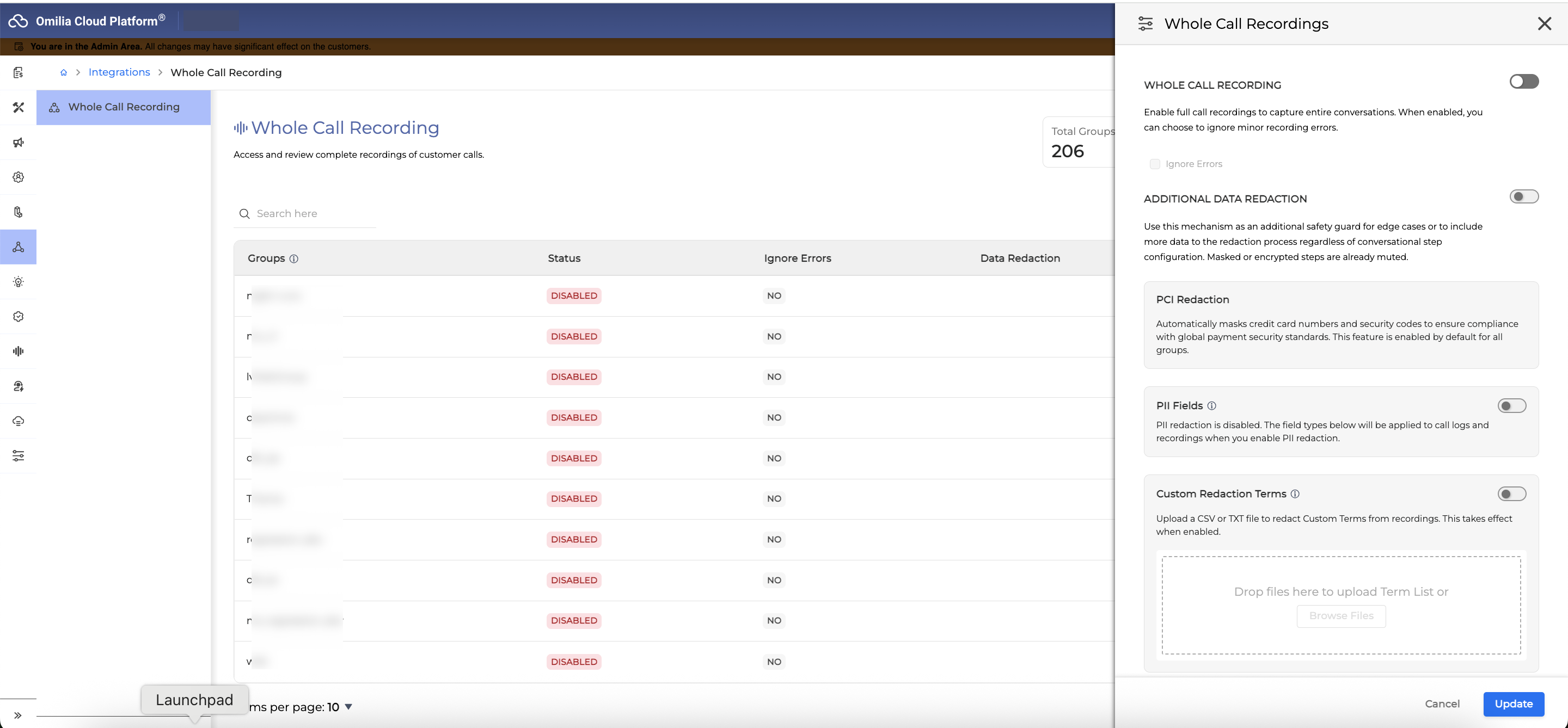
This covers Whole Call Recording, Agent Assist, and Agentic Applications.
Supported Capabilities
-
PCI Sensitive Terms
-
PII Sensitive Terms (Specific List of Supported Entities)
-
Specific Term List (As per client configuration)
Identification Numbers
-
Social Security Number (SSN)
-
Canada Social Insurance Number (SIN)
-
Driver's License Number
-
State ID Number
-
Passport Number
-
Adoption Taxpayer Identification Number (ATIN)
-
Preparer Tax Identification Number (PTIN)
-
Unique Identification Number (Aadhaar)
-
Military ID
-
Special Tax Identification Number (NITE)
-
Tax Identification Code (TIN)
-
Individual Taxpayer Identification Number (ITIN)
-
Vehicle Identification Number (VIN)
-
License Plate Number
Financial & Payment Data
-
Primary Account Number (PAN) for Debit and Credit Cards
-
Bank Account Number
-
Last 4 digits of Bank Account Number
-
International Bank Account Number (IBAN)
-
4-digit PIN
-
3 or 4-digit CVV
-
Card Expiration Date
Personal Attributes & Demographics
-
First Name
-
Surname
-
Date of Birth (DOB)
-
Death Date
-
Last 4 digits of SSN
Contact & Digital Identifiers
-
Address
-
Zip Code
-
Phone/Fax number
-
E-mail
-
Username
-
Password
-
IP address
Explicitly Term List as defined by the customer
As defined by the customer
Testing Studio 1.17.4
Q&A Agents Unit Testing
What it is
A regression-testing workflow for Q&A agents. Build a suite of question / expected-answer pairs, run them against any version of your agent, and see what changed.
Why it matters
Until now, validating a knowledge base change or a prompt tweak meant ad-hoc chats and finding regressions in production. Q&A Agents Unit Testing lets teams validate a Q&A agent the same way they'd validate any other piece of software: repeatable suites, version-over-version comparisons, and a clear pass/fail signal before the change ships.
What you can do now that you couldn't before
-
Run a regression suite against any agent change - Define what your agent should say. Hit run. Get pass / fail across the whole suite in one place. Repeat after every knowledge base update, every prompt change, every model swap - without an hour of manual chatting.
-
Tell whether a wrong answer is a model problem or a knowledge base problem - This is the part most Q&A testing misses. Every result shows the retrieved knowledge behind the answer, the exact passages the agent pulled from your KB, with links to the source documents.
-
If the right document never made it into context → it's a retrieval problem.
-
If it did and the answer is still wrong → it's a model or prompt problem.
-
Two different fixes, two different teams. Today, you can tell them apart in seconds.
-
Build coverage without writing every test by hand - Bulk-upload an
.xlsxof real customer questions to seed the suite. For questions where you don't have a "correct" answer yet, run them once and promote a good response into the expected answer in one click. Coverage grows alongside the agent instead of blocking the release. -
Show the quality trend over time - Every run is recorded. The Results tab shows pass / fail counts across runs, filterable history, and shareable views. When QA, product, or compliance asks "is the agent getting better?" - there's a real answer, not a vibe.
Testing Studio 1.18.0
New Features
-
Add get task details endpoint - Added a new API endpoint to retrieve Celery tests upload task details, providing visibility into task status, creation time, completion time, and failure reasons for asynchronous operations.
-
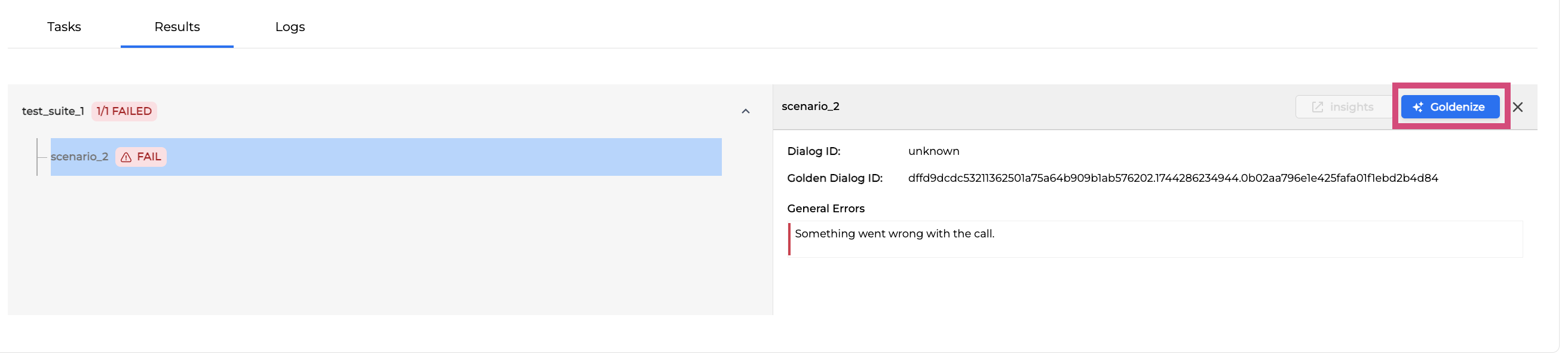
Goldenize Unavailable and Failed Test Cases - You can now goldenize failed or unavailable test cases directly from run results, enabling faster test maintenance and golden dialog updates without requiring successful runs.
Improvements
-
OCP Console Overhaul - UI updates - Phase 1 - Updated the user interface with refreshed colors, typography, icons, spacing, and illustrations as part of the OCP Console® modernization initiative, improving visual consistency and user experience.
-
Include Data Model fields in golden dialogs - Golden dialogs now include data model fields for each dialog step, providing richer test case validation and better alignment with conversational flows.
-
Include Upload Task on Project schema - Project details now include the latest upload task information, allowing you to track the status of test suite uploads and identify any issues with project updates.
-
Refactor Upload Project Tests response - The upload project tests endpoint now returns task details immediately with a 202 Accepted status, enabling asynchronous tracking of upload operations.
-
Add Project detail polling - The interface now automatically polls project status after uploading test suites, providing real-time feedback on project lock status and upload completion.
-
Increase Augmented custom instructions char limit - The character limit for augmented custom instructions has been increased to 200 characters, allowing more detailed guidance for LLM-augmented testing.
-
Full screen admin panel - The admin panel now expands to full screen, providing more workspace for managing projects and configurations.
-
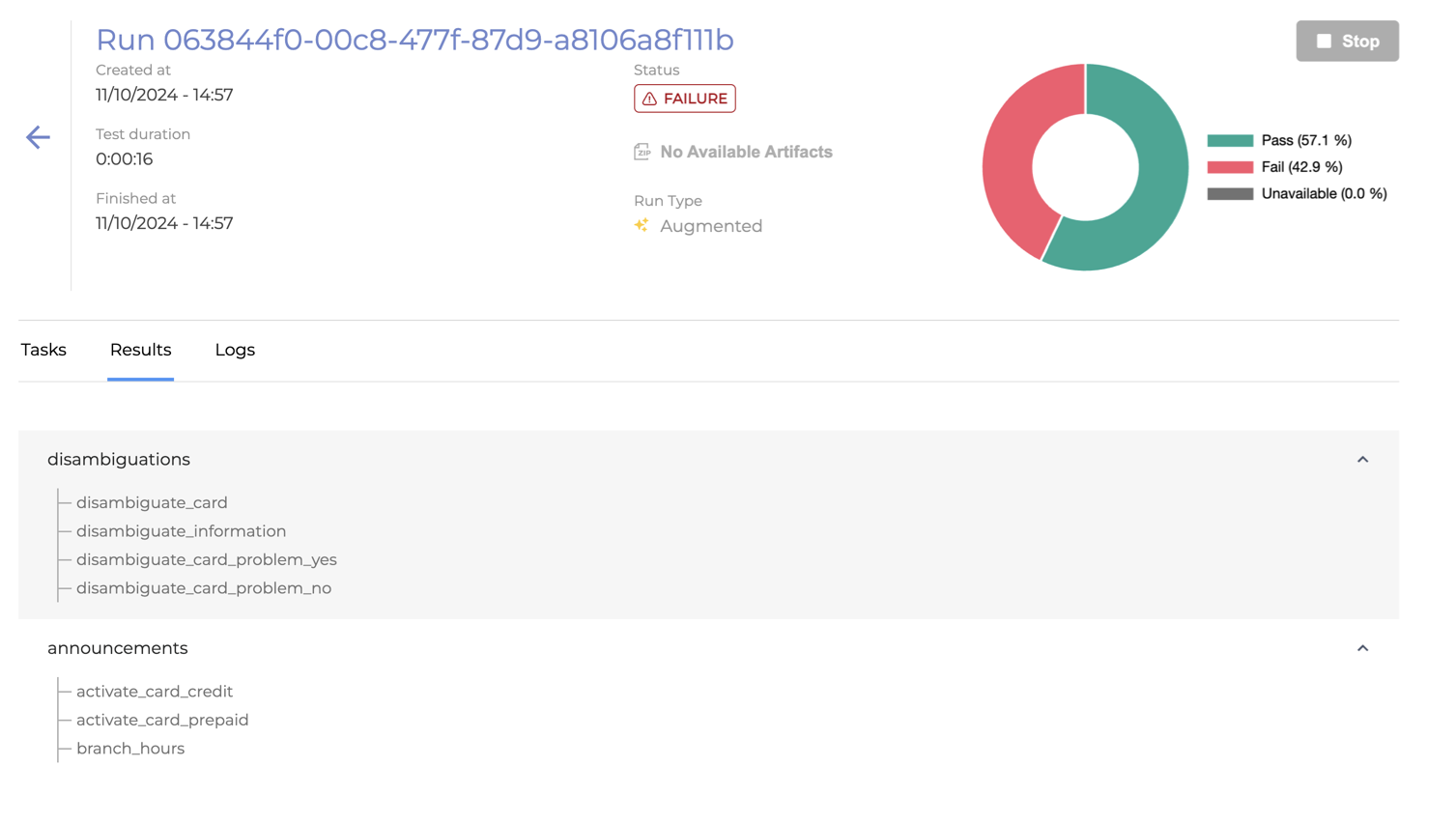
Request to Highlight Failed Test Suites and Cases in Testing Studio® UI - Test suites and test cases with failed or unavailable results are now visually highlighted, making it easier to identify and focus on issues that require attention.
-
Revisit test suite name validation - Test suite name validation now accepts dots and hyphens, supporting naming conventions used in generated test cases from Orchestrator (for example, en-US.Intents).
Fixes
-
LLM-augmented run fails when more than four test suites are uploaded - Fixed an issue where LLM-augmented chat runs would consistently fail when configured with more than four test suites.
-
Change file content focus - Fixed an issue where deleting a folder would incorrectly close the file content panel that was open in the right panel.
For more information, go to Testing Studio+™ User Guide.
STT 8.6.0
New Features
-
Word Boosting for Generic ASR Models - Generic ASR models (ATLAS and HERMES) now support on-the-fly word boosting, allowing you to increase recognition accuracy for specific terms during speech recognition. For more information, go to ASR Adaptation User Guide.
Improvements
-
Enhanced Numeric Transcription Formatting - Generic ASR models now returns numeric and alphanumeric sequences without separators (for example, 1231234123 instead of 123-1234-123), significantly improving PCI and PII term detection accuracy.
-
Turn Detection Completion Reasons - The Riva integration now accurately labels turn completion reasons, distinguishing between maximum speech duration (MX) and text-based turn completion (TC) instead of marking all results as speech recognition completion (SR).
-
Word-Level Confidence Scores - Word confidence scores from the Riva integration now return valid probability values between 0.0 and 1.0 instead of placeholder negative values, enabling proper low-confidence threshold logic.
-
Delayed Audio Upload Handling - The delayed audio upload feature now handles client requests gracefully even when the feature is disabled on the ASR node, preventing unexpected 501 errors.
Fixes
-
Word Timings Accuracy - Fixed word timing drift that caused increasing discrepancies over the duration of calls, ensuring consistent timing accuracy for audio redaction and analysis.
STT 8.6.1
Fixes
-
Accurate Logging for Dynamic Grammar Recognitions - Speech recognition logs now correctly reflect when dynamic grammars are used. Previously, successful dynamic grammar calls were incorrectly logged with a generic placeholder value, disrupting analytics and reporting. The system now accurately captures which grammar type handled each request, restoring reliable metrics for recognition analysis.
STT 8.6.2
Improvements
-
Reliable Final Results with Legacy Voice Detection - Speech recognition now correctly handles empty responses when using legacy voice activity detection with small audio inputs, eliminating infinite waits and ensuring timely no-input results. This resolves an issue where short audio segments would cause the system to hang indefinitely waiting for final transcription results.
STT 8.7.0
New Features
-
Hybrid Turn Detection - deepASR® now combines audio signals and partial speech transcriptions to determine when a caller has finished speaking, replacing the previous text-only approach. This delivers more natural conversation pacing, reducing instances where the system responds too early or waits unnecessarily before handing the turn back to the virtual agent.
-
Multiple Address Assets per Recognition Step - Address recognition now accepts multiple postal-area asset sets in a single step, allowing the system to cover a broader range of addresses without requiring additional dialog turns. This reduces friction in address-collection flows and improves first-attempt recognition rates across complex or overlapping coverage areas.
-
Enhanced Liveness Detection Model Configuration - The Liveness Detection capability now retrieves the active detection model and decision threshold directly from your group configuration at the start of each call, ensuring the correct anti-spoofing parameters are applied automatically without manual intervention.
Improvements
-
More Natural End-of-Turn Recognition - Turn-taking decisions are now deferred until a brief silence is detected, preventing the system from interpreting natural mid-sentence pauses as the end of a caller's response. Callers experience fewer interruptions during extended or complex utterances.
-
Accurate Word Timing with Omilia VAD - Word-level timestamps are now accurate when Omilia's built-in voice activity detection is active alongside the generic transcription model. This improves downstream features that rely on precise timing such as redaction, analytics, and turn detection, without the higher processing cost of the previous workaround.
-
Automatic Audio Format Correction - Incoming audio that does not match the expected sample rate is now detected and resampled automatically before transcription. This safeguards recognition quality when audio arrives in an unexpected format, preventing silent accuracy degradation.
Fixes
-
This release includes security updates.
TTS 2.8.0
English (en-US, en-AU) verbalization improvements
-
Smarter context-aware abbreviation handling in a sentence for English: Common short forms like gov., co., org., no., and in. behave according to the context of the sentence. For example the word location in the sentence - in the middle or the end of the sentence, changes the way an abbreviation is treated.
-
Example Sentences: "Say yes or no." vs "Share the no. 8 item on your list"
-
In in the first sentence, it no longer reads as "Say yes or number".
-
For more information, go to .
Greek (el-GR) verbalization & pronunciation improvements
-
Currency amounts with 3+ decimal digits now read the decimal portion as a whole number (e.g., "1,623 ευρώ" → "ένα κόμμα εξακόσια εικοσιτρία ευρώ").
-
Decimal currency with text-form words is read naturally (e.g., "1,99 ευρώ" → "ένα ευρώ και ενενηνταεννέα λεπτά").
-
Digit-prefix ψήφι- compounds verbalize correctly (e.g., "9ψήφιο" → "εννιαψήφιο", "14ψήφιο" → "δεκατετραψήφιο").
-
Percentages followed by punctuation, like a full stop (.), now verbalize correctly (e.g., "24%." → "εικοσιτέσσερα τοις εκατό.").
-
Numbers (tens) have a more natural delivery
-
Article references like "9.2α" are verbalized correctly (e.g., "εννέα τελεία δύο άλφα").
-
GB and MB are read as "γιγαμπάιτ" / "μεγαμπάιτ" in both attached and standalone forms. (e.g for "4GB" and "GB")
-
Gender agreement is corrected for feminine-singular -ά nouns (e.g., "1 φορά" → "μία φορά"); short function words like "ή" no longer feminize the preceding number.
For more information, go to .
SSML <phoneme> tag & stability fixes
-
Phoneme markers are now correctly applied across all supported languages and voices
-
Example: <phoneme alphabet="ipa" ph="ˈanTropos">άνθρωπος</phoneme> and <phoneme alphabet="x-sampa" ph='"anTropos'>…</phoneme> now correctly pronounced
-
-
Multi-word phoneme markers now respect word boundaries.
-
Example: <phoneme alphabet="ipa" ph="fipi ˈa">fipia</phoneme> (a pronunciation override containing a space) is now pronounced properly
-
-
Support for very long prompts >800 characters, that contain many <phoneme> markers. For example, a long sentence with a dozen or more <phoneme> overrides, previously prone to truncation mid-sentence on some voices, now synthesizes in full.
For more information on SSML support, go to SSML tags support of Omilia TTS.
Security
-
General security vulnerability fixes
TTS 2.8.1
Stability
-
Fixed a rare audio-generation failure on prompts of certain lengths. Affected prompts now synthesize normally.
xPacks 1.16.2
Fixed OCP xPacks
-
en-GB Universal deepNLU® xPack v3.14.2-
Improved recognition accuracy for DayOfMonth and MonetaryAmount entities.
-
Date utterances in
Day-Monthword order (for example "twentysix oh four") are now correctly recognized and resolved to the expected date value, fixing a gap where onlyMonth-Dayorder was supported. -
Two-digit year tokens spoken as a single compound word (for example. "twentysix" → 2026) are now correctly handled in
Day-Month-Yearutterance patterns, consistent with the split form.
-
-
en-GB Universal+ deepNLU® xPack v3.14.2-
Improved recognition accuracy for DayOfMonth and MonetaryAmount entities.
-
Date utterances in
Day-Monthword order (for example "twentysix oh four") are now correctly recognized and resolved to the expected date value, fixing a gap where onlyMonth-Dayorder was supported. -
Two-digit year tokens spoken as a single compound word (for example. "twentysix" → 2026) are now correctly handled in
Day-Month-Yearutterance patterns, consistent with the split form.
-
xPacks 1.17.1
New OCP xPacks
-
pl-PL Universal deepNLU® xPack v3.0.0
Fixed OCP xPacks
-
en-GB Universal deepNLU® xPack v3.15.0-
Improved recognition accuracy for Alphanumeric, Amount, DayOfMonth, DIALOGACT, Exit, Month, MonetaryAmount, UKPostcode, and Year entities.
-
Fixed false positive DIALOGACT=CLOSING triggers in "anything else" contexts. Utterances expressing a legitimate intent (e.g. "I want to finish this loan early") were incorrectly matched by closing logic due to ambiguous words like "finish".
-
Fixed Amount entity misparse where spoken disfluencies (e.g. "two two hundred sixty nine dollars") caused incorrect parsing to 2269.00 instead of 269.00. "Two two hundred" is not a natural English spoken form for 2200 - native speakers would say "twenty-two hundred". Rule constraints have been updated to prefer the higher-confidence match in such cases.
-
Fixed Date entity recognition for multiple spoken date formats. Patterns now correctly resolved include: compound day + month numeric spoken forms (e.g. "twentysecond oh seven", "twentyfourth zero eight"), day + month without year (e.g. "twentysixth oh four", "thirtyfirst ten"), and full dates with four-digit year (e.g. "twentyfour oh eight two thousand twentysix").
-
Fixed Alphanumeric and UKPostcode extraction for spoken sequences where zero appears as the middle digit of a three-digit group. This caused incorrect postcode parsing for callers spelling out digits (e.g. "I P twenty nine H D" could be read as either IP209HD or IP29HD).
-
-
en-GB Universal+ deepNLU® xPack v3.15.0-
Improved recognition accuracy for Alphanumeric, Amount, DayOfMonth, DIALOGACT, Exit, Month, MonetaryAmount, UKPostcode, and Year entities.
-
Fixed false positive DIALOGACT=CLOSING triggers in "anything else" contexts. Utterances expressing a legitimate intent (e.g. "I want to finish this loan early") were incorrectly matched by closing logic due to ambiguous words like "finish".
-
Fixed Amount entity misparse where spoken disfluencies (e.g. "two two hundred sixty nine dollars") caused incorrect parsing to 2269.00 instead of 269.00. "Two two hundred" is not a natural English spoken form for 2200 - native speakers would say "twenty-two hundred". Rule constraints have been updated to prefer the higher-confidence match in such cases.
-
Fixed Date entity recognition for multiple spoken date formats. Patterns now correctly resolved include: compound day + month numeric spoken forms (e.g. "twentysecond oh seven", "twentyfourth zero eight"), day + month without year (e.g. "twentysixth oh four", "thirtyfirst ten"), and full dates with four-digit year (e.g. "twentyfour oh eight two thousand twentysix").
-
Fixed Alphanumeric and UKPostcode extraction for spoken sequences where zero appears as the middle digit of a three-digit group. This caused incorrect postcode parsing for callers spelling out digits (e.g. "I P twenty nine H D" could be read as either IP209HD or IP29HD).
-
-
en-US Universal deepNLU® xPack v3.16.0-
Improved recognition accuracy for Amount, DIALOGACT, Exit, and MonetaryAmount entities.
-
Fixed false positive DIALOGACT=CLOSING triggers in "anything else" contexts. Utterances expressing a legitimate intent (e.g. "I want to finish this loan early") were incorrectly matched by closing logic due to ambiguous words like "finish".
-
Fixed Amount entity misparse where spoken disfluencies (e.g. "two two hundred sixty nine dollars") caused incorrect parsing to 2269.00 instead of 269.00. "Two two hundred" is not a natural English spoken form for 2200 - native speakers would say "twenty-two hundred". Rule constraints have been updated to prefer the higher-confidence match in such cases.
-
-
en-US Universal+ deepNLU® xPack v3.16.0-
Improved recognition accuracy for Amount, DIALOGACT, Exit, and MonetaryAmount entities.
-
Fixed false positive DIALOGACT=CLOSING triggers in "anything else" contexts. Utterances expressing a legitimate intent (e.g. "I want to finish this loan early") were incorrectly matched by closing logic due to ambiguous words like "finish".
-
Fixed Amount entity misparse where spoken disfluencies (e.g. "two two hundred sixty nine dollars") caused incorrect parsing to 2269.00 instead of 269.00. "Two two hundred" is not a natural English spoken form for 2200 - native speakers would say "twenty-two hundred". Rule constraints have been updated to prefer the higher-confidence match in such cases.
-
-
es-US Universal deepNLU® xPack v3.10.2-
Improved closing detection for "no" / "no gracias" at Intent_ReAsk (anything else) step.
-
-
es-US Universal+ deepNLU® xPack v3.10.2-
Improved closing detection for "no" / "no gracias" at Intent_ReAsk (anything else) step.
-
-
pt-BR Universal deepNLU® xPack v3.6.0-
Improved recognition accuracy for Alphanumeric and Numeric entities.
-
Fixed Numeric entity dropping the component in spoken digit sequences with "e" + cardinal.
-
-
pt-PT Universal deepNLU® xPack v3.13.0-
Improved recognition accuracy for Alphanumeric and Numeric entities.
-
Fixed Numeric entity dropping the component in spoken digit sequences with "e" + cardinal.
-
-
ru-UA Banking deepNLU® xPack 4.3.0-no_intents-
Improved dialog act recognition for:
-
agent-transfer requests
-
repeat requests
-
-
Reduced Yes/No miniApp misclassification where YesNo could interfere with REPEAT_REQUEST.
-
Fixed an issue where the Amount miniApp failed to correctly extract monetary values when the transcription had a grammatically incorrect accusative form of the thousand multiplier (e.g. сім тисячу гривень instead of the standard сім тисяч гривень). In such cases, the grammar was parsing the utterance as two separate amounts and returning the higher-confidence one, causing the system to confirm "7" instead of "7000".
-
-
ru-UA Universal deepNLU® xPack v3.8.0-
Fixed an issue where the Amount miniApp failed to correctly extract monetary values when the transcription had a grammatically incorrect accusative form of the thousand multiplier (e.g. сім тисячу гривень instead of the standard сім тисяч гривень). In such cases, the grammar was parsing the utterance as two separate amounts and returning the higher-confidence one, causing the system to confirm "7" instead of "7000".
-
Voice Biometrics 1.16.1
Fixes
-
Voice Profile Migration for Legacy Sessions - Voice biometric profiles enrolled before the April 2025 deepVB® release are now correctly included when migrating to the latest voice model, ensuring all enrolled users retain their profiles and are not skipped during the upgrade process.
Voice Biometrics 1.17.0
Cross-Group VB Operations
Enrollment, verification, and opt-out operations can now be triggered across multiple groups within the same organization. This enables deployments where a single user is enrolled under different groups, using a profile-based group resolution model.
New API Endpoints
Three new versioned endpoints have been added to support multi-group operations:
-
POST /api/v2/enrolments- supports group-specific audio download via a newapplication_groupfield. -
POST /api/v3/users/optout- supports profile-based group resolution via a newprofile_idfield. -
POST /api/v3/users/info/search- supports profile-based group resolution via a newprofile_idfield.
All endpoints remain backward compatible - existing fields continue to work unchanged.
Improvements
-
Error handling: TokenService errors are now correctly propagated with the original HTTP status code instead of returning a generic 500.
-
Resilience: Voiceprints with missing or empty vector data are now gracefully skipped during processing instead of causing failures.
-
Accessibility: The Voice Biometrics Console now supports full keyboard navigation (ARIA/WCAG compliant).
Bug Fixes
|
Component |
Description |
|---|---|
|
BioService |
Fixed verification failures occurring at high concurrency (~70 concurrent calls per replica). |
|
BioStore |
Fixed enrollment migration errors caused by sessions with no associated profile. |
|
BioStore |
Opt-Out V3 now correctly returns 404 for non-existent users instead of 204. |
|
Console |
Fixed BioKeys table resizing unexpectedly when pressing Space on the "is bioUser ID" toggle. |
Security
This release includes dependency and container image updates to address known high and medium severity vulnerabilities across all components.
⚠️ Upgrade Notes
BioStore - Auth Config: AUTHORISATION_ENABLED now defaults to true when not explicitly set. Verify your environment configuration before upgrading to avoid unexpected traffic rejection.
Component Versions
|
Component |
Version |
|---|---|
|
BioStore |
6.22.0 |
|
BioBuilder |
6.22.0 |
|
BioService |
1.0.1 |
|
Console-VB (middleware) |
1.17.0 |