.svg)
AI governance documentation
Two new AI governance documents are now available:
-
EU AI Act Compliance Status, which summarises Omilia’s current compliance position and readiness against EU AI Act requirements, and
-
Deployer Responsibility Guidelines, which outlines key obligations and recommended practices for organisations deploying Omilia AI solutions.
AGI-Connector 4.23.0
Improvements
-
Reduced False Error Alerts on Caller Hang-Up - When a caller ends a call normally, including short calls or platform-initiated disconnects, the connector no longer sends an error notification to the contact center platform. This eliminates false alert emails and error signals that were previously triggered for calls that ended without any issue.
-
IVR Error Code Visibility - When a call encounters a speech or prompt failure, the connector now surfaces the specific IVR error code (for example, a prompt playback failure or a grammar error) instead of reporting all failures under a single generic label. Omilia Support teams can identify the type of failure at a glance, reducing the time it takes to diagnose and resolve the issues.
Fixes
-
Reliable Transfer Completion for Genesys Calls - Calls transferred from OCP® to a Genesys agent now reach the agent consistently. Previously, a small percentage of calls were returned to OCP as if they were new, causing callers to repeat their interaction instead of being connected to the agent they were transferred to.
-
This release includes security updates.
AudioHub 7.2.1
Fixes
-
Prevented Critical Errors - Improved audio retrieval API response time and reliability by eliminating an unnecessary database query.
AudioHub 7.3.0
New Features
-
Speaking Rate and Volume Control for Google Chirp 3 HD Voices - You can now control speaking rate and volume when synthesizing speech with Google Chirp 3 HD voices.
Improvements
-
Expanded Language Support - AudioHub now supports an extended set of languages and locales, including Norwegian, Swedish, Japanese, Mandarin Chinese, Cantonese, Filipino, Malay, Thai, Indonesian, Hindi, and a range of regional Spanish, German, English, Dutch, Hebrew, Danish, and French variants. This broadens the reach of voice applications to more global audiences.
AudioHub 7.3.1
Fixes
-
Reliable Streaming Speech Synthesis for Longer Prompts - OCP Conversational Text-to-Speech® streaming now completes longer spoken responses without timing out partway through. The streaming timeout is independently tunable, so longer prompts play back in full and consistently.
-
Accurate Accents for Non-English Voice Synthesis - Non-English voices, including Portuguese, Spanish, French, and German, now speak with the correct regional accent instead of defaulting to an English accent. Multilingual conversations sound more natural and easier to understand.
Chat-Connector 8.18.0
New Features
-
Automatic Language Detection for Chat Sessions - The chat widget now detects the visitor's browser language automatically and selects the matching conversation configuration, ensuring visitors are served in their preferred language without requiring separate API keys for each locale. If no matching language is found, the session falls back to the default locale seamlessly.
-
Chatter IP Address Visibility in Dialog Logs - The IP address of the person chatting is now captured and displayed in OCP Conversational Insights®, giving your team additional context for antifraud analysis and session identification.
-
Secure Sensitive Information Capture in WebChat - When a dialog requests sensitive information such as a password, the chat widget can now mask the input field and preserve the exact characters typed, including uppercase letters, ensuring credentials are handled securely throughout the conversation.
Improvements
-
Chat Input Locked During Agent Transfer - While a conversation is being transferred to a live agent, the chat input is disabled and displays a waiting message. Input is re-enabled automatically once the agent connects, preventing messages from being sent into an unattended session.
Fixes
-
Accurate Agent Join Detection for Salesforce Transfers - Supervisors monitoring a Salesforce chat session are no longer mistakenly treated as joined agents, so the handoff experience behaves as expected.
Console 1.21.0
New Features
-
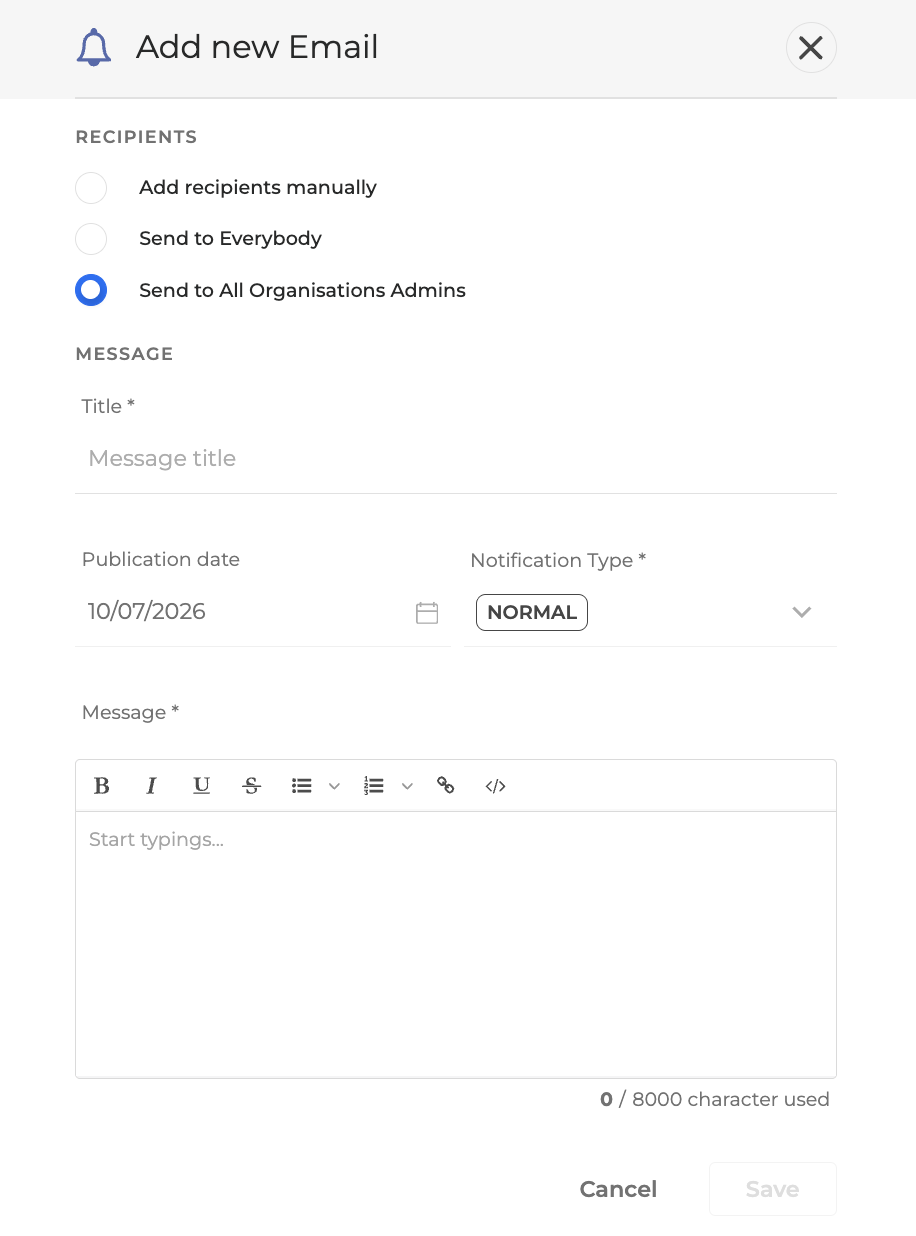
Broadcast Emails and Notifications to All Organisation Admins - Administrators can now select all Organisation admins as a recipient group when sending emails or notifications through OCP Console®, eliminating the need to add each admin individually. A dedicated toggle makes it straightforward to reach every Organisation admin across the platform in a single action.
-
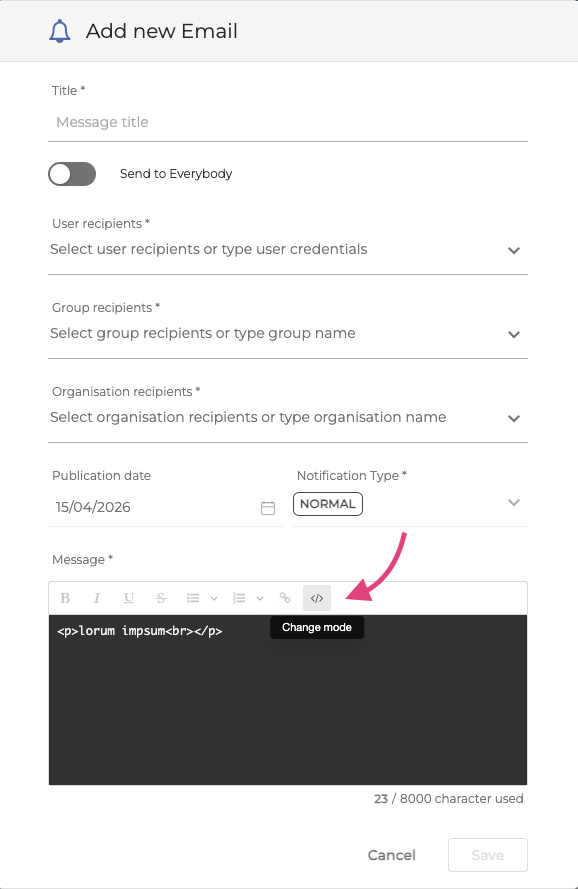
HTML Preview for Email Templates - Email templates in the OCP Console® interface now include a View HTML option, allowing administrators to inspect the raw HTML content of an email before it is sent.
Improvements
-
Refreshed OCP Console® Interface - The OCP Console® has received a significant visual and structural overhaul in this release, improving navigation, layout consistency, and overall usability across the platform.
Console 1.22.0
-
This release focuses on internal platform and console updates to improve performance.
Copilot 1.10.0
New Features
-
Create Concierge-in-Flow Node from Chat - You can now ask Copilot to add a Concierge-in-flow node directly to your OCP® flow, without leaving the chat interface. Describe the node you need in plain language, Copilot creates and wires it into your flow on your behalf, saving you the manual steps of navigating the canvas and configuring the node yourself.
-
Create QnA Agent from Chat - Copilot can now create a fully configured QnA agent on your behalf, directly from a conversation. Describe your use case, provide a knowledge base source, and Copilot sets up the agent for you, eliminating the need to navigate the agent builder UI manually.
Improvements
-
Tool Usage Analytics in the Admin Page - The Copilot admin page now displays how often each tool has been called and which agent invoked it, giving administrators clear visibility into how Copilot capabilities are being used across their deployment.
CoPilot 1.11.0
New Features
-
New Self-Learning UI - New Self-Learning MFE surfaced in Copilot, giving users a dedicated interface for the Agentic Self-Learning capability.
Improvements
-
Copilot-Server - Server-side updates to support the new Self-Learning UI.
DiaManT 10.44.0
Improvements
-
Richer Agentic Session Reporting - Call detail records for agentic sessions now capture more context: the number of turns each agent handled, the goal assigned to task agents, the outcome of each tool action, the escalation queue selected at transfer, and details of any knowledge base documents retrieved. This gives supervisors and analysts a fuller picture of how each call was handled by the AI agent.
-
Locale-Specific Word Boosting - Word boosting lists can now be configured per language, allowing each locale to have its own set of prioritised phrases. This improves recognition accuracy in multilingual deployments without affecting other language configurations.
-
Expanded Language Support - DiaManT® now supports 18 additional locales, including Norwegian, Swedish, Japanese, Mandarin Chinese, Cantonese, Thai, Filipino, Bahasa Malay, Bahasa Indonesia, Hindi, multiple Spanish variants (Mexico, Peru, Colombia, Chile), German variants (Switzerland, Austria), English (Philippines), and English (India).
-
Knowledge Base Data in Testing Studio Assertions - Knowledge base content retrieved by QnA agents during a session is now included in the DiaManT® response, enabling OCP Testing Studio® users to assert on retrieved documents as part of their automated test scenarios.
Environments Manager 1.27.1
New Features
-
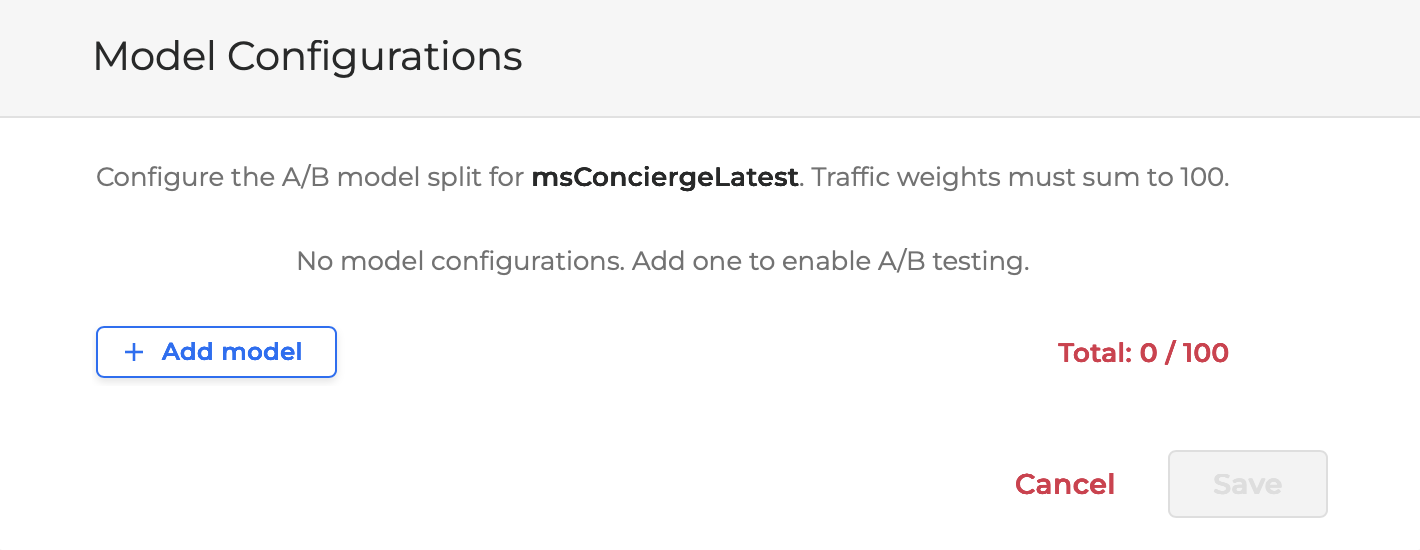
Agent A/B Model Testing Admin Panel - Administrators can now set up A/B model testing for agents from a new Agent Models page in the console admin area. The page lists your agents (searchable and paginated) and lets you add or remove model configurations for each one, choosing the model, backend, and provider from dropdowns and setting how traffic is split between them. The traffic shares must add up to 100% before the configuration can be saved, and clearing an agent's configurations asks for confirmation first. The feature is enabled per environment.
Security Improvements
-
Internal dependencies were updated to address reported security vulnerabilities. These are hardening updates with no change to how the product works.
Environments Manager 1.28.0
New Features
-
Large File Import Support - Applications and tag packages up to 1Gb in size can now be imported by uploading the ZIP in small chunks, enabling reliable imports that previously failed due to file size limits at the network boundary. Uploads resume automatically from any failed chunk, so large deployments complete without restarting from scratch.
-
Global NLU Configuration Transfer - Global NLU configuration is now included when exporting or importing an application, ensuring the full conversational configuration travels with the app when promoting between environments.
Improvements
-
Streamlined A/B Testing Setup - The A/B agent testing configuration no longer requires selecting backend, provider, and model type, simplifying the setup flow and reducing the risk of misconfiguration.
-
Cache Re-sync Controls in Admin Console - Two Re-sync Cache buttons are now available in the Deployment Service admin console - one for the production environment and one for sandbox - enabling administrators to trigger a full cache refresh directly from the console.
-
Clearer Export Validation - When an export fails due to an invalid configuration, the error is reported immediately with a clear explanation, reducing the time needed to identify and correct the issue.
Fixes
-
Reliable Agent Import with Dependencies - Agentic applications now import correctly when agents reference other agents or flows as components, preventing broken configurations that previously occurred when import order was not respected.
-
Correct Export of Applications with Double Underscores in Names - Applications, flows, and groups whose names contain consecutive underscores now export and import correctly, resolving an issue where the exported archive contained empty folders instead of the expected content.
-
Agentic Group Name Editing - Editing the name of an agentic group in the admin console now works correctly; text no longer resets to a full selection with each keystroke.
Export Service 1.13.0
Overview
Exports API 1.13.0 introduces Schema Registry integration. Customers can now discover the data schemas available for export and their versions, and optionally bind a streaming subscription to a specific schema version. Versioning is opt-in: subscriptions that do not select a version continue to receive the latest data version by default, exactly as they do today. The release is additive and backward compatible, with a single previously deprecated header removed (see Deprecations & Removals).
New Features
-
Schema Discovery endpoint - A new
GET /v1/schemasendpoint returns every schema available for export, including all versions and their full JSON definitions. Use it to explore the data structures before creating or updating a streaming subscription. Exports API -
Optional schema versioning for streaming subscriptions - Streaming export subscriptions now support a
schema_versionfield on creation, update, and retrieval. Selecting a version is entirely optional: if you do not setschema_version, the subscription continues to receive the latest data version by default, exactly as it does today. Pin a version only when you want payloads to stay fixed as schemas evolve. -
Schema-validated streaming exports - Streaming payloads are now deserialized against the registered schema for the subscription. Each delivered message now includes
X-OCP-DATA-TYPEandX-OCP-SCHEMA-VERSION(applicable only if aschema_versionis selected) headers.
Deprecations & Removals
-
Removed:
Client-Corelation-Idheader - The previously deprecated, misspelledClient-Corelation-Idheader has been removed. The correctly spelledClient-Correlation-Idheader remains and is unaffected. Update any integration still reading the misspelled header.
Security
-
Multiple dependency upgrades and vulnerability fixes.
Compatibility
-
Schema versioning is optional and disabled by default, and all new fields are additive. Existing integrations continue to work unchanged and keep receiving the latest data version. The only breaking change is the removal of the misspelled
Client-Corelation-Idheader.
IAM 3.12.0
Improvements
-
Expanded Organization Admin Capacity - Organizations can now assign administrator access to twice as many users as before, giving larger support teams the access they need to help end customers without hitting a limit.
-
Smoother Group Role Updates - Updating role assignments for groups now works reliably even in organizations with many custom roles, removing a barrier for admins managing complex permission setups.
Fixes
-
Prevented Duplicate and System Role Names - Custom role creation now blocks names that match existing system roles or other custom roles, preventing the confusion and access issues that duplicate names used to cause.
Insights 1.26.0
New Features
-
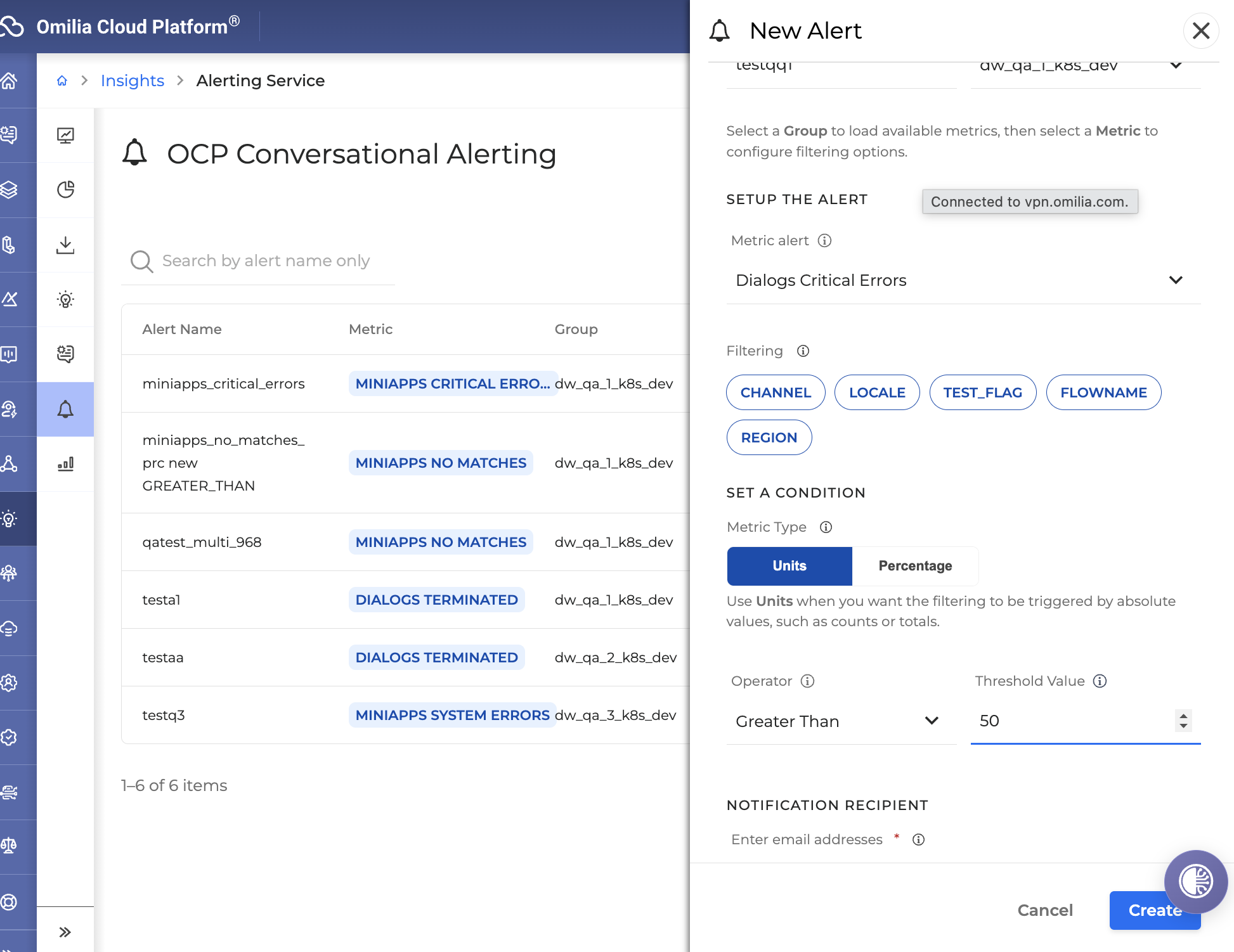
Alerts Management from the Insights Interface - Alerts can now be enabled and managed directly within OCP Conversational Insights®, giving teams a single place to configure and monitor conversational alerts without relying on separate tooling. OCP® Alerting Service
-
AI Agent Performance Reporting - A new Agentic reporting tab in OCP Conversational Insights gives supervisors visibility into how AI-orchestrated agents are performing. It surfaces coverage, completion, and containment rates alongside escalation, routing, and usage trends, broken down by agent type (Q&A, Concierge, Router, and Task), so teams can quickly spot trends and target improvements. Availability is scoped per organization based on entitlement. OCP® Reporting User Guide
.png?cb=a6d4a71ca58e67c742fb780203bd6e7a)
Improvements
-
Consistent Virtual and Live Agent Labeling in Voice Biometrics Reports - Filters and titles in Voice Biometrics reporting now consistently distinguish Virtual Agent and Live Agent, making it easier to interpret results at a glance.
Liveness Detection 6.1.0
This release introduces version 3.1.0 of the RA Detection model, normalizes scoring logic for Liveness Detection, adds new deployment capabilities, and improves system security.
RA Detection model
-
Introduces version 3.1.0 of the RA Detection model.
-
Adds new data to the training set.
Liveness Detection
-
Normalizes output scores to the [0, 1] range.
-
Revises thresholding logic to align with the new score range.
-
Updates label selection to reflect the revised threshold.
Deployment
-
Adds support for zero-downtime deployments.
Security
-
Resolves security vulnerabilities.
miniApps 2.42.1
Improvements
-
Base64 Encoding and Decoding in JavaScript Scripts - The `
atob` and `btoa` functions are now available in all JavaScript scripts running in isolated execution mode, enabling base64 encoding and decoding without extra libraries or workarounds. Scripts that previously relied on these functions when running outside isolated mode now work consistently regardless of the execution strategy in use.
Fixes
-
Reliable Handling of Non-ASCII Characters in Script Requests - Scripts and parameters containing non-ASCII characters, such as accented letters, special symbols, or non-Latin text, are now decoded correctly even when the request body is received in multiple parts. Previously, these characters could be corrupted intermittently, causing unexpected script execution errors.
miniApps 2.43.0
New Features
-
Dutch Language Support for OCP miniApps® - OCP miniApps® now support Dutch (nl-NL), enabling contact centers serving Dutch-speaking customers to deliver fully localized conversational experiences out of the box.
-
Flemish Language Support for OCP miniApps® - OCP miniApps® now support Flemish Dutch (nl-BE), extending localization coverage for contact centers operating in Belgium and serving Flemish-speaking callers.
-
Confidence-Based Intent Clarification - A configurable confidence threshold can now be set per intent, allowing the system to automatically trigger clarification prompts when a caller's intent is not recognized with sufficient certainty. This reduces misrouted calls and improves the accuracy of automated conversations without requiring manual intervention.
More information in Intent OCP miniApps®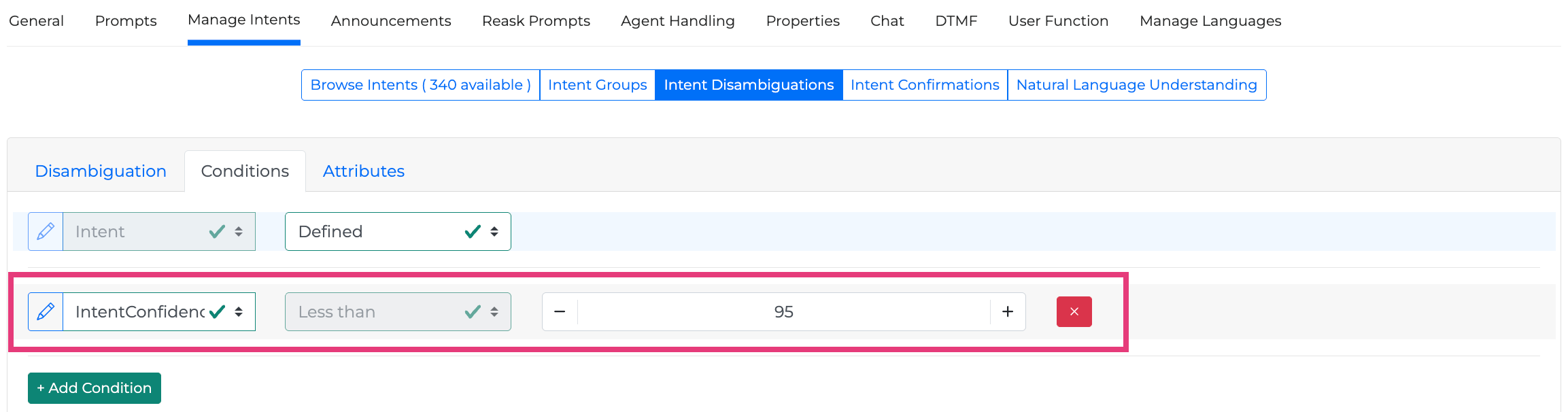
OCP NLU 1.16.0
Improvements
-
Larger File Uploads for Training and Evaluation - Training and evaluation file uploads now support files up to 15 MB, up from the previous 10 MB limit, giving you more room to work with bigger datasets.
-
Clearer Snapshot List Layout - Fixed a display issue where the snapshot list could overlap the Cancel and Create buttons, so both stay visible and clickable.
-
Non-Latin Character Support in Context Rules - Context rule matching patterns now accept non-Latin characters, such as Cyrillic script, directly from the console, matching what was already available through the API.
-
Cleaner Model Import Error Handling - When linking a model to an existing artifact fails because of a domain mismatch, the system no longer leaves behind a stray application, keeping your workspace free of unwanted leftovers.
-
Recover from Stuck App Checkouts - You can now unblock and delete an application that's stuck mid-checkout or mid-deletion because its underlying resources were already removed, so you're not left waiting on an unrecoverable state.
-
Cross-Validation Results Travel With Your Model - Exporting, importing, or creating a snapshot of a model now automatically carries its cross-validation results along with it, so validation metrics move with the model instead of being left behind.
-
OCP Console® Overhaul, Phase Two - The OCP Console® continues its refresh with updated modals, drawers, input fields, and data tables for a more consistent look and feel across every section. The new experience can be turned on or off through a feature flag, so you control when you switch over.
-
Simplified Deployment Notifications - Notifications about inactive NLU deployments scheduled to stop are now grouped into a single message per user instead of one per application, with clearer wording letting you know deployments will stop in 24 hours.
-
Clearer Limit Messages for Models and Apps - When you reach a model or application limit, the message now tells you specifically whether it's your account limit or your group's limit, and who to contact, so you know exactly how to proceed.
-
More Reliable xPack Deployments - xPack deployments now check that required components are ready and configurations are in sync before proceeding, and prevent duplicate deployments of the same version, reducing failed or conflicting updates.
Orchestrator 1.36.0
New Features
-
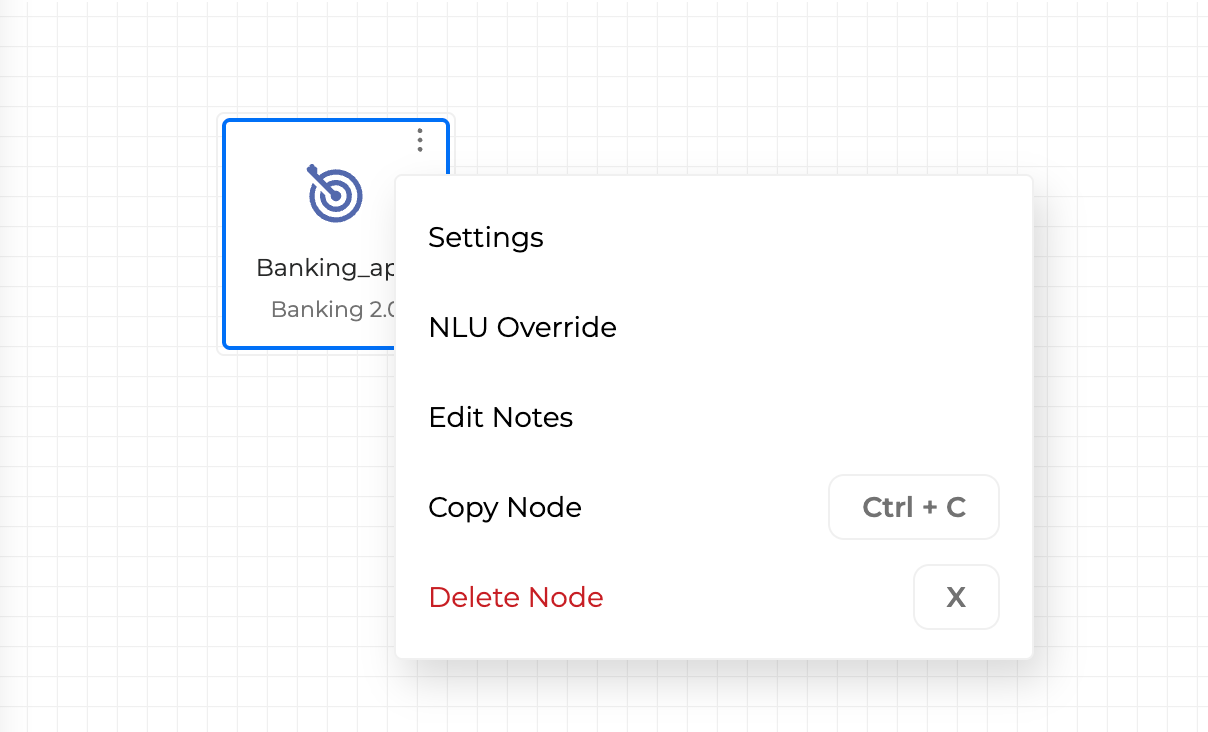
Global NLU Override per Flow and miniApp - The Natural Language Understanding (NLU) model that drives intent recognition can now be configured independently for individual flows and OCP miniApps® on the canvas, overriding the application-level Global NLU setting. This enables multi-domain applications to route each part of the conversation through the most appropriate NLU model, improving recognition accuracy without changing the overall application structure. A new Global NLU setup option is also available directly from an existing application, so you no longer need to recreate an app to enable Global NLU. Application Options Menu
-
Reorderable Node Configuration Fields - Fields within a node's configuration panel can now be reordered manually by dragging them into the preferred sequence. This makes it easier to organise complex node configurations and aligns the layout with the logic of your application.
Improvements
-
Google Chirp Voice Support - Google Chirp voices are now fully supported in the Global Text-to-Speech configuration, with provider-specific volume and rate ranges applied automatically when a Chirp voice is selected, ensuring the audio output stays within the voice's supported limits.
-
Goal Field for Task Agents - Task Agents now include a dedicated Goal field, providing a concise statement of the agent's objective. The Goal is required before deployment, ensuring every Task Agent has a clear, documented purpose visible in the agent configuration.
-
Streaming Voice Validation on TTS Save - When saving a Global TTS configuration that includes a streaming-enabled voice, OCP Conversation Studio® now validates whether TTS streaming is active for your group before saving. If streaming is not enabled, the save is rejected with a clear error message, preventing misconfigured deployments.
-
OCP Console Visual Consistency Improvements - Phase 2 of the OCP Console® overhaul delivers a more consistent look and feel across all sections, with updated modals, drawers, input fields, and data tables aligned to a unified design.
-
Cleaner Concierge Agent Label in Reask Node - The outdated Router Agent selector in the Reask node settings has been replaced with the correct Concierge label, removing a source of confusion for application designers.
-
Stable Canvas Zoom on Node Paste - Pasting a node onto the canvas no longer resets the zoom level, so you can continue working at your chosen zoom without interruption.
-
Dash Character Accepted in Test Case Names - When creating a test case, the name field now accepts the dash character, allowing more flexible and descriptive naming conventions.
Fixes
-
Reliable Escalation Guard Flow Deployment - Flows referenced only through an agent's escalation guard configuration are now correctly included when deploying an application, so guardrail logic runs as expected during live conversations.
-
Global NLU Configuration Preserved on Import - Importing an application no longer clears the Global NLU configuration. The NLU setup is now retained after import, keeping your application ready to deploy without reconfiguration.
-
Validation Before Deploying with a Missing NLU - Attempting to deploy an application whose Global NLU references a deleted or unavailable NLU now produces a clear error message instead of proceeding silently with an invalid configuration.
-
Intent Change Now Resets Failure Tracking - When a flow is configured to reset on intent change, the failure-tracking state is now correctly cleared when the caller switches intent, preventing previous failures from incorrectly influencing subsequent dialog paths.
-
Accurate Optional Output Fields in Deployed Applications - Optional output fields on Concierge agents are now correctly marked as optional in the deployed application, restoring the behavior from earlier versions.
-
Chat Testing No Longer Triggers Accidental Node Deletion - Typing in the chat test window no longer interferes with canvas keyboard shortcuts, so nodes are not accidentally removed while testing a conversation.
-
Agent Card Saves Correctly When Selecting a Knowledge Base Project - The agent configuration panel now waits for project metadata to finish loading before allowing a save, preventing incomplete agent cards from being stored.
-
This release includes security updates.
Orchestrator 1.36.1
Fixes
-
Reliable Voice Provider Selection in Text-to-Speech Configuration - Organizations using only certain third-party voices previously found the text-to-speech provider list empty, blocking configuration entirely. The provider dropdown now always shows a valid option, so you can configure text-to-speech voices without interruption.
-
Accurate Detection of Chirp Voices - Chirp voices are now identified by their unique identifier instead of by name, ensuring correct voice behavior and features apply consistently even as naming conventions change.
Pathfinder 1.9.3
Fixes
-
Restored Functionality for Imported RAG Applications - Applications using online and offline Retrieval-Augmented Generation (RAG) that were exported and re-imported would fail with a "No vector stores found" error when queried. This is now resolved, and imported RAG applications respond correctly.
-
Reliable Service Account Authentication - Requests authenticated with a Service Account were returning an internal server error when performance monitoring was enabled. This is now resolved, and Service Account-authenticated requests are handled correctly in all configurations.
STT 8.8.0
New Features
-
Improved Liveness Detection Accuracy - deepASR® now streams a brief period of silence before speech audio begins, giving the liveness detection engine more complete audio context. This reduces misclassification at the start of calls, providing more reliable detection of whether a live person or an answering machine has picked up.
Improvements
-
More Reliable Number Transcription for GENERIC ASR (logos models) - deepASR® now applies a post-processing step to Generic ASR transcription results, converting spoken numbers (zero through twelve, including "oh" for zero) into digits when the engine's built-in normalization does not. This reduces transcription errors in scenarios where callers speak numeric values such as zip codes, account numbers, or menu selections.
-
Faster and More Consistent Recognition Completion - Resolved a condition where simultaneous internal processing events could cause recognition to stall for up to two seconds before returning results. Speech recognition now completes promptly and consistently, regardless of the order in which audio processing events arrive.
Fixes
-
Reliable Session Log Uploads - Session log files were not being uploaded after early April 2026. This has been resolved by consolidating the upload service directly into deepASR®, ensuring session logs are captured and stored reliably for every call.
-
Prevented Engine Failures on Large Audio Frames - deepASR® now enforces a maximum size on incoming audio chunks before they are forwarded to the recognition engine. Previously, oversized audio frames could corrupt the internal audio stream, causing the recognition engine to fail for the remainder of the session and forcing a session restart.
-
Prevented Startup Crash When Voice Biometrics is Misconfigured - deepASR® no longer crashes on startup when the biometrics service is disabled but the voice verification service is also enabled. The service now detects the inconsistency and disables voice verification automatically, ensuring a clean startup in all configuration combinations.
-
Resolved Stuck Engine Incident Causing Call Failures - A production incident where all deepASR® recognition engines became occupied and unable to process new calls has been investigated and resolved. Improvements to thread management and internal timeout handling prevent engines from becoming permanently stuck, restoring normal call processing without requiring a restart.
-
This release includes security updates.
STT 8.8.1
Improvements
-
More Complete Speech Transcripts - deepASR® now captures the full spoken sentence more consistently. Previously, a trailing word could occasionally be missing from the transcript under certain call conditions; this gives your applications a more accurate, complete record of what callers said.
-
More Accurate Zip Code Recognition - Fixed an issue where dictating a zip code slowly, digit by digit with pauses, could occasionally insert a stray extra letter in the middle of the number. Numbers dictated this way are now recognized more accurately.
STT 8.8.2
Improvements
-
More Complete Speech Transcripts - deepASR® now captures the full spoken sentence more consistently. Previously, a trailing word could occasionally be missing from the transcript under certain call conditions; this gives your applications a more accurate, complete record of what callers said.
Testing Studio 1.20.0
New Features
-
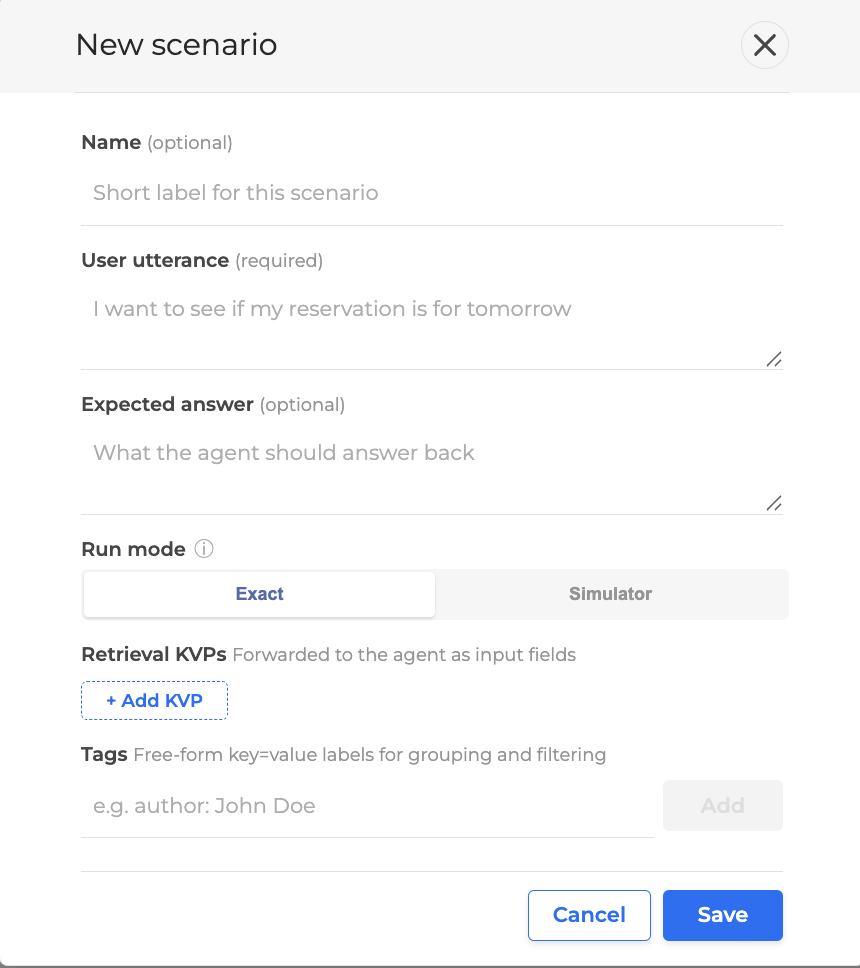
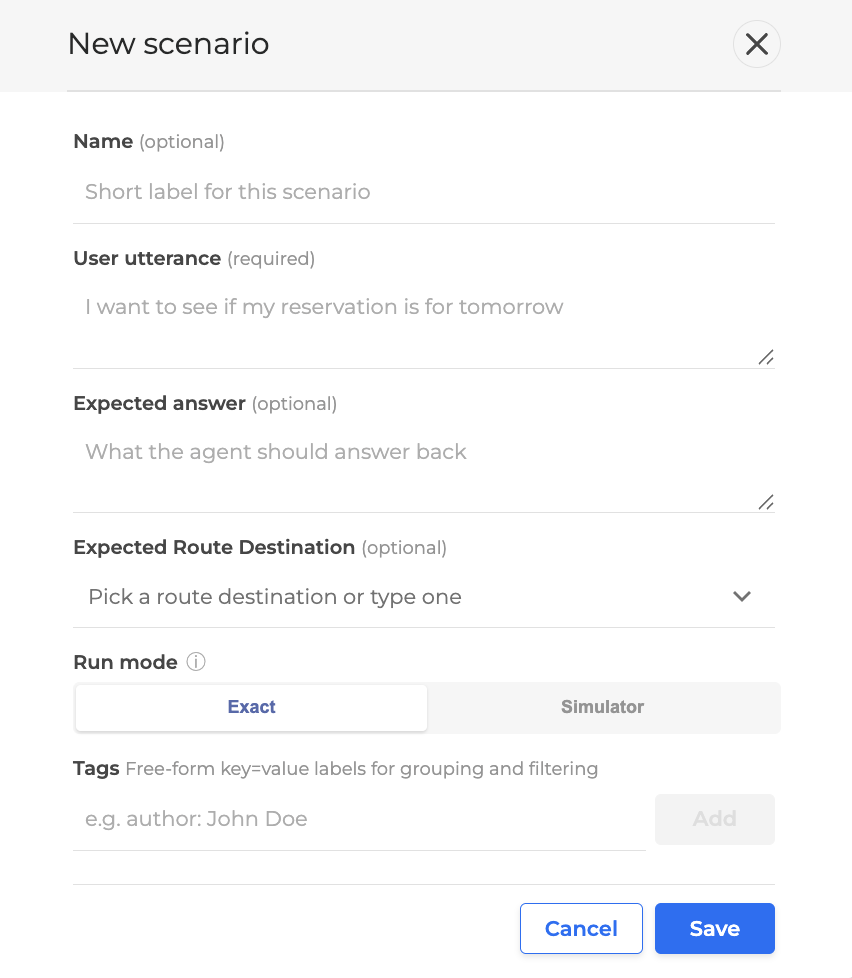
Add support for testing concierge / router agents in Agents Unit Testing (AUT). Users can now define an expected route for a scenario, and the scenario UI adapts to the agent type so only the relevant fields are shown.
Improvements
-
Update LLM model for our LLM features.
-
Speedup Run tests clone task.
-
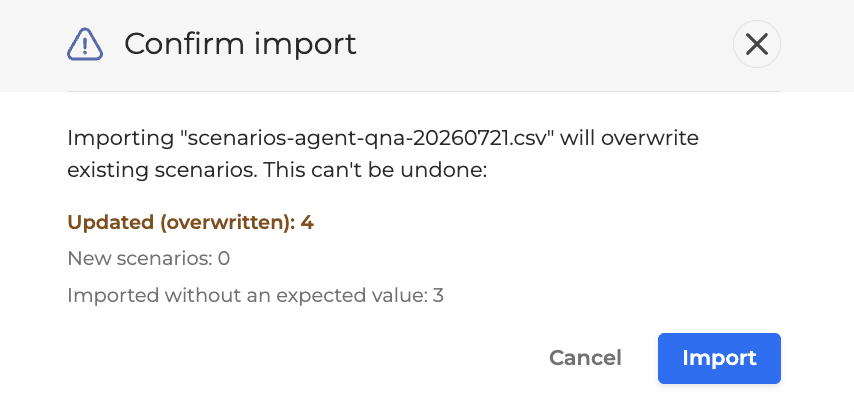
Enhance the Agents Unit Testing (AUT) CSV export/import so that exported results can be re-imported cleanly as scenarios, with full support for both QnA and Concierge agent types, route-based grading, and a safe import preview.
Testing Studio 1.21.0
New Features
-
Add support for data models testing.
Improvements
-
Deliver Console Overhaul - Phase 2 for the UI
-
Add
session_channel = “web-chat”as default on Test Case generate
Internal Improvements
-
Speedup test runtime (by splitting Run’s tests based on the test cases number per test suites)
-
Update Sidecar
-
Use trixie-debian based docker image
TTS 3.0.0
Beta
Lexis is Omilia’s new generative text-to-speech model, built to unlock the most authentic Customer Service experiences.
Speech with the expressiveness, warmth, timing, and emotion of a skilled human agent, generated in real time, entirely inside your own platform and adapting to the context and the stakes of every conversation, in many languages.
-
Model: Lexis v1.0.0
-
CX Ambassador Persona library: en-US - Rob v1.0.0
-
SSML support: <break>
New features
-
New voice family Lexis. Adds support for our newest, more natural-sounding voice technology.
-
New SSML <sub> tag. You can now control exactly how a word or abbreviation is spoken by supplying a spoken-form alias. Example: <sub alias="World Health Organization">WHO</sub> is read as "World Health Organization" while "WHO" stays in your text.
For more information go to SSML tags support of Omilia TTS.
TTS 3.1.0
New Lexis voices - https://omilia.com/platform/voice-agents/lexis/
-
New Spanish (Colombia) CX Ambassador personas from our latest Lexis voice family: María v.3.0.0 and Andrés v.3.0.0 (Trusted Advisor)
Pan-locale verbalization change for Lexis voices only: en-US, en-GB, fr-CA, es-US, es-CO
-
Multi-word acronyms and all-caps words are no longer spelled out letter-by-letter. Instead they are spoken as a whole word.
New Lexis locale verbalization support
-
Colombian Spanish (es-CO) verbalization local currency ("$" → "pesos", "COP" → "peso colombiano"), Colombian number format, and web-address reading.
-
Canadian French (fr-CA) verbalization including local date, time, currency, percentage delivery, long decimal fractions, ordinal numbers.
American Spanish (es-US) pronunciation & verbalization fixes
-
Abbreviation "dr." now reads as "doctor" (previously "médico").
-
Symbols read naturally: "%" → "por ciento", "+" → "más", "&" → "y".
-
Percentages like "20%" read as "veinte por ciento".
-
Hyphenated words such as "check-in" no longer read the hyphen aloud.
-
Large quantities read correctly: "millones", "billones" (no longer "millónes").
-
A sentence-initial "Y" is now read as the word "y" instead of being spelled out.
-
New Spanish and US-style address abbreviations are expanded (e.g. "ave." → "avenue", "blvd." → "boulevard").
SSML improvements and support on our Lexis voices - SSML tags support of Omilia TTS
-
<prosody> , <rate> , <volume> : Speaking-rate control on our latest voices: adjust pace with (e.g. slow, fast, or a numeric factor), as well as volume control
el-GR improvements for existing voices -
-
Improved pronunciation and word stress of embedded English words.
Security
-
General security vulnerability fixes.
Webchat 2.37.0
New Features
-
Chat Transcript Download During Active Conversations - The "Download as PDF" button in OCP Conversational Chat® is now available throughout an active conversation, not only after it ends. Users can download a full transcript of all messages exchanged so far at any point during the session, enabling mid-conversation reference and record-keeping.
.png?cb=4b040d5149c67a87446c76919f9c23a2)
-
Sensitive Input Masking for Secure Data Entry - When a conversation requires confidential information, the chat widget can now mask each character as it is typed, replacing it with asterisks. An eye icon lets the user reveal what they typed before sending, and the chat history displays the value as masked, protecting sensitive data from being visible on screen.
-
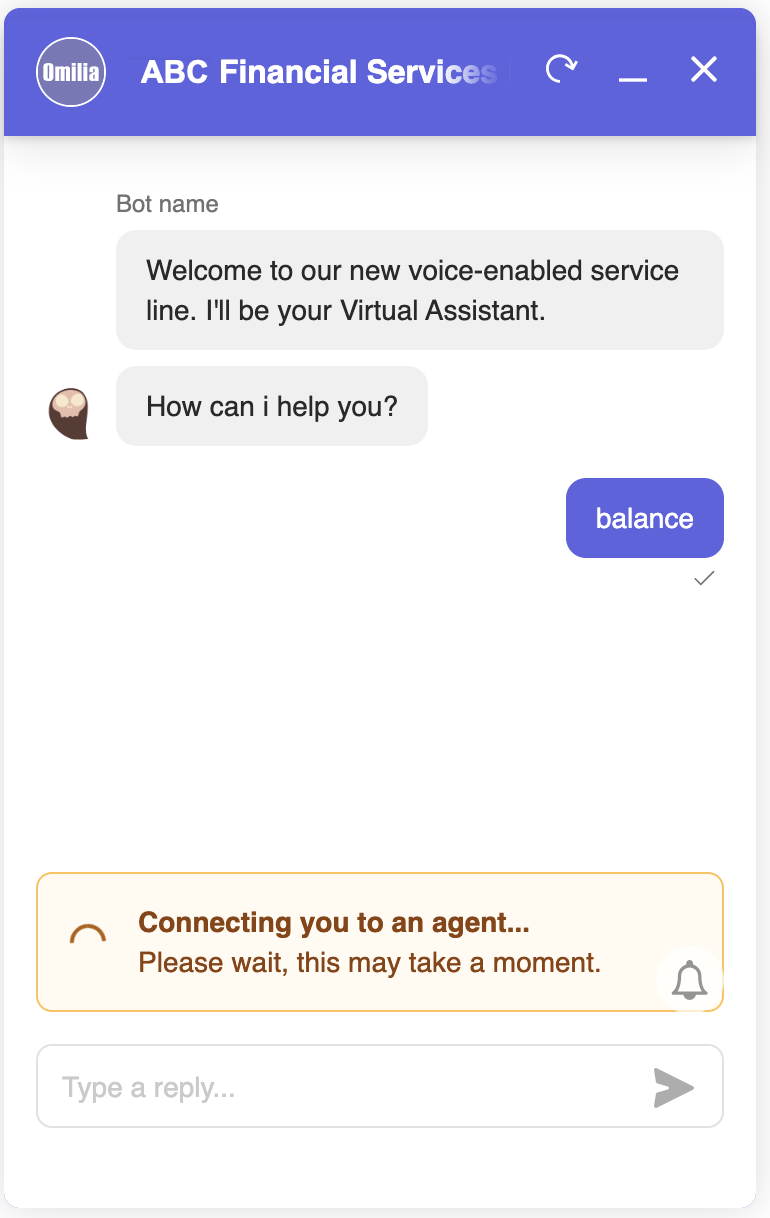
Input Disabled During Agent Transfer - While a conversation is being transferred to a live agent, the chat input field and send button are automatically disabled and a waiting message is shown. Input re-enables as soon as the agent joins, preventing messages from being sent into an unmonitored session during handover.
Fixes
-
Accessible Time Picker via Keyboard Navigation - Users navigating the chat widget by keyboard can now fully select and confirm a time in the time picker without requiring a mouse.
-
Localized Interface Text for Updated Chat Header - Text fields introduced in the updated chat header are now correctly translated across all supported languages, ensuring a consistent experience for all users.
xPacks 1.18.3
Fixed OCP xPacks
-
en-GB Universal deepNLU® xPack v 3.16.0-
Improved recognition accuracy for ACCEPT, Agree, Alphanumeric, CardNumber, CONVENTIONAL, DIALOGACT, Exit, Hour, Numeric, REJECT, SentimentDescriptor, and YesNo entities.
-
The Numeric entity now returns all candidate interpretations of composite spoken numerals (e.g. "twenty nine" → 29, 20, 9) when the caller is interacting with Numeric or Alphanumeric miniApps.
-
The words "space" and "hyphen", when spoken during Alphanumeric dictation, are now filtered out. The resulting annotation remains continuous.
-
Phrases such as "it is", "it does" (ACCEPT) and "it is not", "it does not" (REJECT) are now reliably mapped to the correct dialog act entities. Previously these were missed or only partially triggered.
-
Several Hour entity misrecognition cases have been addressed, including false Hour annotations triggered by numeric ordinals (e.g. "one time", "two times") and incorrect value assignments for expressions like "all night and all morning" and "three o’clock this morning".
-
Improved recognition of card numbers provided as compound spoken numerals. Previously, such inputs were truncated to partial values due to incorrect numeral decomposition.
-
-
en-GB Universal+ deepNLU® xPack v 3.16.0-
Improved recognition accuracy for ACCEPT, Agree, Alphanumeric, CardNumber, CONVENTIONAL, DIALOGACT, Exit, Hour, Numeric, REJECT, SentimentDescriptor, and YesNo entities.
-
The Numeric entity now returns all candidate interpretations of composite spoken numerals (e.g. "twenty nine" → 29, 20, 9) when the caller is interacting with Numeric or Alphanumeric miniApps.
-
The words "space" and "hyphen", when spoken during Alphanumeric dictation, are now filtered out. The resulting annotation remains continuous.
-
Phrases such as "it is", "it does" (ACCEPT) and "it is not", "it does not" (REJECT) are now reliably mapped to the correct dialog act entities. Previously these were missed or only partially triggered.
-
Several Hour entity misrecognition cases have been addressed, including false Hour annotations triggered by numeric ordinals (e.g. "one time", "two times") and incorrect value assignments for expressions like "all night and all morning" and "three o’clock this morning".
-
Improved recognition of card numbers provided as compound spoken numerals. Previously, such inputs were truncated to partial values due to incorrect numeral decomposition.
-
-
en-AU Universal deepNLU® xPack v 3.7.0-
Improved recognition accuracy for ACCEPT, Agree, Alphanumeric, Amount, CardNumber, CONVENTIONAL, DIALOGACT, DayOfMonth, Exit, Hour, MonetaryAmount, Numeric, REJECT, SentimentDescriptor, TimeRelativeToNow, and YesNo entities.
-
The Numeric entity now returns all candidate interpretations of composite spoken numerals (e.g. "twenty nine" → 29, 20, 9) when the caller is interacting with Numeric or Alphanumeric miniApps.
-
The words "space" and "hyphen", when spoken during Alphanumeric dictation, are now filtered out. The resulting annotation remains continuous.
-
Phrases such as "it is", "it does" (ACCEPT) and "it is not", "it does not" (REJECT) are now reliably mapped to the correct dialog act entities. Previously these were missed or only partially triggered.
-
Several Hour entity misrecognition cases have been addressed, including false Hour annotations triggered by numeric ordinals (e.g. "one time", "two times") and incorrect value assignments for expressions like "all night and all morning" and "three o’clock this morning".
-
Improved recognition of card numbers provided as compound spoken numerals. Previously, such inputs were truncated to partial values due to incorrect numeral decomposition.
-
xPacks 1.19.0
New OCP xPacks
-
da-DK Universal deepNLU® xPack v3.0.0
Fixed OCP xPacks
-
en-US Universal deepNLU® xPack v3.17.2-
Improved DIALOGACT recognition accuracy.
-
The affirmative expression "why not" is now correctly recognized as YesNo=YES / DIALOGACT=ACCEPT in the Confirmation and YesNo miniApp contexts.
-
-
ru-UA Universal deepNLU® xPack v3.8.2-
Tuning for recognition of the following entities: ACCEPT, CONVENTIONAL, DIALOGACT, and REJECT.
-
Improved DIALOGACT=REJECT recognition accuracy on ambiguous or poorly-transcribed utterances, which previously triggered a definitive entity instead of falling through to No Interpretations.
-
xPacks 1.19.1
New OCP xPacks
-
fr-FR Universal+ deepNLU® xPack v3.2.2-
The fr-FR Universal xPack has been enhanced with French address recognition, delivered as a separate fr-FR Universal+ xPack.
-
New public entities: BECity, BEPostCode, BEProvince, BERegion, BuildingPart, FRArea, FRDistrict, FRPointOfInterest, FRVillage, and POIRelation.
-
Tuning for the recognition of the following entities: LocationIndicator, StreetType, FRCity, FRDepartment, FRRegion, FRPostCode, and Numeric-related entities.
-
Added recognition and annotation support for location-related entities, including FRStreet, StreetNumber, StreetName, Building, BuildingNumber, BuildingUnit, BuildingUnitNumber, Apartment, ApartmentNumber, Floor, FloorNumber, POBox, POBoxNumber, FRArea, FRDistrict, FRPointOfInterest, FRVillage, and POIRelation.
-