
The following sections list every released version of Insights and the Monitor component, newest first by release date. Each section comes from the monthly OCP® Release Notes page named in its Released line.
Insights 1.27.10
Released: September 2026
|
US1 |
US2 |
EU1 |
|---|---|---|
|
September 28, 2026 |
October 7, 2026 |
October 15, 2026 |
Fixes
-
Fixed a Timezone mismatch when redirecting from Reporting to Monitor tab.
Insights 1.27.9
Released: September 2026
|
US1 |
US2 |
EU1 |
|---|---|---|
|
Rolled-forward |
Rolled-forward |
Rolled-forward |
New Features
-
Sentiment and Call Experience Insights for Agent Assist - OCP Conversational Insights® now includes a dedicated sentiment review for Agent Assist reporting, so supervisors can see call-experience trends at a glance. Caller and agent sentiment are shown as trends over time, alongside breakdowns of overall caller sentiment and agent responsiveness, filtered by the same date range and groups you already use. This gives supervisors a fast way to spot shifts in call quality without reviewing individual calls.
-
Schema Version Selection for Data Export Subscriptions - When creating or updating a subscription in OCP Secure dataFeed®, you can now choose a schema version to control the shape of the data you receive, keeping downstream integrations consistent as your data formats evolve. Export Service User Guide | Create an Export Subscription
Improvements
-
Faster, Lighter Dialog Audio Playback in Monitor - Audio for voice dialogs in Monitor now loads only when you choose to play it, reducing unnecessary page load time and ensuring you're only billed for recordings you actually listen to.
-
Group Selection Now Persists on Page Reload - Organization administrators no longer need to reselect their saved group after reloading the Monitor page - your last selection is remembered automatically.
Fixes
-
Reliable Audio Playback When Revisiting Dialogs - Replaying a step's audio after switching between dialogs in Monitor now always fetches the correct recording, instead of occasionally replaying audio left over from a previously viewed dialog.
-
Improved Reliability of Alerting Screens - Alert History now loads without error, and updates to alert filtering criteria display correctly right away, so what you see on screen always matches what was saved.
-
Clearer Tab Labels in Reporting - Tab labels across Reporting pages, including Real-time report and Agent Performance, now display cleanly at all screen widths, without overlapping the underline indicator or nearby filters.
-
Accurate Time Range When Jumping to Monitor from Real-time Report - Selecting "Show Actual Dialogs" from the Real-time report now carries over the correct time window to Monitor, so matching dialogs appear instead of a false "no dialogs found" result.
-
Correct Date Selection for Exports in Forward-Shifted Time Zones - When your time zone shifts the local date forward, the export date picker now correctly allows you to select that day, instead of disabling it as if it were in the future.
Insights 1.26.15
Released: August 2026
|
US1 |
US2 |
EU1 |
|---|---|---|
|
August 31, 2026 |
Rolled-forward |
Rolled-forward |
This release contains internal and administrative updates only.
Insights 1.26.0
Released: July 2026
|
US1 |
US2 |
EU1 |
|---|---|---|
|
July 27, 2026 |
Rolled-forward |
Rolled-forward |
New Features
-
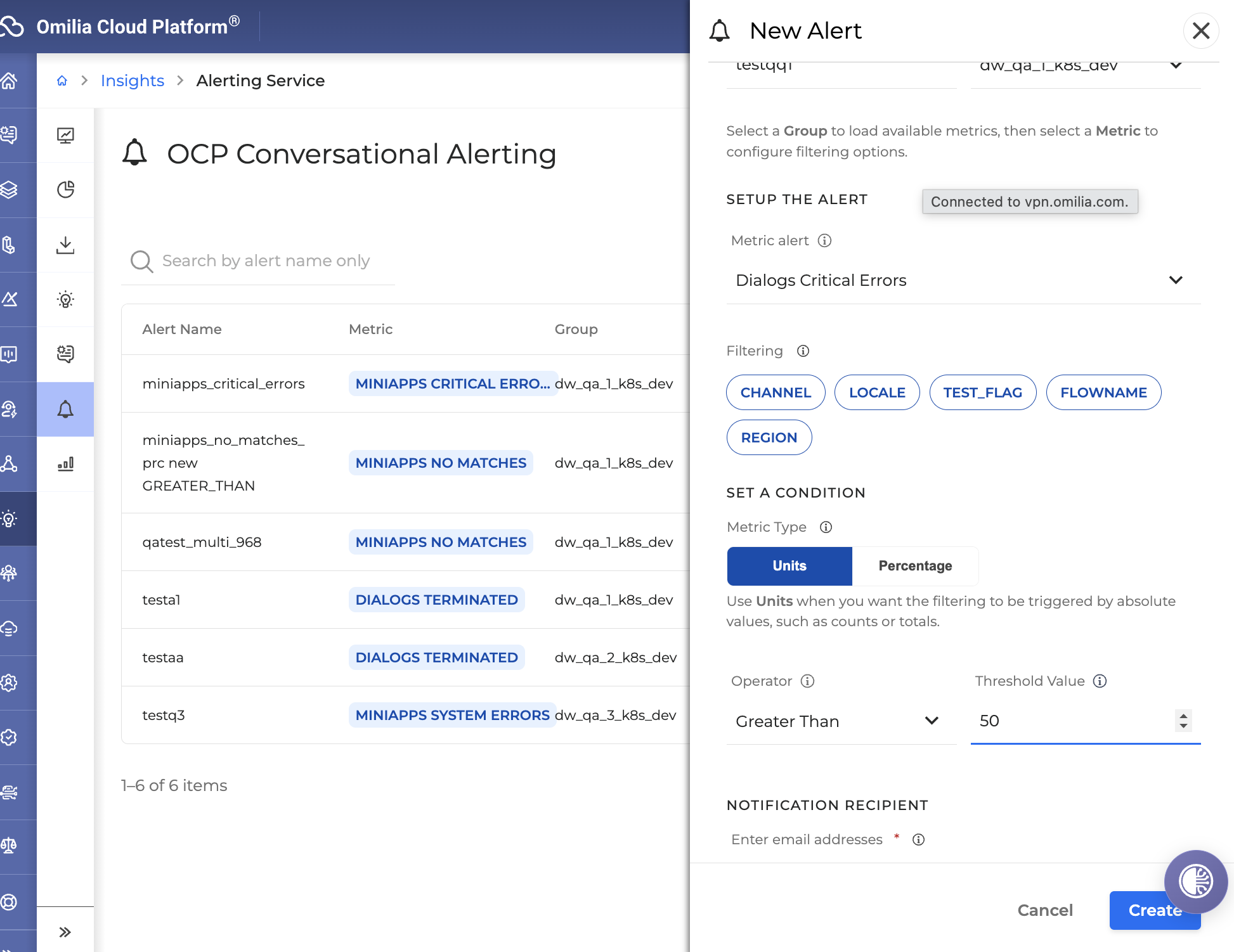
Alerts Management from the Insights Interface - Alerts can now be enabled and managed directly within OCP Conversational Insights®, giving teams a single place to configure and monitor conversational alerts without relying on separate tooling. OCP® Alerting Service
-
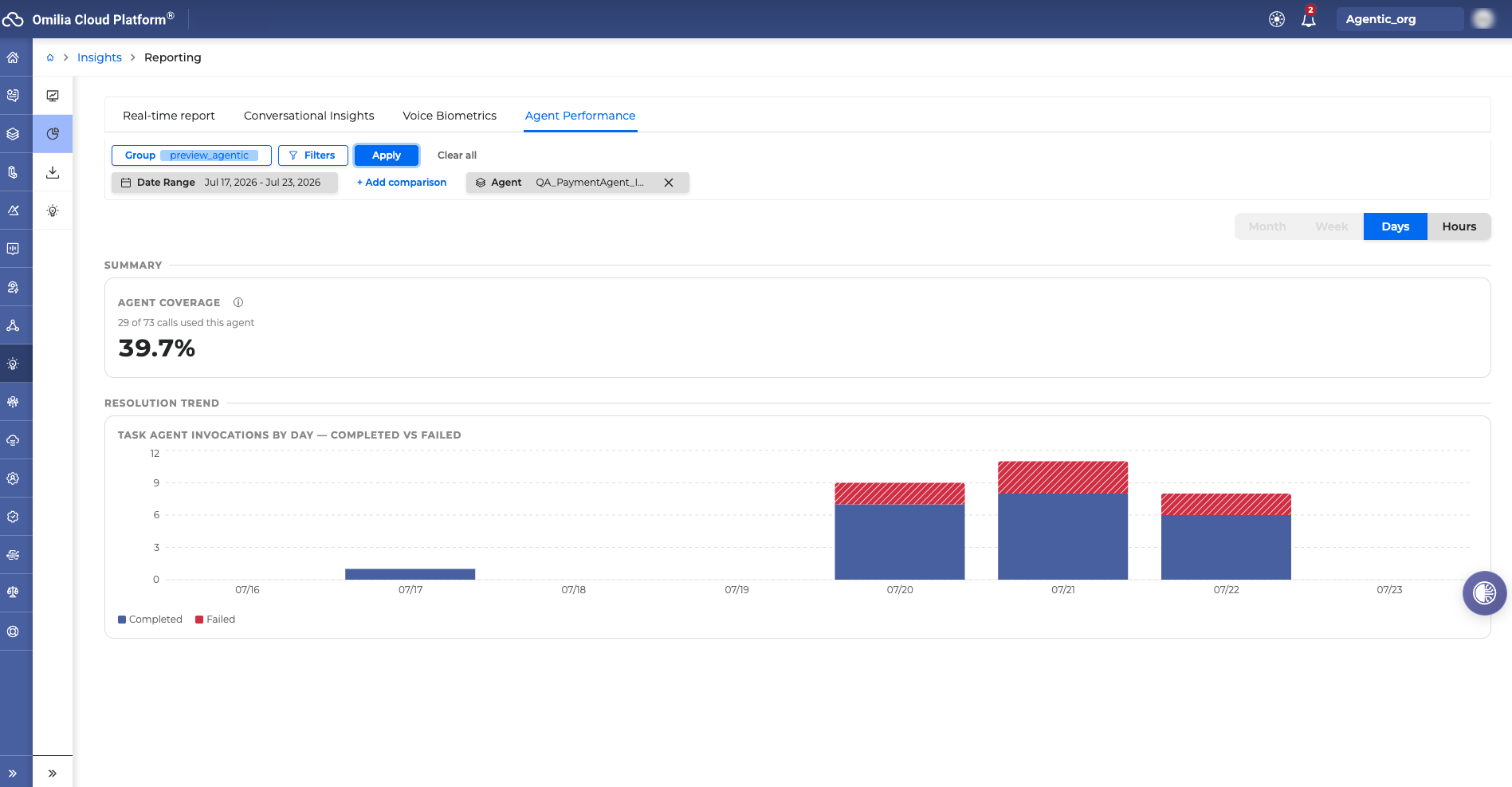
AI Agent Performance Reporting - A new Agentic reporting tab in OCP Conversational Insights gives supervisors visibility into how AI-orchestrated agents are performing. It surfaces coverage, completion, and containment rates alongside escalation, routing, and usage trends, broken down by agent type (Q&A, Concierge, Router, and Task), so teams can quickly spot trends and target improvements. Availability is scoped per organization based on entitlement. OCP® Reporting User Guide
Improvements
-
Consistent Virtual and Live Agent Labeling in Voice Biometrics Reports - Filters and titles in Voice Biometrics reporting now consistently distinguish Virtual Agent and Live Agent, making it easier to interpret results at a glance.
Insights 1.25.0
Released: June 2026
|
US1 |
US2 |
EU1 |
|---|---|---|
|
July 1, 2026 |
July 13, 2026 |
June 29, 2026 |
New Features
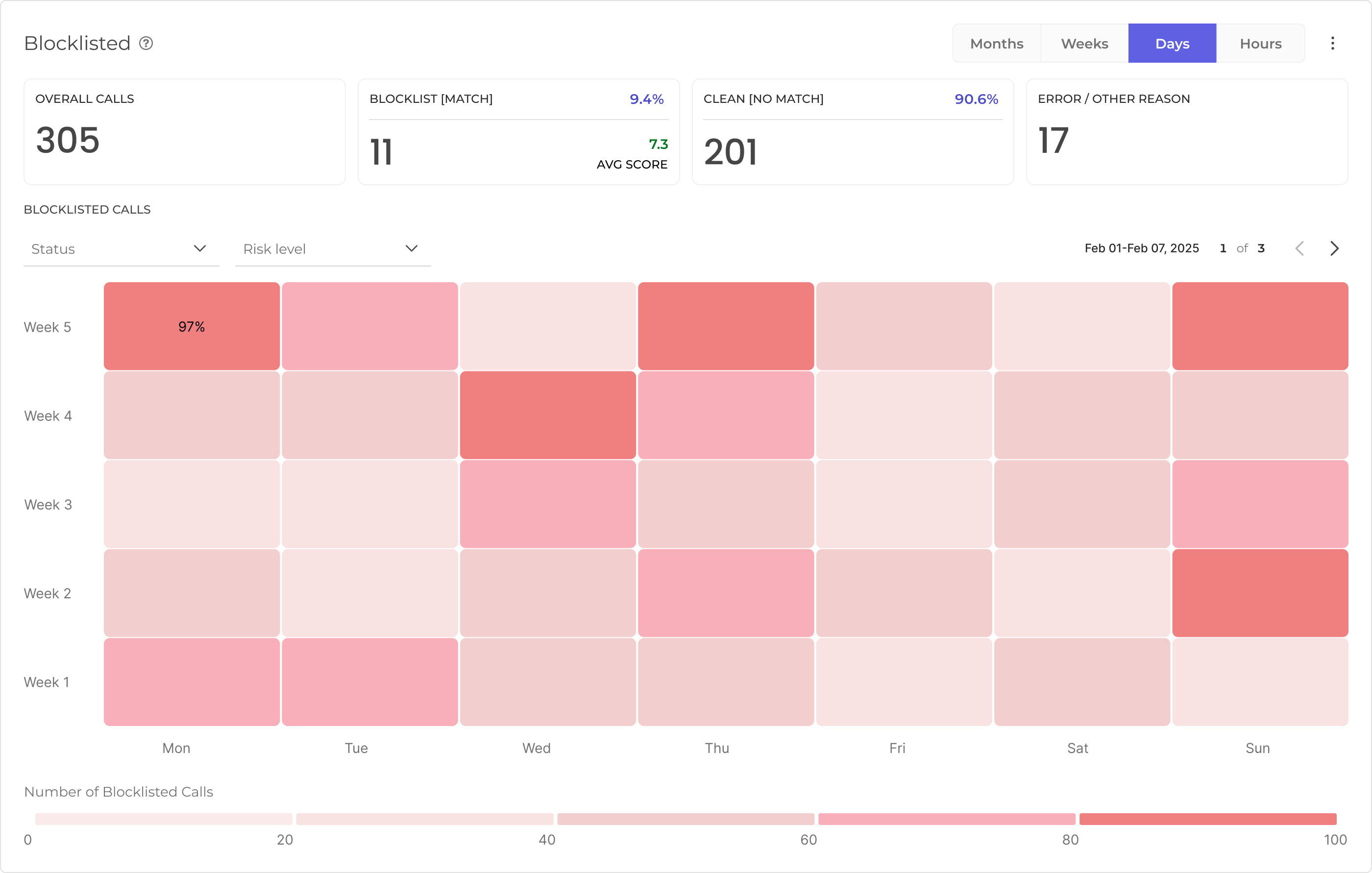
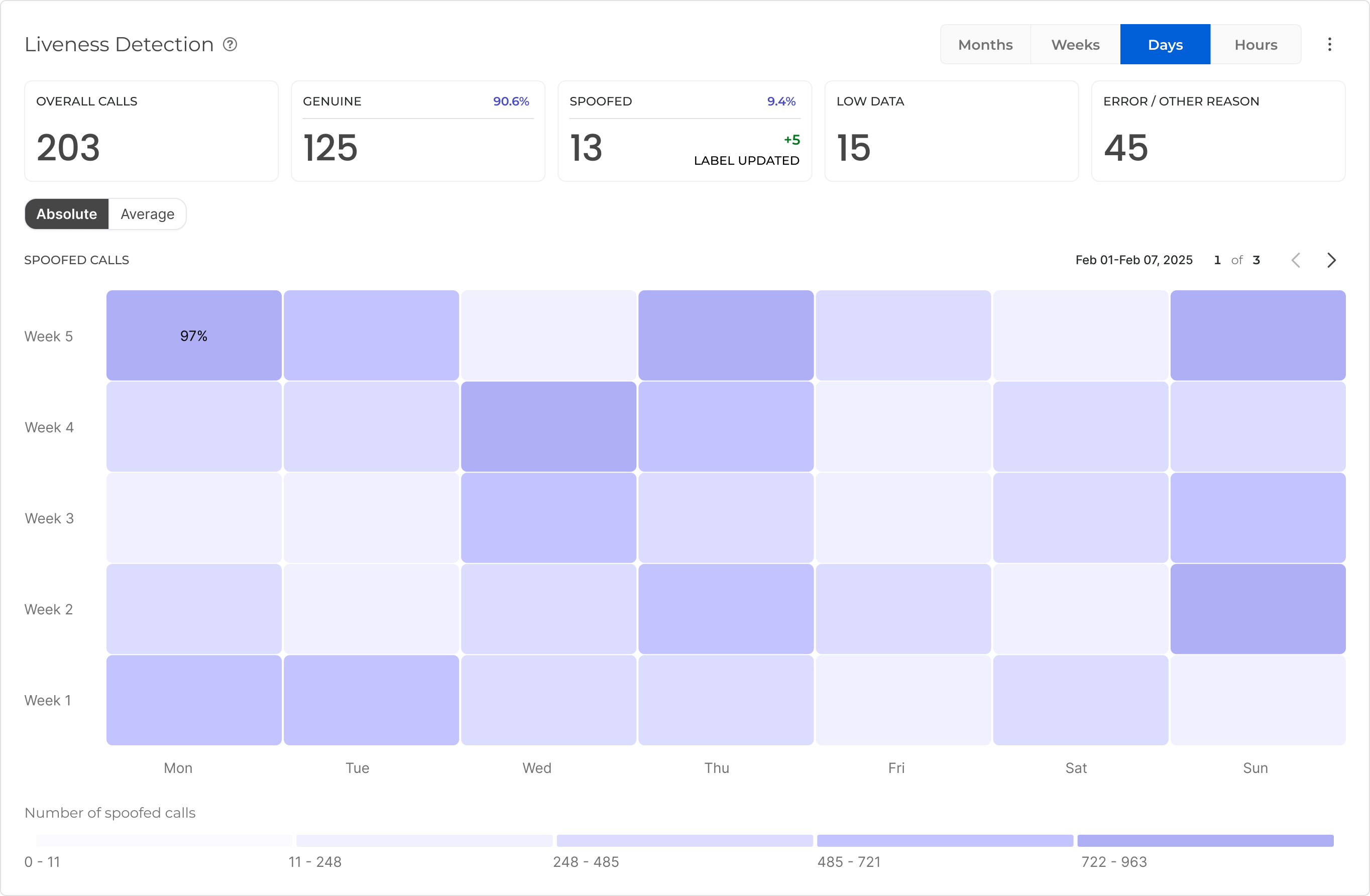
Liveness Detection and Blocklisting Reports - OCP Conversational Insights® now includes dedicated reporting for Liveness Detection and Blocklisting in the Voice Biometrics section. You can track how many spoofed or blocklisted calls reached your applications, view heatmap breakdowns by day or week, and filter by origin and region - giving your fraud operations team a clear, at-a-glance picture of anti-fraud activity across all calls.
-
Timezone-Aware Export Scheduling - When creating a data export, you can now select a timezone offset for your date range, making it easier to align exports with your local business hours. A note is displayed confirming that exported data is always delivered in UTC, regardless of the timezone used for selection. The date and time picker also supports hourly precision for more granular scheduling.
-
Agent Assist Events in Raw Data Exports - Raw data exports now support Agent Assist event types, enabling you to include agent-side interaction data in your export streams for analysis and reporting.
For more information go to Export Service User Guide.
-
Audience Field for Export Authorisation - When configuring an export stream, you can now supply an optional Audience value as part of the authorisation settings, providing greater control over token-based access to your export destinations.
-
Duplicate Key Searches in Monitor - In the Monitor dialog search, you can now search using the same key with different values simultaneously, for example, filtering for two different outcomes under the same call attribute. This makes it easier to find conversations where a particular data point takes any of several values.
For more information go to OCP® Monitor User Guide.
Improvements
-
Configurable Headers for Export Streams - Export stream configurations now support adding custom static HTTP headers, giving you more flexibility when connecting exports to destinations that require specific header values for authentication or routing.
Fixes
-
Reliable Live View in Dialog Monitor - The live dialog view in Monitor now refreshes its time window continuously, so new calls appear without requiring a manual page reload. Previously, the view would freeze at the time the page was first loaded, causing recent conversations to go missing until you refreshed.
-
Consistent Button Labels in Reporting - The button used to load reports in the Agent Assist reporting page has been relabelled to match the label used across all other reporting pages, providing a consistent experience throughout the Reporting section.
Insights 1.24.0
Released: March 2026
|
US1 |
US2 |
EU1 |
|---|---|---|
|
June 4, 2026 |
June 17, 2026 |
June 8, 2026 |
Unified Monitoring & Cross-Agent Insights
We are excited to announce a major evolution in how you monitor and analyze your CX performance.
The upcoming update to OCP Monitor and Insights Reporting bridges the gap between automated and human-assisted interactions, providing a truly unified view of your operations.
The vision behind the change
Our focus shifts to a more intuitive, user-centric experience that empowers you to achieve more with less effort. By unifying the caller journey, we remove barriers between automated and human interactions, providing a complete, uninterrupted view of the caller experience. We expand filtering and navigation capabilities to help you find the right data faster. More importantly, we evolve that data into action-oriented insights. Our goal is to transform OCP Insights from a reporting tool into a proactive optimization platform where data not only informs but drives your next improvement.
What's New
The "Single Glass Pane" Experience
Navigating between your Virtual Agent (Automated) and Live Agent (Human) interactions is now seamless.
-
Seamless Transitions: Track a customer's journey from the first "Hello" with the virtual agent to the final resolution with a live representative without switching contexts.
-
Unified View: A consolidated interface that eliminates data silos, allowing you to monitor the health of your entire CX ecosystem in one place.
Advanced Filtering
Finding the "needle in the haystack" just got easier. We are introducing enhanced filtering capabilities to help you drill down into specific use cases.
-
Granular Filters: Filter by intent, duration, or specific transition points (for example, "Virtual to Live Agent" handoffs).
-
Pinned Filters: Modify your view in seconds. Selected filters are now displayed as interactive tags, allowing you to update or clear your selection without reopening the filter menu.
-
New Filter Criteria:
-
Test Flag: Easily toggle between production data and test-flagged calls/chat sessions to isolate QA results.
-
Transfer Reason: Filter dialogs based on why they were escalated (for example, user request, intent not recognized, or system error).
-
Actionable Data: Testing Studio Integration
We believe data should lead to improvement. You can now move seamlessly from analysis to optimization.
-
One-Click Testing: Send filtered datasets and specific call examples directly to Testing Studio.
Major Functionality and Design Updates
-
Navigation between different agents
Ability to review calls across channels or filter between virtual and live agents for deepdive.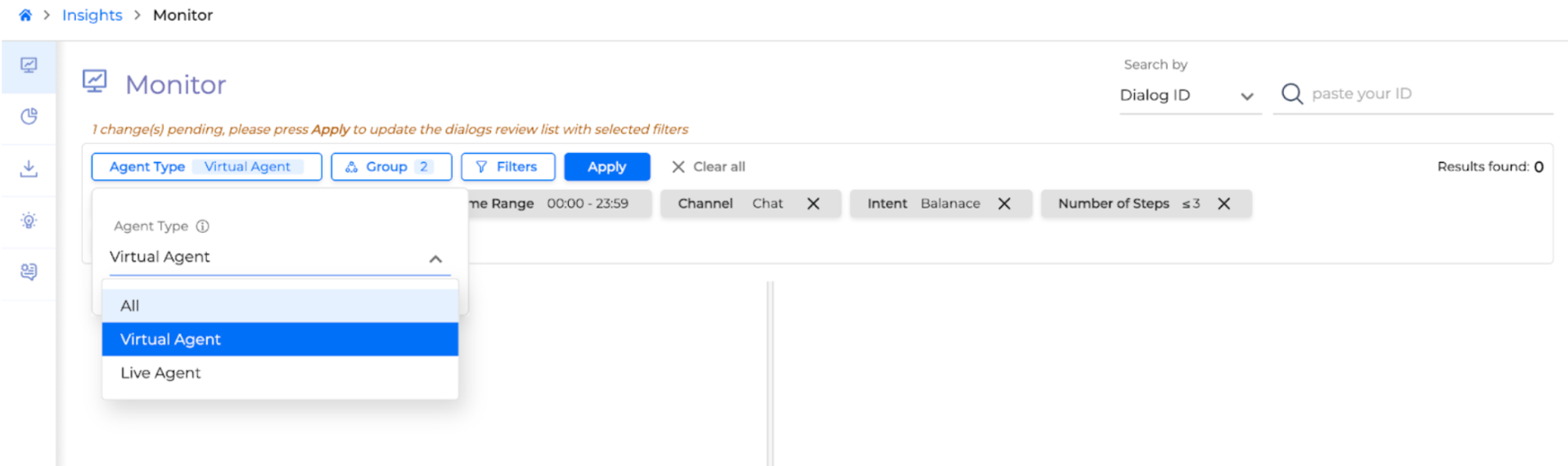
-
Filter Hierarchy
Users must first select either Virtual or Live Agents to access advanced filtering options, with relevant filters highlighted.
As filter capabilities expand, the layout will adopt a hierarchical structure based on conversational functions, enabling users to explore calls deeply without being overwhelmed by options.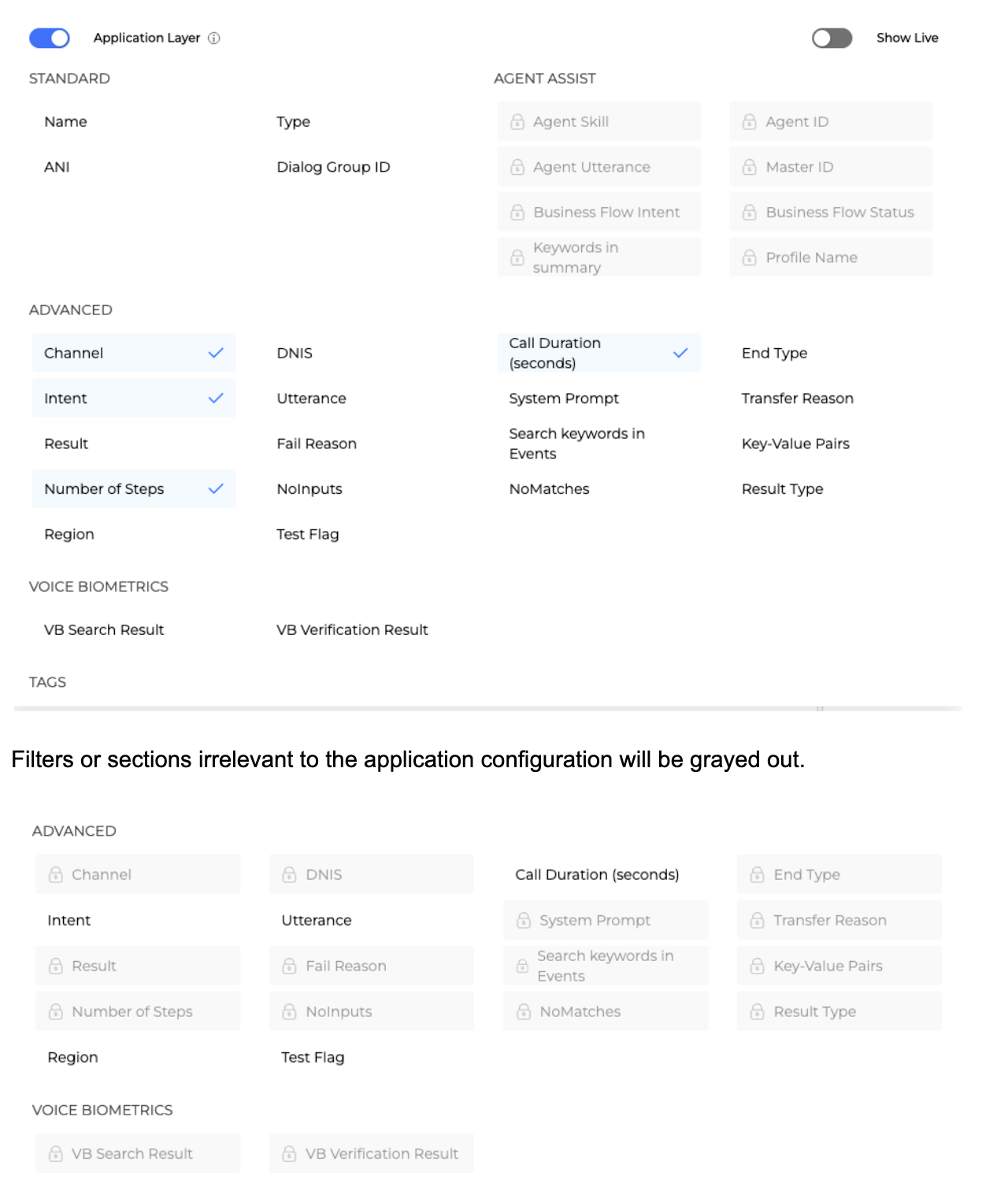
Filters or sections irrelevant to the application configuration will be grayed out.
As more capabilities are expanded — Antifraud and Sentiment analysis — the filter list will grow organically without overwhelming the users.
Previous Version
Filter Expansion Option without hierarchy or applicability logic. Users had to scroll the list to find the search parameters they wanted.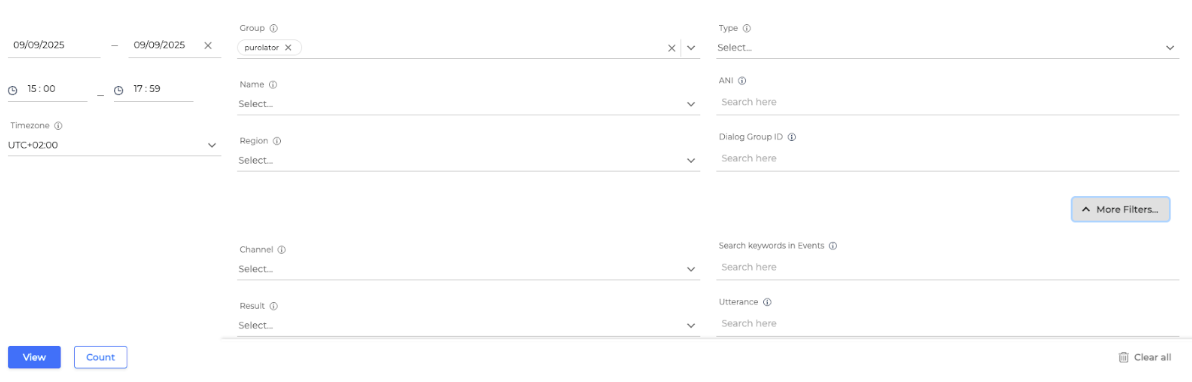
-
Pinned Filters When users are selecting filters, they remain pinned at the dialog review page.

This helps users both understand what is their current search status and perform quick action updates to their selected filters.
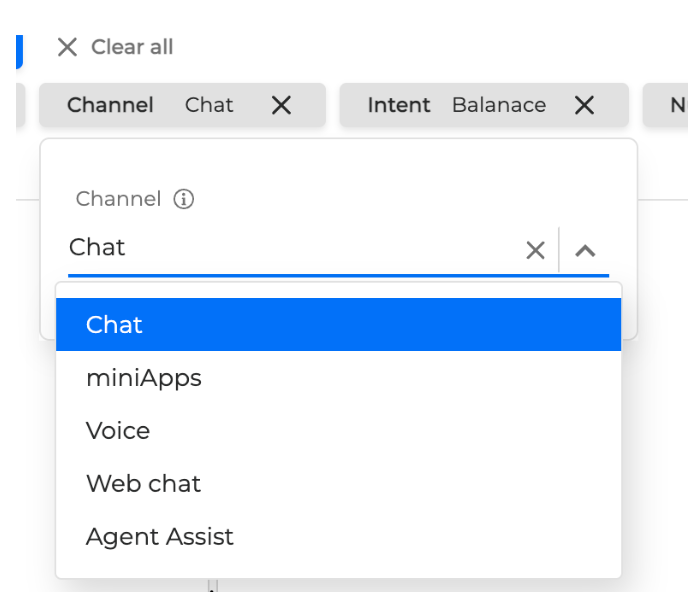
Previous Version
Users had to navigate back and forth between monitoring calls and updating filters. -
Actionable Data
Latest versions of Insights focus on actionable data so the interface will provide more quick actions to our OCP Users. Integration with the testing studio is aligned with our roadmap for a seamless journey within OCP.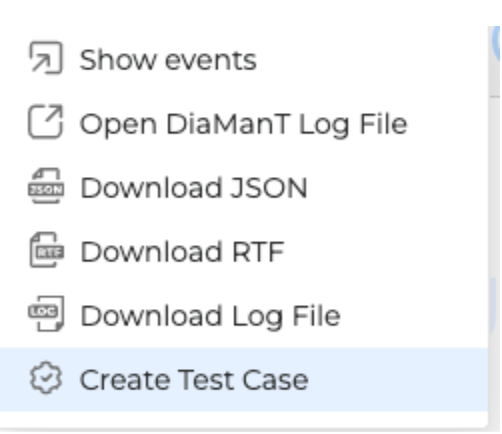
Previous Version
Users had to go through multiple steps and reach the testing studio interface to enhance test cases. -
Post Call Summary
Dialog Review now offers post call summary if the functionality is enabled. The summary serves as the final validation of the entire reasoning chain.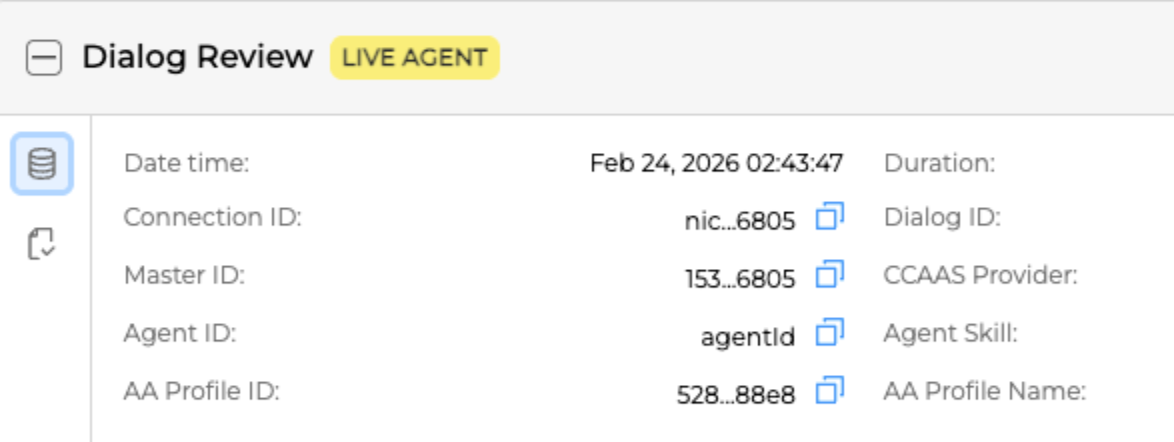
For lengthy conversations users may review and search across the information included in post call summaries instead of reviewing the entire conversations.

For more information, see the OCP® Monitor User Guide.
Insights UI v1.23.0
Released: November 2025
|
US1 |
US2 |
EU1 |
|---|---|---|
|
January 27, 2026 |
Rolled-forward |
Rolled-forward |
Updated Components
-
Metrics API v4.0.0
-
Export Service v1.10
-
Insights UI v1.23.0
Added
-
Agent Assist Integration in Monitor
-
Export Service Subscription Update
-
Billing Integration
-
Filtering in Insights UI Between Group and Exports
-
Minor Updates in Optimise IQ
-
Support Backend for Metrics
Monitor v1.22.0
Released: July 2025
|
US1 |
US2 |
EU1 |
|---|---|---|
|
Rolled-forward |
Rolled-forward |
Rolled-forward |
Added
-
Added Voice Biometrics tab in Reporting UI
-
Introduced new customization options in the VFO Monitor UI
-
Added the option to include Escalation Reason in VFO search functionality
-
Integrated the admin miniApps API into the admin Monitor
Fixed
-
Improved error display in the Monitor UI to accurately reflect transfer statuses
-
Fixed the missing clear/delete option for the
Escalation Reasonfilter in the Monitor UI -
Resolved an issue where the Voice Biometrics tab's region filter was not functioning in the Reporting UI
-
Addressed an issue where the Task Success Rate stacked bar chart was not displayed in the Conversational Insights tab
-
Improved error handling for VFO streaming subscription creation when users do not belong to a group
-
Reporting UI now responds correctly to IVR filter selections on the Voice Biometrics graph
-
optimize IQ now uses the optimized statistics endpoint for improved accuracy and performance
-
Flow Subdialogs Steps removal from Insights handling
Monitor v1.21.0
Released: May 2025
|
US1 |
US2 |
EU1 |
|---|---|---|
|
Rolled-forward |
Rolled-forward |
Rolled-forward |
Added
-
Download button for log files
-
Different icons per termination type
Fixed
-
FRT files Greek encoding bug fix
-
Various bug fixes
Monitor v1.19.0
Released:
|
US1 |
US2 |
EU1 |
|---|---|---|
|
Rolled-forward |
Rolled-forward |
Rolled-forward |
-
Include Annotation Span in Monitor UI
-
Monitor - User Step and wrong ASR Grammar
-
Pre-selected Region for Single Region Envs
-
Integrate with new miniApps Spring API
-
Update Tooltips
-
Add i18n to Insights UI
-
Include VB Exports in Export UI
-
Wrong subscription card text for export data types