.svg)
AGI Connector 4.23.3
-
This release includes security updates.
Chat Connector 8.19.2
-
This release includes security updates.
Copilot 1.18.0
-
Copy the session ID from Onboarding: Copy it from the conversation panel so you can share or look up that chat without opening the floating widget.
Copilot 1.19.0
New Features
-
Chat command menu — In the Copilot chat composer, typing
/now opens a searchable list of available commands that you can move through with the keyboard, so you can find and run commands without memorising them.
Improvements
-
Full conversation reset with
/clear— In Copilot chat,/clearnow resets the whole conversation, both on screen and in the session behind it, so the next message starts as a brand-new chat. -
Accurate context indicator — The token ring in the chat header now shows how much of the model's context window is currently in use, with warnings at 90% and 100%. Billed usage is shown separately, so you can tell when a long conversation is about to lose earlier context.
-
Tabbed Test Panel — The Test Panel now has separate Chat, Voice and Phone tabs, and each session stays connected while you switch between them, so you no longer lose a test in progress.
Environments Manager 1.29.0
New Features
-
Pathfinder Knowledge Base Transfer – The Pathfinder projects an application references are now carried in the export bundle and recreated in the target environment on import, with the application's agents automatically repointed at the newly created knowledge bases. Promoting an agentic application between environments no longer leaves its knowledge bases behind or pointing at the source environment. Requires Pathfinder 1.9.0 or later. Application tags are not covered, because Pathfinder projects are not tagged.
-
Dedicated Database Schema – Environments Manager can now be deployed against a dedicated, non-public PostgreSQL schema, so it can share a database instance with other services without sharing a schema. Existing deployments are unaffected.
-
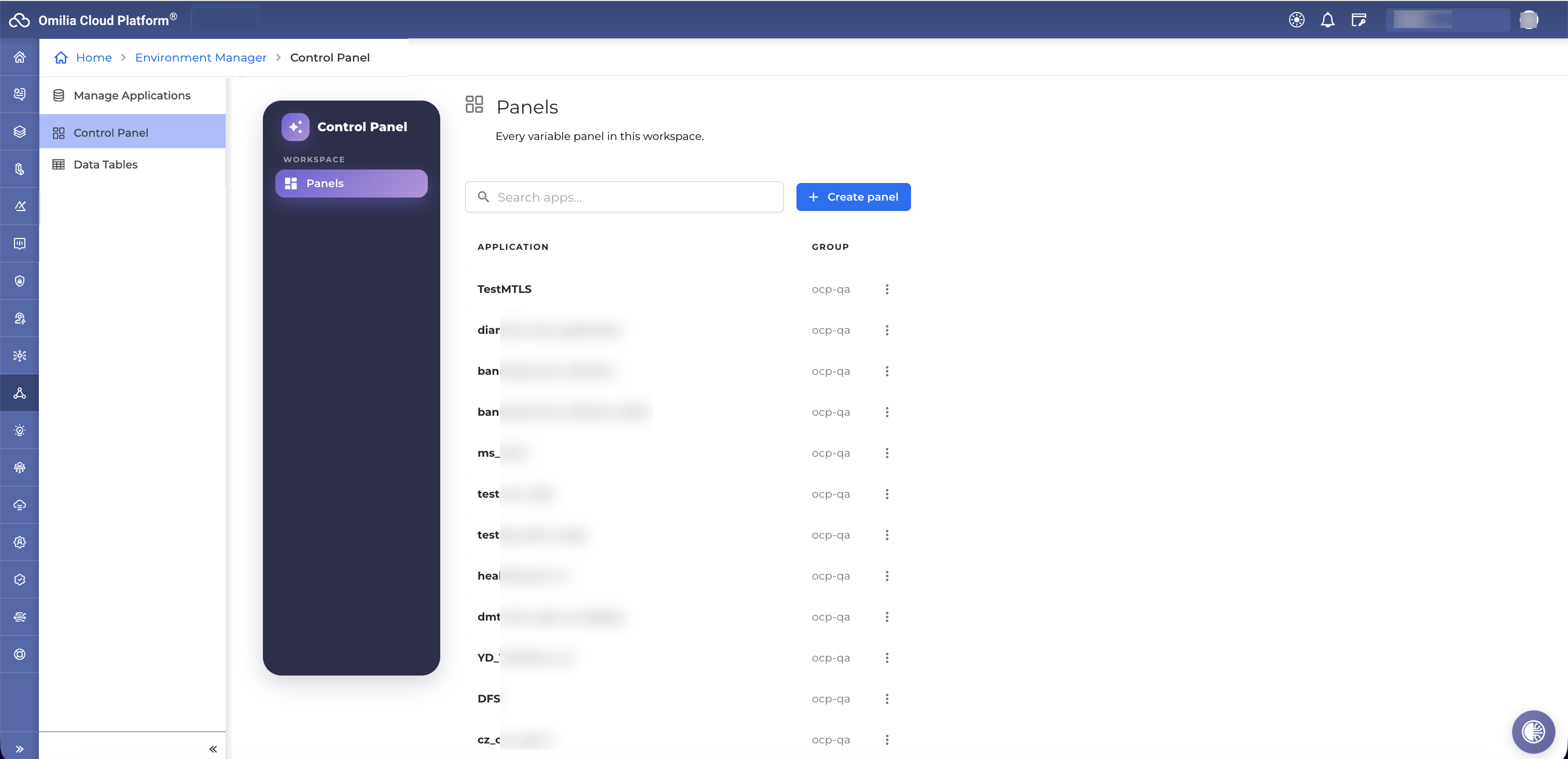
Control Panel Support – Environments Manager now supports Control Panel, the new business-user variable console in Integrations. Variables can now have optional properties: enabled/disabled, an active-from/active-until window, a fixed list of allowed values, and a grouping label. Existing integrations keep working unchanged. Environments Manager stores the validity window but does not enforce it. Every change made through Control Panel is recorded in an audit history. It can be filtered by user, application and variable, and users only see history for groups they can access. Business users can also preview how a text prompt sounds with the application's configured voice.
Improvements
-
Verified NLU Bindings on Import – When an import creates NLU deployments, the resulting miniApp NLU bindings are read back and verified; if a binding was not applied, the import report names the affected miniApp and languages instead of reporting success. The NLU app ids used during an import are also logged, so the bindings an import applied can be recovered afterwards.
-
Safer Export Validation – An export that references two different NLU apps sharing the same name is now rejected up front, instead of producing a bundle that could only be imported by silently discarding one of them. Exports also verify the caller's permissions on every group that owns a referenced NLU app.
-
Clearer API Documentation for Large Uploads – The chunked upload endpoints now publish their full response schemas, including an explicit note that the reported chunk size is informational and not an enforced constraint.
Fixes
-
Deployment Service Admin Page No Longer Fails – Applications with no group, such as the internal MiniApps record, no longer cause the deployment service admin page to fail; the page loads normally and per-application actions on such records are rejected.
-
Tag Promote With Nested Flows – Promoting a published tag for an application that contains a flow now completes successfully.
-
Rate Limiting Enforced Again – Per-endpoint rate limits, which had silently stopped being applied after a framework upgrade, are enforced again on every endpoint.
Environments Manager 1.29.1
New Features
-
Control Panel for Application Variables — Environments Manager now offers a dedicated Control Panel where business users manage application variables, schedule changes, and preview text-to-speech voices, all without needing separate tools. Turn it on for an environment to replace the previous Variable Collections view with this more complete workspace.
Exports Service 1.14.0
-
This release includes internal changes and security updates.
IAM 3.12.1
-
This release includes security updates.
Integration Configurations 1.13.2
-
This release includes security updates.
Liveness Detection 7.2.0
RA Detection model — v4.0.4
-
Liveness detection training data is expanded with alphanumeric utterances, combining genuine samples from real calls with spoofed counterparts generated from them via VC-TTS.
Fixes
-
Model fails during stress tests
LLM Service 1.4.5
-
Various internal service and security improvements
Orchestrator 1.37.2
New Features
-
Streamlined Concierge v2 Agent Setup in OCP Console® – Configuring a Concierge v2 agent is now quicker and easier to scan. Policies, Conditional Logic, Constraints, and Error Handling are grouped into expandable sections you open one at a time, so you no longer scroll past empty fields. A summary view lets you jump straight to any section to update it.
Orchestrator 1.37.3
New Features
-
Agents in subflows in Advanced Agents Configuration in OCP Console® — The Advanced Agents Configuration drawer now lists agents placed in subflows as well as in the main app, so they can be configured from the same place.
OXP 1.22.0
Fixed OCP xPacks
-
en-US Universal deepNLU® xPack v3.20.0/en-US Universal+ deepNLU® xPack v3.20.0-Addresses-
Tuning for the recognition of the following entities: Alphanumeric, DIALOGACT, MonetaryAmount, and Numeric.
-
Improved recognition of card numbers (CardNumber) spoken with different digit groupings.
-
Fixed recognition of monetary amounts (MonetaryAmount) when part of the amount is repeated due to hesitation.
-
Improved NLU handling of the ASR confusion between "and" and "n" in Alphanumeric.
-
DIALOGACT=HOLD is now returned for hold-related utterances only in MiniApps that support hold. In all other MiniApps, only CONVENTIONAL=hold is returned, without a DIALOGACT entity.
-
Resolved a conflict between AGENT_REQUEST and CLOSING/NEW_TASK values. When an utterance contains AGENT_REQUEST together with CLOSING or NEW_TASK, only AGENT_REQUEST is now returned.
-
Fixed "washington d c" being incorrectly resolved to the state of Washington in the USState entity. It now resolves to DC (District of Columbia).
-
-
en-US Redaction deepNLU® xPack v1.2.0-
Tuning for the recognition of the following entities: CardExpirationDate, CardHolderName, CreditCardNumber, and CVV.
-
Added more misheard CVV keywords to the dictionary: (e.g. "cvp", "cvt", "cbd", "cbb").
-
A card number read in groups of 4 or 8 digits across several turns is now labelled as CreditCardNumber when it is next to any card-related section (CVV, card number, cardholder name, or expiration date). Previously, this applied only next to a card number section.
-
Digit groups spoken before a full card number read-back are now recognized as CreditCardNumber.
-
A 4-digit group following a detected card number is now labelled as CreditCardNumber, unless it looks like an expiration date (MMYY).
-
Within a card number section, a MMYY group after the word "expiration" is now recognized as CardExpirationDate.
-
Added support for the phrase "the name on it is [first name] [last name]" (e.g. "the name on it is John Smith") for CardHolderName.
-
Pathfinder 1.9.7
Fixes
-
More Reliable Document Search and Version History – Searching knowledge base documents by multiple metadata filters at once now correctly returns only documents that match every filter, not just the last one applied. Document version history is also preserved more reliably, so earlier versions of updated documents remain retrievable.
-
More Consistent Knowledge Base Search Results – Searching the knowledge base now returns the same, most relevant answers consistently for identical questions, and surfaces all matching documents instead of occasionally missing the best match. This improves answer accuracy and reliability for repeated or similar questions.
-
Faster Recovery From Temporary AI Service Issues – Chat responses now fail fast when a genuine configuration issue occurs instead of waiting through repeated retries, and recover more quickly from brief service hiccups, reducing wait times during occasional disruptions.
-
This release includes security updates.
Self Learning Agents 1.19.0
-
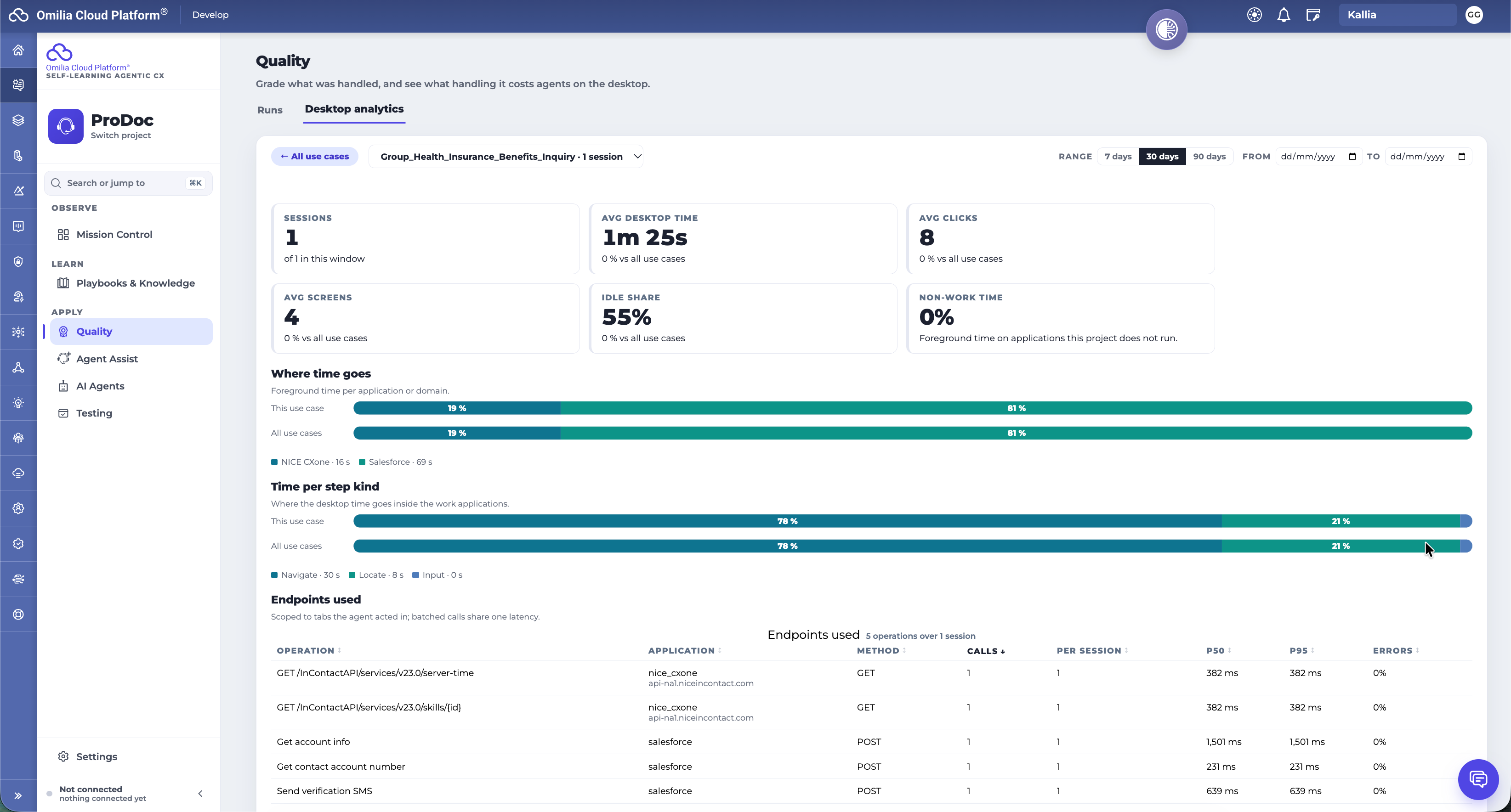
Desktop analytics in Quality Management: for each use case, see how much desktop time, clicks and app switching handling takes. See which agents work differently from the rest of the team, and replay one of their sessions.
-
No more waiting on first ingestion: it finishes as soon as discovery is done, so you can start working with the agent right away instead of watching the connecting animation.
-
Uploaded calls keep their agent, queue and time: Quality Management can now rank agents, filter by queue and sample across days for uploaded calls, just as it does for a connected contact center. Before, every uploaded call landed on the upload day with no agent.
Self Learning 1.20.0
New Features
-
Q&A tests from your knowledge base — In Testing, you can generate Q&A test scenarios from selected knowledge-base documents and see which documents aren't covered yet, so building a test suite takes less manual work.
-
Quality Management intelligence — Quality Management now adds standing findings, calibration, recurring review periods and conditions on when a rule applies, giving coaching and quality decisions more context over time.
-
Mission Control diagnostics — Mission Control now shows diagnostics and operational insights for each integration, so issues surface without digging through logs.
-
New workspace pages — Knowledge, Agent Assist and Project Costs pages are added, along with a first-run tour, a command palette and agent chat available on every page.
-
Omilia batch transcription and redaction — Call ingestion can now use Omilia batch transcription, which also separates speakers, and Omilia redaction for those transcripts.
Improvements
-
Build AI Agents from Playbooks & Knowledge — A Build AI Agents button now sits next to Upload files, so you can start an agent from the content you just added.
-
Deployment progress on every page — Deployment and rollback progress stays visible while you move between Self-Learning pages and keeps running after you leave.
-
More reliable Q&A evaluation — Test answers are now judged on facts rather than wording and checked against the expected source documents and for groundedness. Failed answers are re-checked by majority vote, which means fewer false failures.
-
Richer agent tests — Agent tests can now check the welcome prompt, conversation history and re-ask behavior.
-
Ingestion progress survives a reload — First-ingestion progress resumes after a page reload, with more accurate completed, retired and pending counts.
Fixes
-
Accepted FAQs stay visible — After Accept or Accept all, approved FAQs now appear in the Accepted tab straight away.
-
More reliable ingestion — Fixes duplicate use-case names, tracking of failed diarized batches, and stalls on silent recordings.
⚠️ Breaking Change: the cost-visibility settings are renamed to
COST_FIGURE_EMAIL_DOMAINS,PROJECT_COST_EMAIL_DOMAINSandPROJECT_COST_EMAILS, and the old names are no longer read. Update your deployment configuration before upgrading.
⚠️ Breaking Change: uploads are now limited to 50 MB, and larger files are rejected.
This release includes security updates.
STT 8.11.0
Improvements
-
Improved Resilience for deepVB® Verification — deepVB® verification now responds faster and no longer blocks call processing when the verification service experiences delays, reducing the chance of calls stalling during authentication.
-
More Reliable Speech Recognition Reranking — Resolved an intermittent issue in the recognition reranking step that could cause requests to fail, improving the consistency of speech recognition results.
Fixes
-
Eliminated Call Hangs From Delayed Verification Billing — Calls using deepVB® verification no longer stall or go unanswered when the billing service responds slowly. Call setup and teardown now complete promptly, even during billing service delays.
-
This release includes security updates.
Storage API 2.22.11
-
This release includes internal changes and security updates.
Testing Studio 1.24.0
New Features
-
Retrieved Document Verification for QnA Agents — Agent Unit Testing in OCP Testing Studio® can now verify which knowledge-base document a QnA agent's answer came from. Testers set the expected source documents on a scenario, so a knowledge change that pulls the wrong source is caught as a failed test before it reaches callers.
-
Clearer Pass/Fail Results in Agent Unit Testing — Scenario results now highlight only the checks that need attention, with a one-click way to accept new expected values and a view into why a check failed. Results from before an expectation was edited are no longer shown as current, so reviewers always see up-to-date outcomes.
-
Test Concierge Re-ask Behavior — Testers can now check how a concierge agent responds when it repeats its routing question after not understanding a caller, instead of testing only the first greeting. Enable it with a switch on concierge scenarios.
-
Edit Conversation Turns on Existing Test Cases — You can now add, remove, and retype conversation turns directly from the edit view of a test case, matching what was already possible when creating one. This removes the need to recreate a test case just to adjust its conversation.
Improvements
-
Quick Link to Legacy Results from the New Test Case View — Each test case in the new Testing Studio interface now links straight to its results in the previous interface, saving you from searching for it there while result views are still rolling out to the new one.
-
Smoother Golden Dialog Panel Animation — The panel that shows golden dialog details now opens with a smooth transition, removing a jumpy animation some users noticed.
Fixes
-
Reliable Editing for All Test Suite Formats — Editing or deleting test cases in suites that list their cases under an alternate file layout no longer fails with an error; all supported file formats now work consistently.
-
More Accurate Test Run Status After Worker Interruptions — Test runs interrupted by an unexpected restart are now retried instead of being immediately marked as failed, so a single infrastructure hiccup no longer shows up as a false failure in your results.
-
Up-to-Date Test Suite Lists After Upload — Uploading a test suite in the previous interface now shows immediately in the new interface's list too, without needing a manual refresh.
-
Clearer Errors When Generating Test Cases — Generating a new test case in a suite that contains an unreadable file now returns a clear, actionable error naming the issue, instead of a generic failure with no useful detail.
-
This release includes security updates.
TTS 3.4.0
New features
-
German (de-DE) verbalization support.
-
European Portuguese (pt-PT) verbalization support.
-
Canadian English (en-CA) verbalization support.
-
More natural flow between sentences. Our latest voice family now takes the previous sentence into account when speaking the next one, so intonation carries across a multi-sentence prompt and across consecutive turns.
-
Better respect for punctuation. Commas and full stops now shape pauses and intonation more faithfully.
-
Audible notice when synthesis retries. If the voice has to restart a sentence, it now also says a short apology in the request's language ("Apologies, I am experiencing some network issues. Let me try again.") instead of pausing silently.
Email and URL verbalization
-
The part of an email address before the @ is read as words where it makes sense, with digits read one by one ("omilia_19@" → "omilia underscore one nine"). Short code-like parts are still spelled out.
-
Email addresses and URLs written in capitals are now recognized ("INFO@EXAMPLE.COM").
-
English "www" is read "W W W", with more stable delivery.
-
Missing symbol names added for French and Ukrainian URLs and emails.
-
Greek: words in web and email addresses are read more accurately, and "ftp" is spelled out.
English
-
"Ave" → "avenue".
-
The ™ and ℠ signs are no longer read aloud as "TM" / "SM".
-
en-GB uses British spelling for metric units ("kilometre", "litre").
French
-
Canadian French (fr-CA) brought up to the same standard as US English for numbers, units, telephone numbers, postal codes and addresses.
-
Month abbreviations ("janv." → "janvier"), "no." before a number ("numéro") and "par ex." are expanded.
-
Hyphenated names are read whole on our latest voice family ("Jean-Pierre" no longer reads "tiret").
Spanish
-
Month abbreviations ("ene." → "enero") and "número" forms ("n.º", "núm.", "nro.") are expanded on all Spanish locales.
-
Latin American Spanish: "w" is read as one word, "dobleú".
Greek
-
Time ranges read naturally ("06:00-22:00" → "έξι προ μεσημβρίας έως δέκα μετά μεσημβρίαν"), including ranges with an en dash or with ΠΜ/ΜΜ markers.
Behaviour changes
-
Hyphenated digit groups now read the same on every locale. On Brazilian Portuguese and French, "4-2-1-4" is read as one group with no pause after each digit, and longer groups are read as numbers.
Audio quality
-
At faster or slower speaking rates, the pauses at the start and end of the audio no longer stretch or shrink with the speech.