
Overview
Plain SIP applications (no_flow app type only) can carry selected application data across a call transfer, so that the application the call lands on receives it. It uses the standard SIP User-to-User header (RFC 7433).
A developer marks individual rows of the Transfer Block's outgoing data with Send as UUI. Those fields travel in the header. Everything not marked continues to travel as its own SIP header, exactly as before.
Three things happen automatically:
-
Outbound: when the dialog ends in a transfer, the marked fields are encoded and attached to the
Refer-To, so that the party performing the transfer carries them onto the call it places. -
Inbound from a transfer: a call arriving with a
User-to-Userheader has its contents read and handed to the application. -
Inbound from a customer: the same applies to a call a customer's own platform originates with a
User-to-Userheader. There is nothing extra to configure; it arrives the same way.
Nothing needs to be enabled. An application that marks no field behaves as it always has.
Why the transfer carries it on the Refer-To
Understanding this matters, since it depends on behavior outside OCP's control.
A SIP header on a REFER targets the party asked to perform the transfer. That party places a new call and is not obliged to copy any headers into it. In practice, it does not.
So the header is attached to the Refer-To URI instead, escaped:
Refer-To: <sip:+19198675309@host?User-to-User=7b22726566223a22616263313233227d%3Bencoding%3Dhex>
RFC 7433 defines that mechanism for a referral. It is not part of the address. It instructs whoever builds a request from this URI to add that header field to the message. The party performing the transfer emits it as a real header on the call it places:
INVITE sip:+19198675309@host SIP/2.0
User-to-User: 7b22726566223a22616263313233227d;encoding=hex
Which is where the receiving application reads it. On the same transfer, an unmarked field sent as X-TARGETDATA reaches only the party performing the transfer and stops there.
This depends on that party to respect the RFC standard. See Scope and limitations.
Marking fields
To mark the fields, proceed as follows:
-
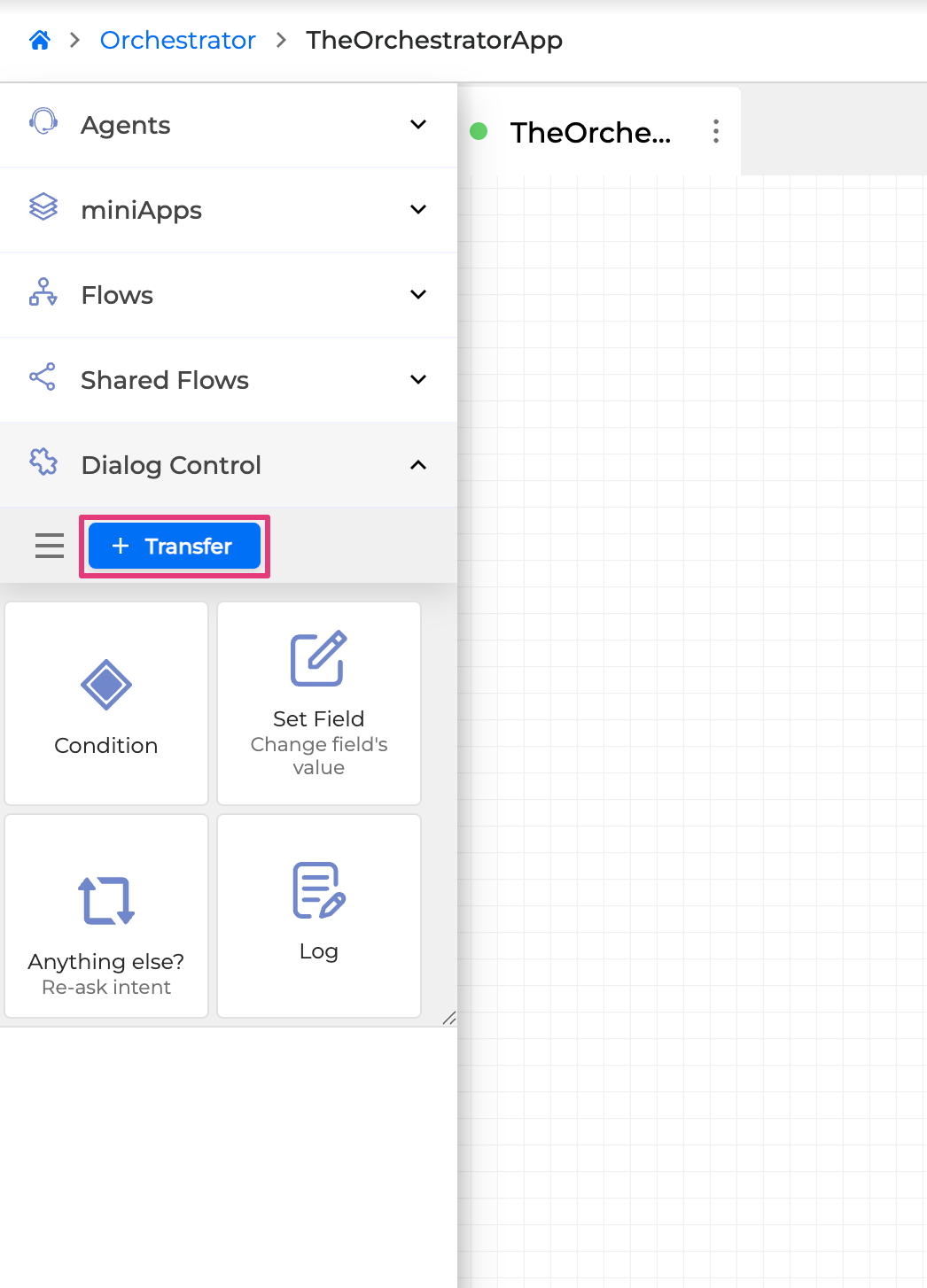
In Orchestrator, open the panel on the left and click the + Transfer button:
-
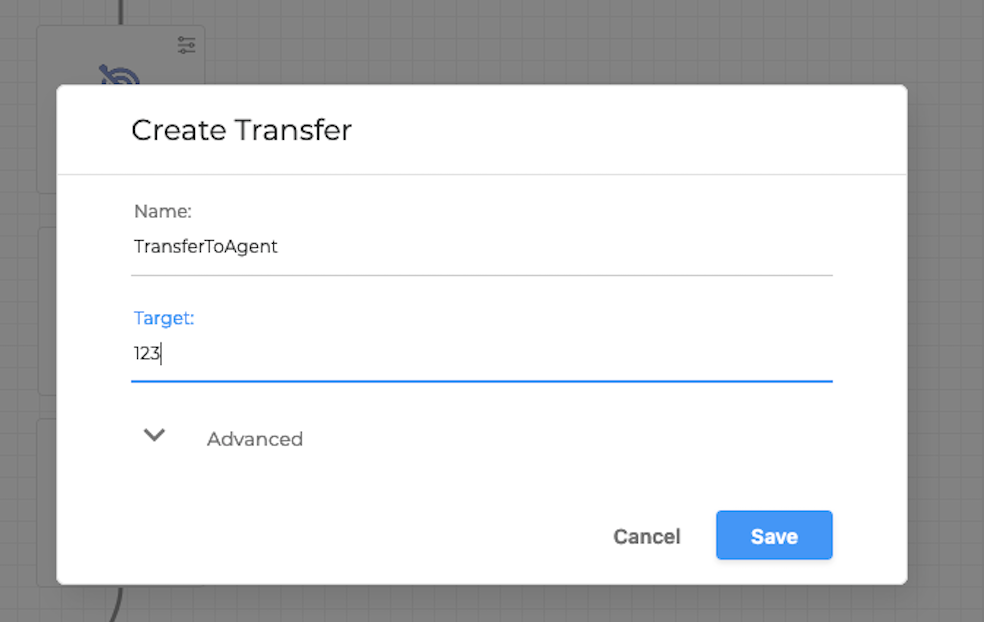
Expand Advanced, and tick Send as UUI on each row that should travel:
-
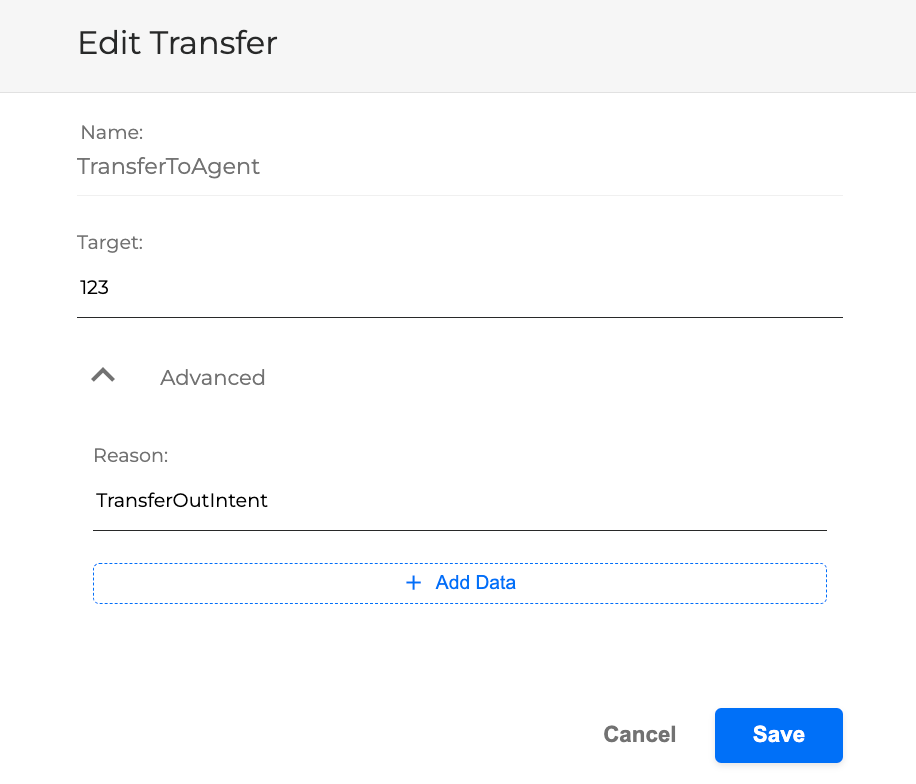
Select + Add Data to attach further information.
-
Mark the Send as UUI checkbox.
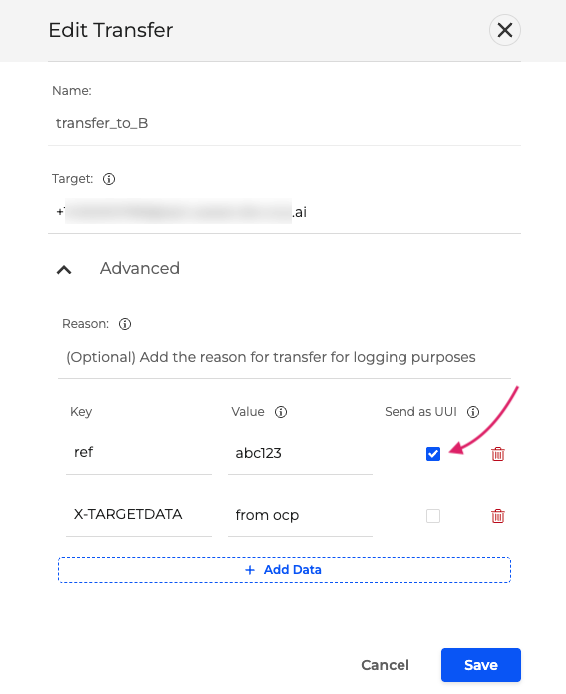
These are the same + Add Data rows described in Transfer Conversation. They are not only written to the reporting logs - on a plain SIP transfer, each row is also sent to the far end as its own SIP header by default and, when marked, inside User-to-User.
-
A marked field travels instead of as a SIP header, not along with it. The same value is never sent on two transports.
-
Field names are not rewritten. A field marked as
refarrives at the next application asref. -
The checkbox is per row and independent. Zero or multiple rows can be marked.
-
The Target is a destination, not a URI. The connector builds the URI itself, so there is nothing to add there — and the Transfer Block will not save a
;or an=typed into it anyway.
How inbound data reaches the application
The receiving application gets fields exactly as the chat connector hands over its input_fields:
-
A field the application has declared as Incoming Attached Data →
context.incoming_data, under the Orchestrator Field it maps to. -
Every other field →
context.flow_input.input_fields, modeled as a pre-filled input at full confidence, so the application reads it like any other input field.
This affects how you test. An undeclared field appears in an app trace under input fields, not under incoming data. Developers often conclude nothing arrived because they looked in the wrong place. Only names you declare appear in incoming data.
To declare the data:
-
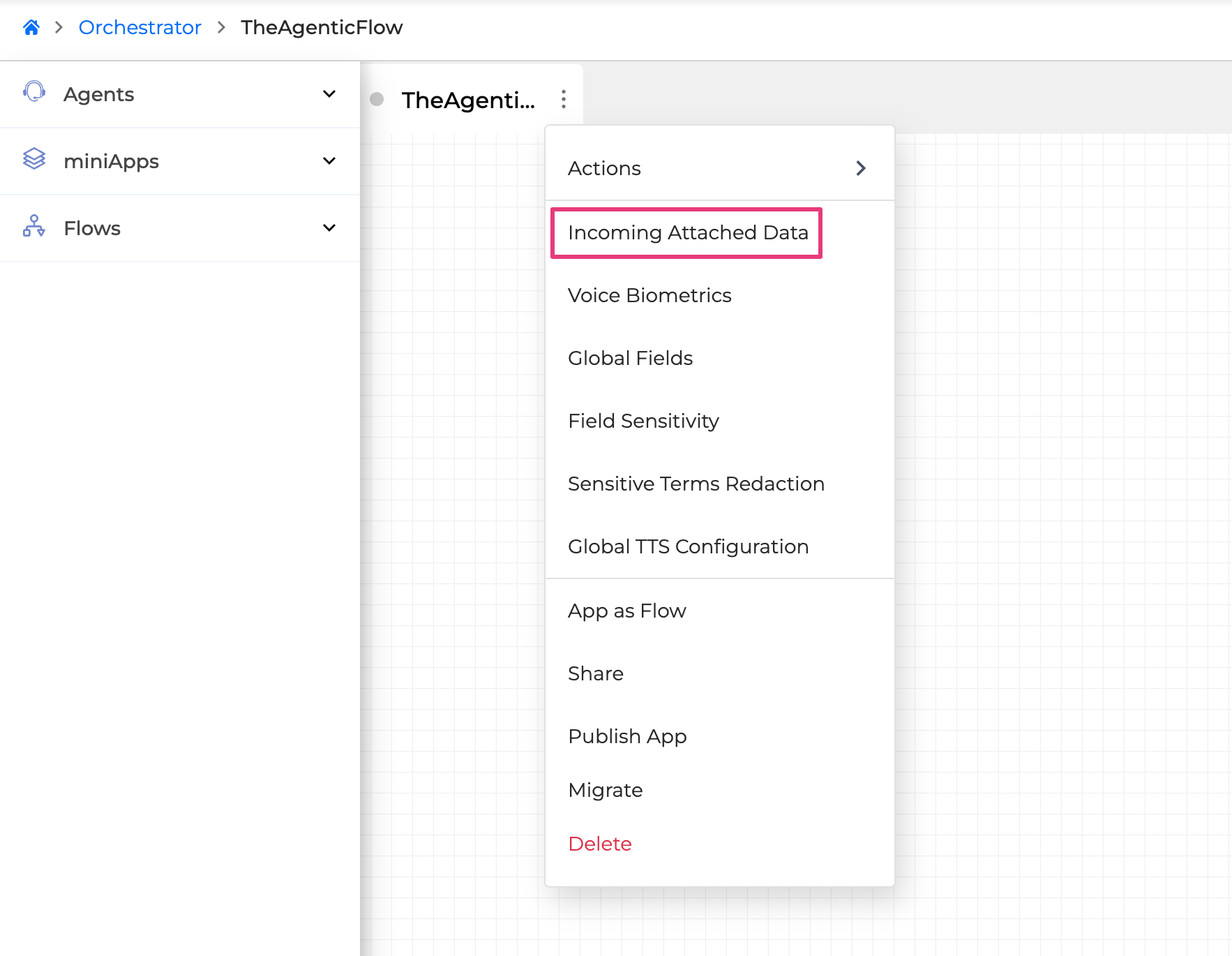
Open Application Options Menu → Incoming Attached Data (for more details, see Configure Incoming Attached Data).
-
Fill in the following Incoming Fields and click Save when finished:
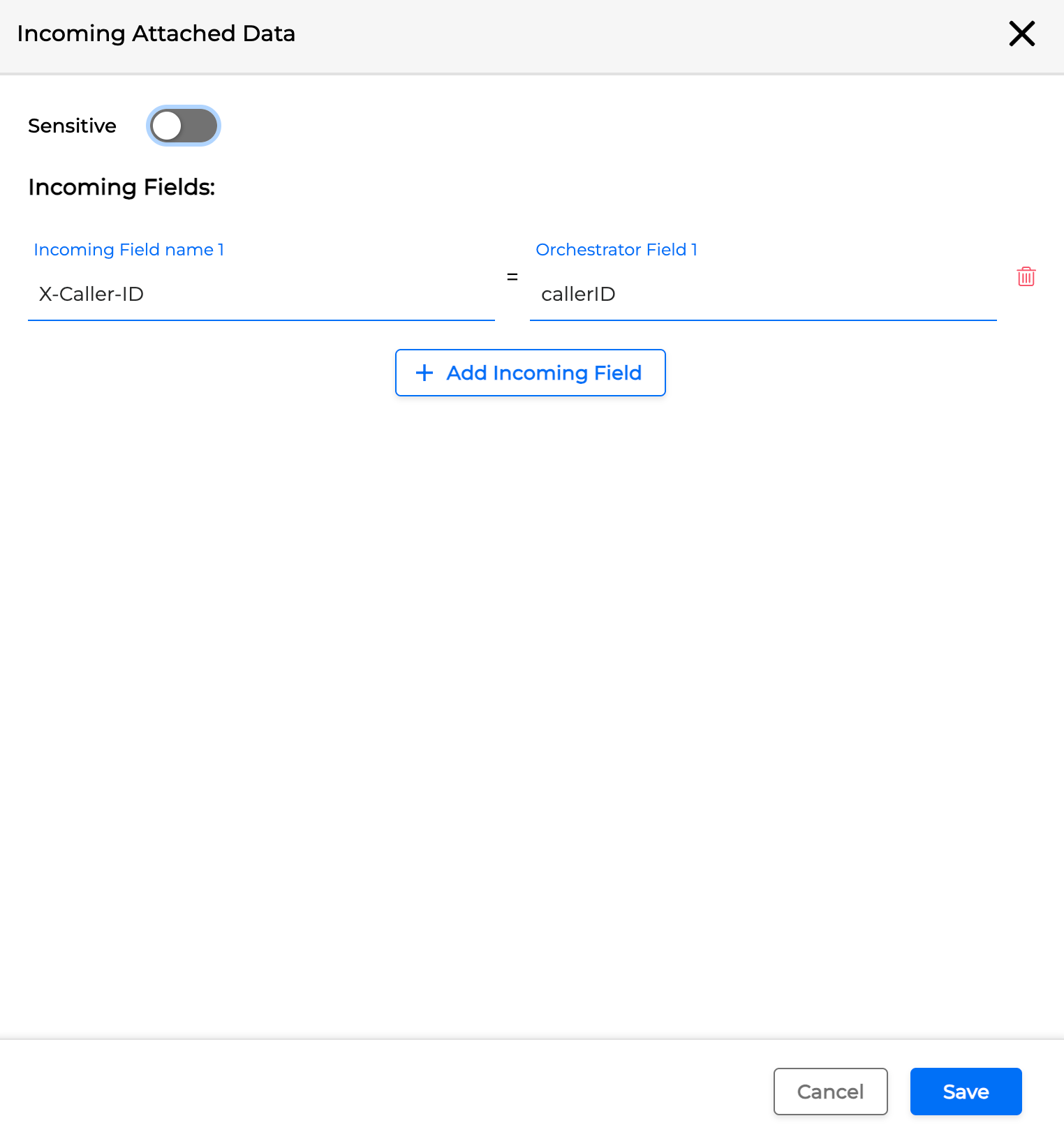
Set the following values:
-
Incoming Field name → the sender's field name (for example, ref)
-
Orchestrator Field → the name your application should use.
Where it is read from
Value is read from three places in a specific sequence. The first source that contains a value is used; no later sources are considered once a hit is found.
|
Source |
When you see it |
|---|---|
|
|
The normal case: a conformant transfer, or a customer sending us data |
|
|
Equipment that can only send the |
|
The escaped header still on the Request-URI |
A party that copied the |
Your application can't tell which of the three places it came from, and it doesn't need to.
Receiving data from a customer
A customer's platform can send context on a new call by putting it in a User-to-User header (or X-User-to-User). It is read and handed over exactly as above - no configuration, and the application does not need to parse the header itself.
What their payload has to look like:
-
Encoding:
hex,base64orascii, declared in the header's ownencodingparameter.Hexis assumed when the parameter is absent, per RFC 7433. The header is self-describing, so their choice does not have to match what this deployment sends. -
Content: once decoded, it must be a flat JSON object:
{"ref":"abc123","businessUnit":"CARD"}
Each pair becomes a field. Values are read as text, so an unquoted number or boolean -{"attempts":2,"verified":true} - is accepted and arrives as 2 and true. Anything that is not a flat object - nested objects, arrays, key=value pairs, or free text - is left unchanged: no fields are added, and nothing is reported to the application. The connector logs unreadable headers under the session ID. If a customer cannot produce JSON, they should send the data as ordinary X-headers or deliver the raw header value as described below.
If their equipment already uses this header
Some platforms create their own User-to-User call-tracking identifier. RFC 7433 exposes the header to all parties on the call, so OCP does not assume the value is ours: if it doesn't decode to a flat JSON object, OCP leaves it unchanged and produces no error or field.
To receive that value, declare User-to-User as Incoming Attached Data. The raw header then arrives like any other SIP header, which is the only useful form for an opaque identifier. Also declare X-User-to-User if their equipment sends that form.
A deployment handles both cases in the same environment: a transfer from another OCP application is decoded and passed as fields, while a call whose equipment writes its own value is passed through unchanged. The decision is made per call with no configuration required.
One hop, not a chain
Inbound fields are not forwarded automatically. Each application decides, on each transfer, which fields to send by marking them.
So in a chain of transfers - application A to B to C - application B must mark a field for it to reach C, even if the same value arrived from A. A leg that marks nothing sends nothing.
This is enforced, not accidental: the User-to-User header the call arrived with is removed before the transfer, so a value can travel only if the application marked it. When reading a REFER trace, note that the header you saw arrive is deliberately absent from the outgoing REFER; any value that appears there was marked by this leg.
If B wants to pass on a value it received, it sets an outgoing data row whose value references the incoming field using the #field# substitution as described in Substitute Field's Value. It ticks Send as UUI on that row.
A row with a literal value sends that literal on every call. To test whether a value actually traveled, reference the field instead of retyping it; otherwise the result looks the same.
When something arrives that cannot be used
Inbound handling never fails the call. If a header is unusable, the handler skips it, and the call continues.
Silence is inadequate: there’s no SIP error response for the sender to inspect, and developers rely on app traces rather than connector logs. So a header that arrived but could not be used is reported to the application as a field named:
ocp_uui_input_error
It is routed like any other inbound field - as an input field, or as incoming data if the application declared that name. Its value says which step failed:
|
What went wrong |
Reported value |
|---|---|
|
Decoded and parsed, but carries no fields |
The |
|
Carries fields, but not one of them could be used - every value empty, or the only name the reserved one |
The |
Deliberately not reported:
-
No such header on the call. Nothing arrived, so nothing is claimed —
ocp_uui_input_erroris absent, not empty. When the field is present, the payload labeled as ours contained nothing the call could use; when it is absent, either no header arrived or the header was not ours. -
A failure reading the channel itself. That is infrastructure, not the caller's payload; reporting a bad header would point to the wrong problem. Logged only.
-
A header that is not ours. RFC 7433 gives
User-to-Userto any party on the call, and equipment on a customer's path commonly writes its own value. A payload that does not decode to a JSON object of fields belongs to another party, so we leave it unchanged and add no fields for this feature.
Two further properties:
-
The name is reserved. A payload with a field named
ocp_uui_input_errorhas that field dropped with a warning; otherwise, a sender could forge a clean report about its own data. -
The value never quotes the payload. We record the reason in our own words rather than echoing the parser's message, because parser messages repeat the input they failed on - the likely location of personal data. Full detail remains in the connector logs under the session ID.
Keep it as small as you can
OCP doesn't set a limit; the systems your call passes through may. No standard defines a maximum for a SIP Request-URI, and equipment varies: some platforms cap it at a few hundred characters; some discard data beyond 128 characters. A value that works on one route can be rejected, truncated, or dropped on another, and OCP cannot know which in advance.
So the guidance is simple: send as little as possible. Include an identifier and look up the rest on the receiver. One or two short fields is the intended shape; this is not a transport for a customer record.
Two things to keep in mind when judging size:
-
The payload is
hex-encoded by default, so every JSON byte costs two characters on the wire.{"ref":"abc123"}is 16 bytes of JSON and 32 characters of payload. -
It shares the URI with the destination on the way out, so the destination's length counts too.
Wire format
Useful when reading a trace or talking to a telephony team.
On the transfer, escaped onto the Refer-To URI:
Refer-To: <sip:+19198675309@host?User-to-User=7b22726566223a22616263313233227d%3Bencoding%3Dhex>
-
?introduces it, and it sits inside the angle brackets. Outside them it would be a parameter of theRefer-Toheader; introduced by;it would be a parameter of the URI and would not become a header. All three look similar in a trace. -
Characters a URI parser treats as syntax are percent-escaped:
;=?&<>and a space, plus%so it cannot swallow other escapes. In practice a hex payload contains only;and=, from the;encoding=hexthat travels with it, which is why an escapedRefer-Toshows%3Band%3Dand nothing else.
On the call that follows, as a real header:
INVITE sip:+19198675309@host SIP/2.0
User-to-User: 7b22726566223a22616263313233227d;encoding=hex
The payload decodes to a flat JSON object of the marked fields:
{"ref":"abc123"}
-
Flat, with no envelope. Both ends of a transfer between OCP applications are ours, so no one needs an envelope; a wrapper would only waste length.
-
JSON rather than key/value pairs, so a value containing a separator or a quote survives intact.
-
encodingtravels with it, so the receiver reads what the sender used rather than assuming.
Troubleshooting
|
Symptom |
Where to look |
|---|---|
|
The field arrives as an input field, not incoming data |
Expected unless declared. Add it under Incoming Attached Data. |
|
Nothing on the |
The field was not marked, or the marking never reached the connector. Check the dialog log for the marking, and that the application was republished after ticking. |
|
|
It arrived and could not be used. Its value names the failing step. |
|
Nothing arrived and no |
Either the sender didn’t include a header, or the party performing the transfer didn’t carry it (see Scope and limitations.). Alternatively, a header arrived that didn’t match ours and was ignored. |
|
The receiving application sees an older value |
Each leg re-sends. Check the sending leg marked the field on that transfer. |
Scope and limitations
-
Plain SIP (
no_flow) applications only, in both directions. -
The party performing the transfer decides whether it survives. OCP adds the header to the
Refer-To; that party then places the call. A party that builds the header from the URI, as RFC 3261 describes, delivers it - this is how carriers such as Bandwidth behave, and it matches Asterisk 22. A party that copies the URI verbatim also works, since the connector reads it from the Request-URI as a last resort. But a party that rebuilds the URI from only the number and host will drop the header, and OCP cannot recover it. Some SIP clients and conservative SBCs do this, so test the path rather than assume compatibility. -
State does not accumulate across a chain; each application decides per transfer.
-
One header per transfer; it cannot be split, so its length is limited by the equipment on the path.
-
A customer's payload must decode to a flat JSON object with a value for every field to be handed over as fields. Anything else is treated as another party's header and left alone (see If their equipment already uses this header).