.svg)
Mock Response Manual
This manual explains how to make a miniApp return canned (mock) responses for its web service calls instead of calling the real backend, and how to write the mock definitions that control what gets returned.
Use this to test a flow's behavior for scenarios that are hard to reproduce against a live backend errors, slow responses, edge-case payloads, without needing the real service to cooperate.
Where your mock definitions go
Mock definitions for a miniApp are stored in that miniApp's failoverResponseBody.json configuration file.
The file must contain a mappings array at the top level. Each entry in that array is one mock definition:
{
  "mappings": [
    {
      "name": "optional human-readable label",
      "request": { "method": "GET", "url": "/api/example" },
      "response": { "status": 200, "body": "example response" }
    }
  ]
}
|
Field |
What it is |
|---|---|
|
|
|
|
|
|
|
|
|
Missing/invalid file
If this file is missing or not valid JSON, mocking silently falls back to calling the real backend for that request.
Upload the Mock Definitions JSON file
After the Mock Definitions JSON file has been created use the Failover functionality menu to upload the file.
Click the Upload Failover JSON button and add the Mock Definitions JSON file to upload it. You can then enable it or leave it disabled until required.
.png?cb=c68b93af65208651213c55218fa4c1c3)
Turning mocking on
Mocking is controlled by a field called mockEnabled. To enable Mock Responses on Application level, you need to set this from the Global Fields in Orchestrator’s Application Options menu and add mockEnabled as a Global field.
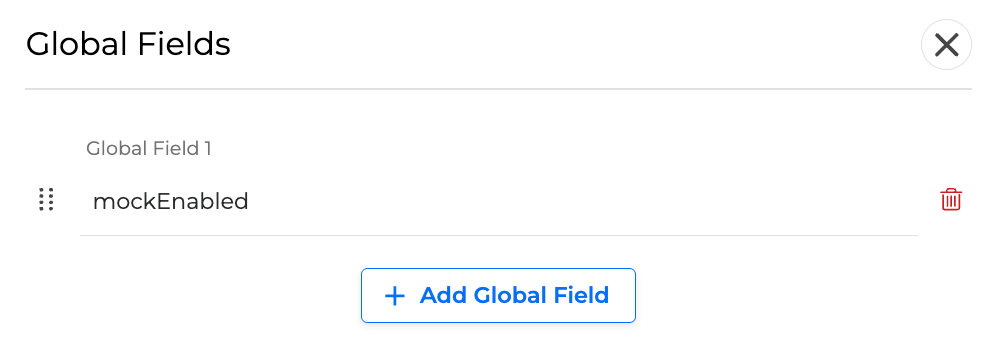
|
Option |
Result |
|---|---|
|
Set |
Set |
|
Any other value (or leaving it unset) |
Any other value (or leaving it unset) means calls behave normally and go to the real backend. |
When mocking is on, the miniApp still prepares the request exactly as it would for a real call (URL, headers, body, with all dynamic values filled in), it just checks that request against your mock definitions instead of sending it out.
How a mock gets picked - first match wins
Your mock definitions are checked in the order they appear in the list, top to bottom. The first one whose request block matches the outgoing call is the one that's used. There's no "closest match" logic, it's strictly first match wins.
Practical rule
List your most specific mocks first, and put a catch-all/fallback mock last.
{
  "mappings": [
    { "request": { "method": "GET", "url": "/api/users/1" }, "response": { "status": 200, "body": "{\"id\":1}" } },
    { "request": { "method": "GET", "urlPattern": "/api/users/[0-9]+" }, "response": { "status": 200, "body": "{\"id\":0}" } },
    { "request": { "method": "GET" }, "response": { "status": 404, "body": "not found" } }
  ]
}
If none of your mocks match a call, the miniApp gets back an error response (status 404) with a message describing what request didn't match, the flow sees this the same way it would see any other failed call.
Describing which requests a mock applies to - the request block
Every field in request is optional. Leaving a field out means "match anything" for that field. If you leave the whole request block out (or empty), that mock matches every call.
|
Field |
Type |
What it does |
|---|---|---|
|
|
text |
The HTTP method to match ( |
|
|
text |
Matches the call's path and query string exactly (e.g. |
|
|
text |
Same as |
|
|
object |
Header name → header rule (§5). Every header you list must satisfy its rule. |
|
|
list |
A list of body rules (§6). Every rule in the list must pass. |
URL examples
{
  "request": { "url": "/api/orders?status=open" }
}
Matches only that exact path and query string, nothing more, nothing less.
{
  "request": { "urlPattern": "/api/orders/[0-9]+" }
}
Matches /api/orders/42, /api/orders/1001, etc. It does not match /api/orders/42/items, because the pattern must match the whole path, for that you'd write /api/orders/[0-9]+.*.
Header rules
headers only constrains the headers you list, any other header the request sends, that you didn't mention, is ignored and has no effect on matching. Only list a header when you want to require, forbid, or check its value.
Each header you list under headers needs exactly one of these rules:
|
Rule |
What it checks |
|---|---|
|
|
Header value must equal this text exactly. |
|
|
Header value must contain this text somewhere in it. |
|
|
Header value must fully match this regular expression. |
|
|
Header value must not fully match this regular expression. |
|
|
The header must not be present at all. |
Things to keep in mind:
-
equalTo,contains,matches, anddoesNotMatchall require the header to actually be present, if the header is missing from the request, the mock won't match, even though the value was technically never checked.absent: trueis the only rule that matches when the header is missing; it's how you say "this header must not be sent." -
A rule with none of the above set never matches anything.
-
If a header is sent more than once, only its first value is checked.
{
  "headers": {
    "Authorization": { "equalTo": "Bearer my-token" },
    "Content-Type":  { "contains": "application/json" },
    "X-Correlation-Id": { "matches": "[a-f0-9\\-]{36}" },
    "X-Debug": { "absent": true }
  }
}
Body rules
bodyPatterns is a list of rules; every rule in the list must pass for the mock to match. Each rule uses exactly one of the options below.
Checking the raw request body text
|
Rule |
What it checks |
|---|---|
|
|
Body must equal this text exactly. |
|
|
Body must contain this text somewhere in it. |
|
|
Body must fully match this regular expression. |
|
|
Body must not fully match this regular expression. |
{
  "bodyPatterns": [
    { "contains": "\"type\":\"purchase\"" }
  ]
}
Checking a specific value inside a JSON body - matchesJsonPath
If the request body is JSON, you can target one specific field in it using a JSONPath expression (e.g. $.customer.id for the id field inside a customer object). There are two ways to use it:
a) Just check that a field exists:
{
  "bodyPatterns": [
    { "matchesJsonPath": "$.accountId" }
  ]
}
Matches as long as that field is present in the body (even if its value is empty/null). Fails if the body isn't valid JSON, or the field isn't there.
b) Check the value of that field:
{
  "bodyPatterns": [
    { "matchesJsonPath": { "expression": "$.name", "equalTo": "John" } }
  ]
}
|
Rule |
What it checks |
|---|---|
|
|
The field's value must equal this text exactly. |
|
|
The field's value must fully match this regular expression. |
|
|
The field's value must contain this text. |
|
|
The field must not be present at all. |
Things to keep in mind:
-
Values are compared as text, so a number like
30in the JSON should be matched with"equalTo": "30", not30. -
If the field isn't present, the rule only matches when you used
"absent": true; otherwise it fails. -
This form has no built-in "field must exist, don't care about its value" option, for that, use the simpler form from (a) instead (
"matchesJsonPath": "$.field"). Setting nothing but"absent": false, or leaving outequalTo/matches/contains/absententirely, will never match, even when the field is present. -
Comparing against a field whose value is itself a nested object or list doesn't work reliably, point the expression at a plain value (text, number, true/false) instead.
-
Anything that goes wrong while checking (invalid JSON, invalid expression) is simply treated as "doesn't match" rather than causing an error.
Combining several body rules
{
  "bodyPatterns": [
    { "matchesJsonPath": { "expression": "$.name", "equalTo": "John" } },
    { "matchesJsonPath": { "expression": "$.age", "matches": "[0-9]+" } },
    { "matchesJsonPath": "$.status" }
  ]
}
All three must hold true at once for this mock to apply.
Describing what to return - the response block
|
Field |
Type |
What it does |
|---|---|---|
|
|
number |
The HTTP status code to return (e.g. |
|
|
text |
The response body, returned exactly as written, it's inserted as-is, not reformatted. If the body itself is JSON, you're writing JSON text as the value of the |
|
|
object |
Response headers to send back, as name/value pairs. |
|
|
number |
How long to wait, in milliseconds, before returning the response. Leave out or set to |
Simulating slow responses / timeouts
If you set fixedDelayMilliseconds:
-
The mock waits that long before responding, unless the call's own timeout setting is shorter, in which case the wait is cut short at the timeout.
-
If your configured delay is longer than the call's timeout, the wait is cut short and you get back a placeholder failure response (status
0, empty body) instead of your configuredresponse, mirroring what the flow would see from a real call that timed out. -
If the delay is shorter than the timeout, you get your configured
response, delivered after the wait.
This is useful for checking that a flow handles a slow or timed-out backend correctly.
Full examples
Simple GET
{
  "request": { "method": "GET", "url": "/api/health" },
  "response": {
    "status": 200,
    "body": "{\"status\":\"ok\"}",
    "headers": { "Content-Type": "application/json" }
  }
}
POST checked by header and JSON field
{
  "name": "create-order-happy-path",
  "request": {
    "method": "POST",
    "url": "/api/orders",
    "headers": {
      "Authorization": { "equalTo": "Bearer test-token" }
    },
    "bodyPatterns": [
      { "matchesJsonPath": { "expression": "$.customerId", "matches": "[0-9]+" } },
      { "matchesJsonPath": "$.items" }
    ]
  },
  "response": {
    "status": 201,
    "body": "{\"orderId\":\"ORD-1001\",\"status\":\"created\"}",
    "headers": { "Content-Type": "application/json" }
  }
}
Simulating a downstream error
{
  "name": "force-500-for-testing",
  "request": {
    "method": "POST",
    "url": "/api/payments",
    "bodyPatterns": [
      { "matchesJsonPath": { "expression": "$.amount", "equalTo": "0" } }
    ]
  },
  "response": {
    "status": 500,
    "body": "{\"error\":\"invalid amount\"}"
  }
}
Simulating latency / a timeout
{
  "request": { "method": "GET", "url": "/api/slow-endpoint" },
  "response": {
    "status": 200,
    "body": "{\"ok\":true}",
    "fixedDelayMilliseconds": 8000
  }
}
If the call's own timeout is set to 5000ms, this mock returns a simulated timeout instead of the 200 response, because 8 seconds is longer than the call would actually wait.
Dynamic URL with a fallback
{
  "mappings": [
    {
      "request": { "method": "GET", "urlPattern": "/api/customers/[0-9]+" },
      "response": { "status": 200, "body": "{\"id\":42,\"name\":\"Jane Doe\"}" }
    },
    {
      "request": { "method": "GET", "urlPattern": "/api/customers/.*" },
      "response": { "status": 404, "body": "{\"error\":\"customer not found\"}" }
    }
  ]
}
A numeric customer ID hits the first mock; anything else (e.g. /api/customers/abc) falls through to the 404 fallback.
Switching scenarios with a header
{
  "mappings": [
    {
      "name": "simulate-unauthorized",
      "request": {
        "url": "/api/profile",
        "headers": { "X-Test-Scenario": { "equalTo": "unauthorized" } }
      },
      "response": { "status": 401, "body": "{\"error\":\"unauthorized\"}" }
    },
    {
      "name": "default-profile",
      "request": { "url": "/api/profile" },
      "response": { "status": 200, "body": "{\"id\":1,\"name\":\"Default User\"}" }
    }
  ]
}
Send an X-Test-Scenario: unauthorized header from the flow to trigger the error mock; otherwise you get the default response.
This section contains short practical examples you can copy into failoverResponseBody.json to try common scenarios quickly.
Common pitfalls
-
Patterns must match the whole value, not just part of it. This applies everywhere a regular expression is used,
urlPattern, a header'smatches/doesNotMatch, a body'smatches/doesNotMatch, and a JSON field'smatches./api/userswon't match aurlPatternof/api, write/api.*instead. -
urlandurlPatternare not a fallback pair. If you set both, onlyurlis checked,urlPatternis never evaluated, even whenurlfails to match. Use whichever one fits the request; don't rely on the other as a backup. -
JSON field values are compared as text. Match a number like
30with"equalTo": "30", not30. -
There's no "field must exist" option in the detailed JSON check. Use the simple form (
"matchesJsonPath": "$.field") to check existence; the detailed form (withexpression) needsequalTo,matches,contains, orabsent: trueto do anything. -
A missing or broken mock file means the real backend gets called. It's not treated as "match everything" or "match nothing."
-
No match found means a 404 error response with a message describing the request, not a crash. If a mock you expect to fire stops working, check the response body for that message.
-
Order matters. Since it's strictly first-match-wins, a broad mock placed too early (e.g. one with no conditions at all) will hide every mock listed after it.