
The following sections list every released version of Testing Studio, newest first. Each section comes from the monthly OCP® Release Notes page named in its Released line.
Testing Studio 1.24.0
Released: October 2026
|
US1 |
US2 |
EU1 |
|---|---|---|
|
October 15, 2026 |
October 21, 2026 |
October 21, 2026 |
New Features
-
Retrieved Document Verification for QnA Agents — Agent Unit Testing in OCP Testing Studio® can now verify which knowledge-base document a QnA agent's answer came from. Testers set the expected source documents on a scenario, so a knowledge change that pulls the wrong source is caught as a failed test before it reaches callers.
-
Clearer Pass/Fail Results in Agent Unit Testing — Scenario results now highlight only the checks that need attention, with a one-click way to accept new expected values and a view into why a check failed. Results from before an expectation was edited are no longer shown as current, so reviewers always see up-to-date outcomes.
-
Test Concierge Re-ask Behavior — Testers can now check how a concierge agent responds when it repeats its routing question after not understanding a caller, instead of testing only the first greeting. Enable it with a switch on concierge scenarios.
-
Edit Conversation Turns on Existing Test Cases — You can now add, remove, and retype conversation turns directly from the edit view of a test case, matching what was already possible when creating one. This removes the need to recreate a test case just to adjust its conversation.
Improvements
-
Quick Link to Legacy Results from the New Test Case View — Each test case in the new Testing Studio interface now links straight to its results in the previous interface, saving you from searching for it there while result views are still rolling out to the new one.
-
Smoother Golden Dialog Panel Animation — The panel that shows golden dialog details now opens with a smooth transition, removing a jumpy animation some users noticed.
Fixes
-
Reliable Editing for All Test Suite Formats — Editing or deleting test cases in suites that list their cases under an alternate file layout no longer fails with an error; all supported file formats now work consistently.
-
More Accurate Test Run Status After Worker Interruptions — Test runs interrupted by an unexpected restart are now retried instead of being immediately marked as failed, so a single infrastructure hiccup no longer shows up as a false failure in your results.
-
Up-to-Date Test Suite Lists After Upload — Uploading a test suite in the previous interface now shows immediately in the new interface's list too, without needing a manual refresh.
-
Clearer Errors When Generating Test Cases — Generating a new test case in a suite that contains an unreadable file now returns a clear, actionable error naming the issue, instead of a generic failure with no useful detail.
-
This release includes security updates.
Testing Studio 1.23.1
Released: September 2026
|
US1 |
US2 |
EU1 |
|---|---|---|
|
October 12, 2026 |
Rolled-forward |
October 13, 2026 |
-
This release focuses on backend reliability and stability work. There are no customer-facing changes in this release.
Testing Studio 1.23.0
Released: September 2026
|
US1 |
US2 |
EU1 |
|---|---|---|
|
October 5, 2026 |
Rolled-forward |
October 6, 2026 |
New Features
-
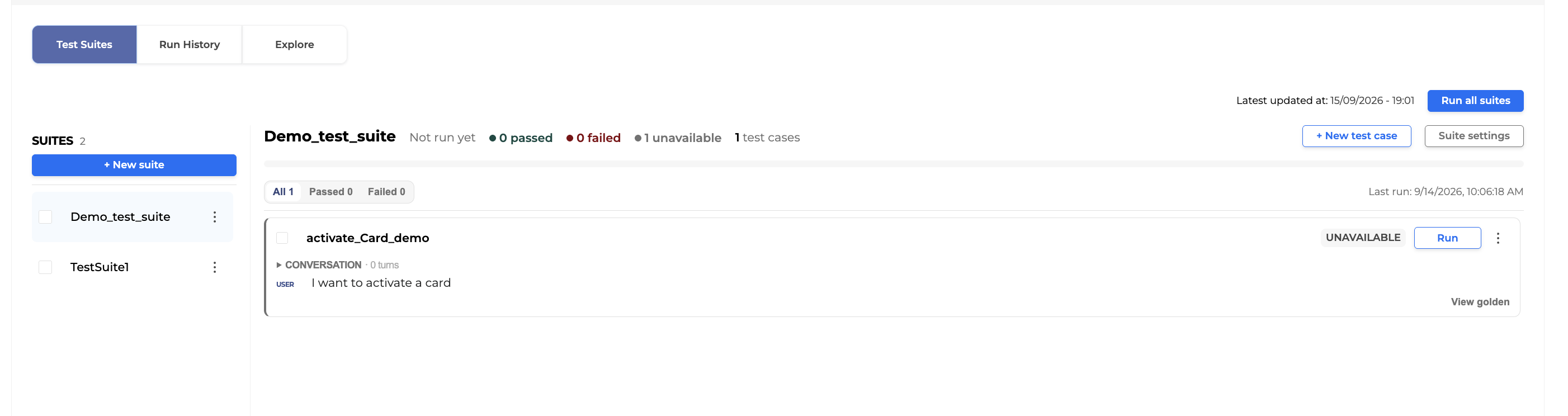
Redesigned OCP Testing Studio® Test Suites Workspace - The Test Suites workspace has been rebuilt to make everyday test management faster and clearer.
-
Test cases display as status cards (passed, failed, not run, or unavailable) that you can filter, view in detail, author, edit, and goldenize or delete without leaving the suite view.
-
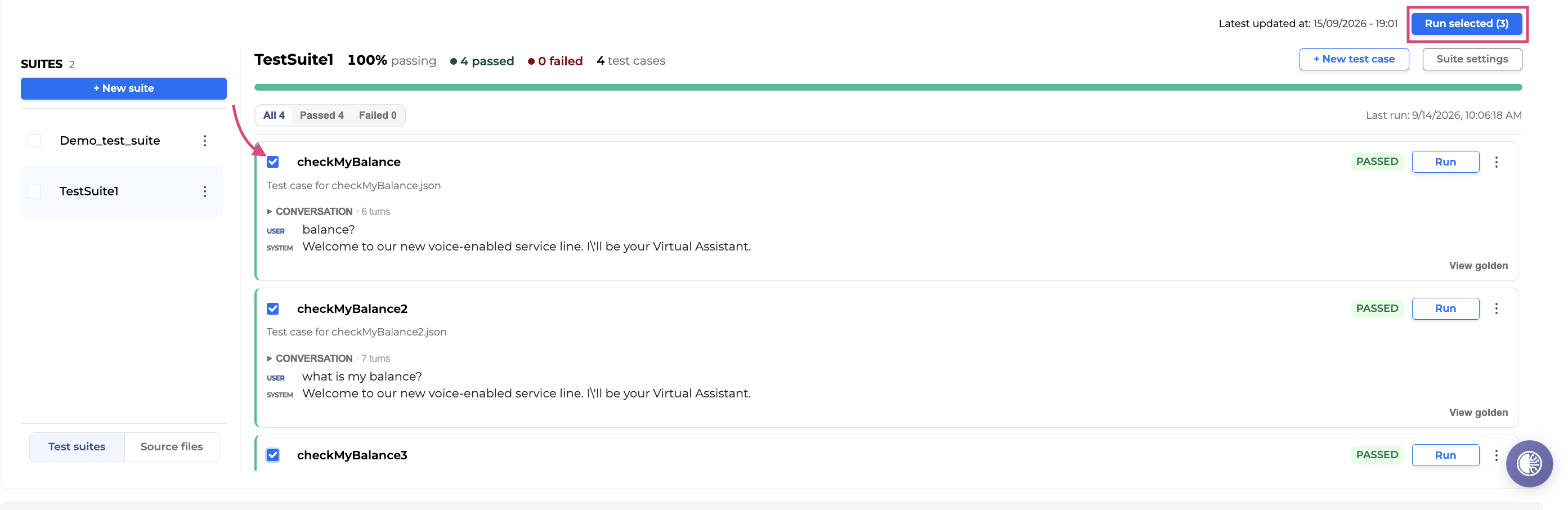
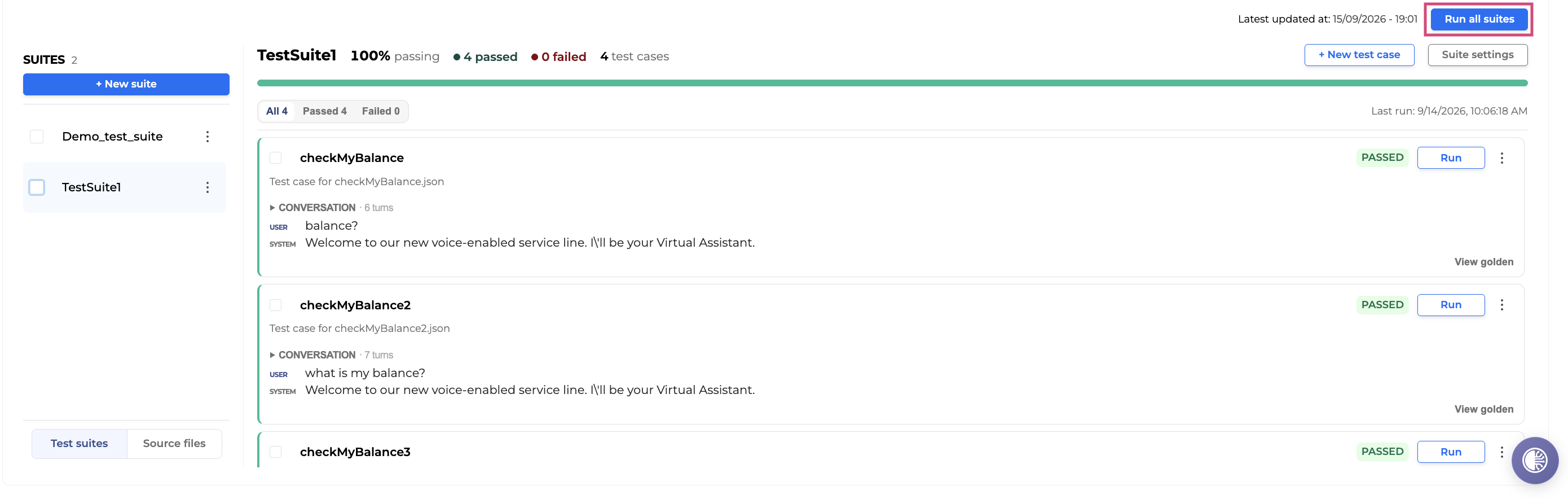
Run an entire project, selected suites, or specific test cases, with a review step before the run starts.
-
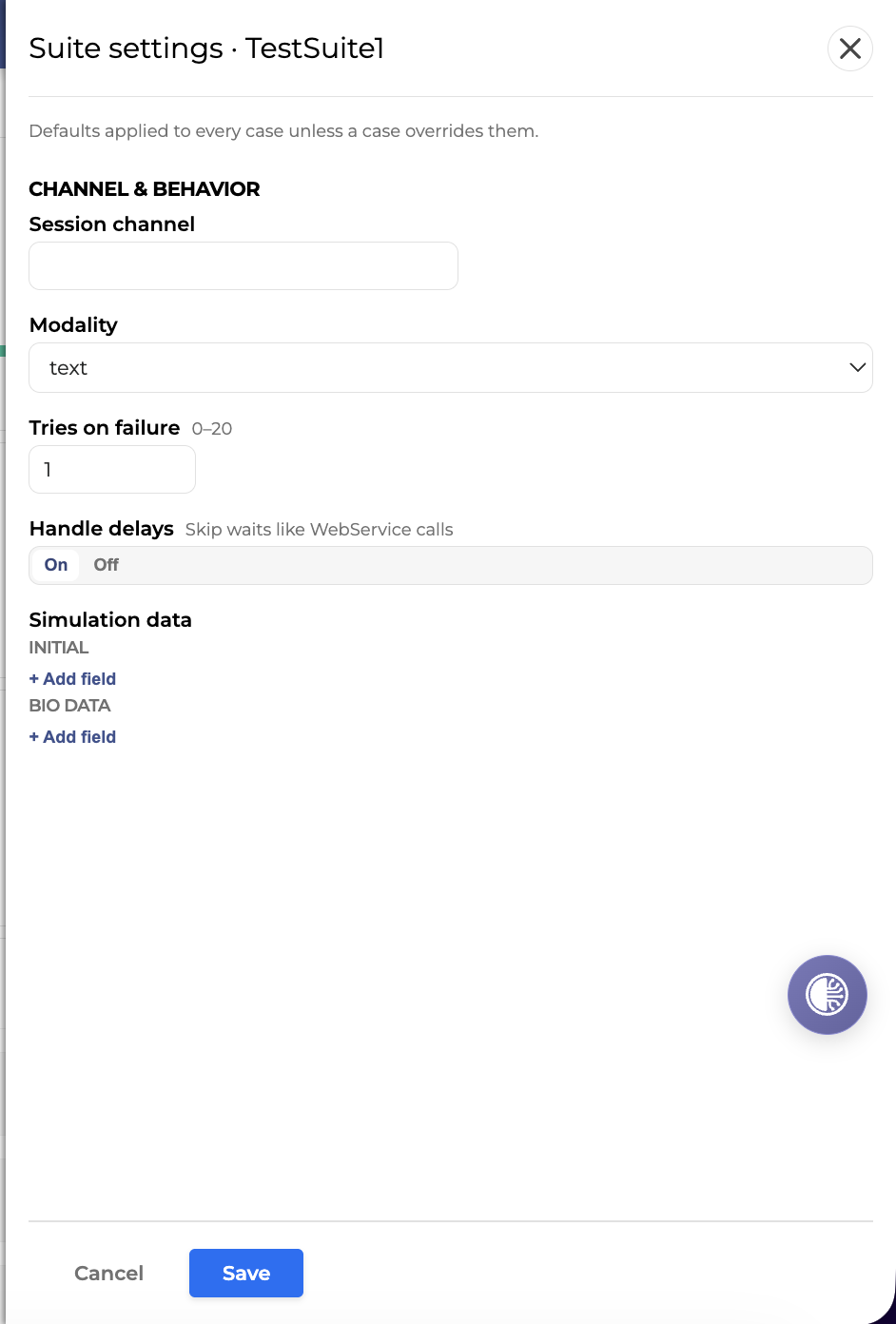
Configure suite-level settings - channel, modality, retries, and simulation data, from a dedicated settings panel.
Fixes
-
Accurate Run Progress Reporting - In-progress test run percentages now display correctly and never exceed 100%, so the Run History progress bar always reflects real, valid progress for chat and voice runs alike.
-
Reliable Delete Confirmation for Test Cases - Deleting the last remaining test case in a suite now shows the same success confirmation as any other deletion.
-
More Accurate Routing Tag Checks - Test runs using the routing tag assertion no longer fail incorrectly for agents without a routing tag, so results reflect genuine mismatches only.
-
This release includes security updates.
Testing Studio 1.22.0
Released: August 2026
|
US1 |
US2 |
EU1 |
|---|---|---|
|
August 31, 2026 |
September 9, 2026 |
August 31, 2026 |
New Features
-
Routing Verification for Concierge Agent Tests - Tests in OCP Testing Studio® can now confirm that a Concierge Agent routes conversations to the correct destination, not just that the reply text matches. Testers select the Routing Param check on a test run, and OCP Testing Studio compares the actual routing decision against the expected one, catching routing regressions that a text-only comparison would miss.
-
Re-run Only Failed Test Cases - After a test run completes, you can now start a new run that repeats only the test cases that failed, instead of retesting the whole suite. The follow-up run appears in run history like any other, saving time when checking a fix.
Improvements
-
Automated Route Testing for Concierge Agents - Generate test scenarios automatically for every routing destination a Concierge Agent supports, then verify and capture the actual route taken during a run. This speeds up coverage of routing logic without writing each scenario by hand.
-
[Unit Testing Agent] Open-Ended Goal Checks for Test Scenarios - Test scenarios can now include a plain-language goal, such as confirming an agent offers a discount, instead of requiring an exact-match answer. Results show whether the goal was met, giving more flexible and realistic coverage of agent behavior.
-
[Unit Testing Agent] Simplified Scenario Checks - Each test scenario now allows only one route check, one answer check, and one goal check, preventing conflicting expectations and keeping test results clear and unambiguous.
-
[Unit Testing Agent] Review and Readiness Guidance for Test Scenarios - Scenario cards now show at a glance what is still missing, such as an expected answer, route, or review confirmation, and let reviewers mark AI-generated scenarios as verified independent of whether the test passed. This makes it easier to track which scenarios are ready for use.
-
[Unit Testing Agent] Clearer Partial Test Results - Test results now distinguish passed, partially passed, failed, and unchecked outcomes instead of a simple pass or fail, making it easier to see when a scenario partly succeeded, such as routing correctly but returning the wrong answer.
-
[Unit Testing Agent] Unified Inputs Column for Test Data - Test scenario key-value inputs now export and import through a single Inputs column in CSV files, with automatic detection of comma, semicolon, or tab separators, simplifying test data exchange with other tools.
-
[Unit Testing Agent] Agent Filtering by Group - When testing agents, you can now filter the agent list after selecting a group, making it faster to find the agent you want without scrolling a long list.
Fixes
-
More Reliable Test Runs Under Load - Test runs with several test cases executing at once no longer intermittently fail with dialog-not-found errors, improving reliability for larger, concurrent test executions.
-
Accurate Detection of an Agent's Final Response - Test validation now correctly recognizes an agent's closing response, preventing scenarios from failing when the agent legitimately hands back control at the end of a conversation.
-
Correct Touch Detection in Generated Test Cases - Test cases generated from recorded conversations now correctly mark button-tap steps even when the recorded text differs from the button label only by capitalization or spacing.
-
Fewer Failures in Large Parallel Test Runs - Large test suites split across parallel workers no longer fail intermittently due to internal file conflicts during execution.
-
This release includes security updates.
Testing Studio 1.21.0
Released: July 2026
|
US1 |
US2 |
EU1 |
|---|---|---|
|
August 3, 2026 |
August 12, 2026 |
August 5, 2026 |
New Features
-
Add support for data models testing.
Improvements
-
Deliver Console Overhaul - Phase 2 for the UI
-
Add
session_channel = “web-chat”as default on Test Case generate
Internal Improvements
-
Speedup test runtime (by splitting Run’s tests based on the test cases number per test suites)
-
Update Sidecar
-
Use trixie-debian based docker image
Testing Studio 1.20.0
Released: July 2026
|
US1 |
US2 |
EU1 |
|---|---|---|
|
June 30, 2026 |
July 15, 2026 |
July 7, 2026 |
New Features
-
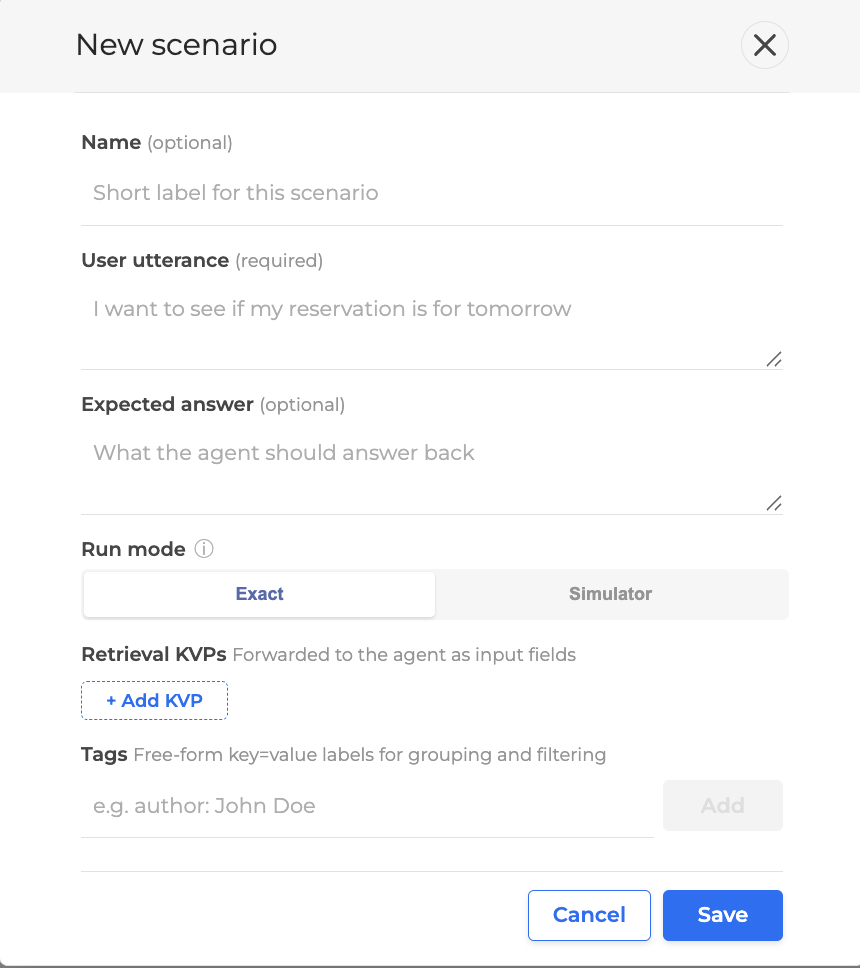
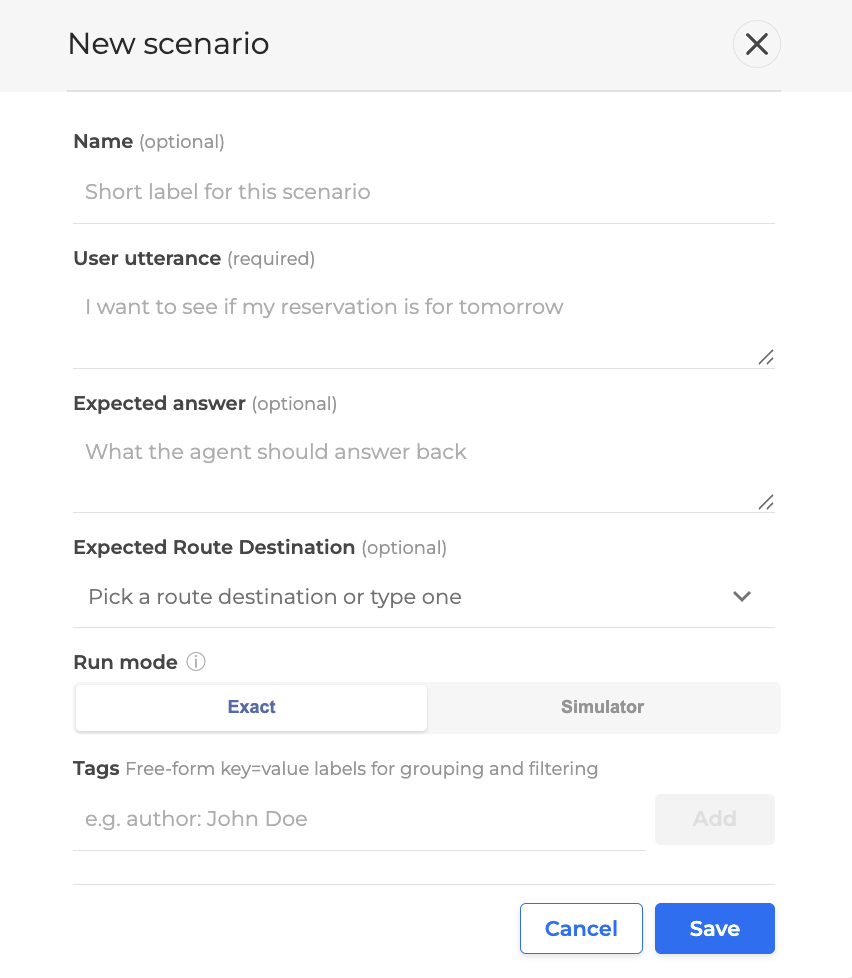
Add support for testing concierge / router agents in Agents Unit Testing (AUT). Users can now define an expected route for a scenario, and the scenario UI adapts to the agent type so only the relevant fields are shown.
Improvements
-
Update LLM model for our LLM features.
-
Speedup Run tests clone task.
-
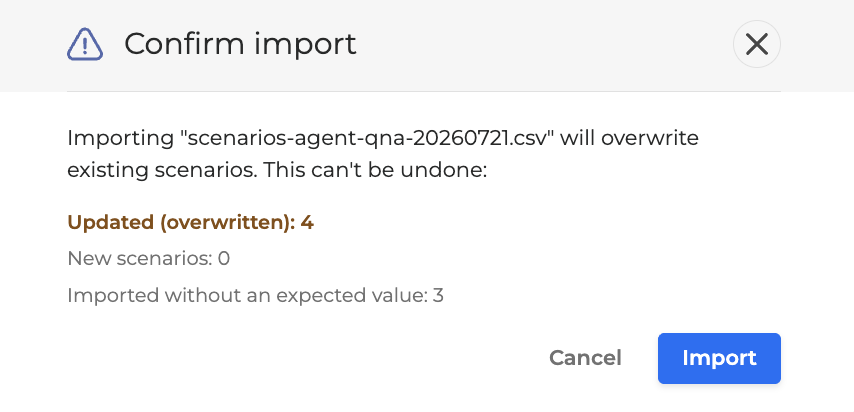
Enhance the Agents Unit Testing (AUT) CSV export/import so that exported results can be re-imported cleanly as scenarios, with full support for both QnA and Concierge agent types, route-based grading, and a safe import preview.
Testing Studio 1.19.0
Released: June 2026
|
US1 |
US2 |
EU1 |
|---|---|---|
|
June 17, 2026 |
Rolled-forward |
June 29, 2026 |
Improvements
-
Agentic Step Control in Test Runs - You can now choose to assert or skip agentic steps within a dialog during test execution. This gives you finer control over which parts of an agentic flow are validated, making it easier to focus test runs on the steps that matter.
Fixes
-
Reliable Goldenize Action on Failed Tests - Goldenizing a failed test case now completes successfully. Previously, attempting to goldenize a failed test returned an error, preventing the expected result from being saved.
-
Persistent Banner Dismissal Across Tab Switches - Dismissing the run-summary banner in Agents Unit Testing now stays dismissed when switching between the Scenarios and Results tabs. Previously, the banner reappeared every time you navigated back to the Scenarios tab.
-
This release includes security updates.
For more information go to Testing Studio+™ User Guide.
Testing Studio 1.18.1
Released: June 2026
|
US1 |
US2 |
EU1 |
|---|---|---|
|
Rolled-forward |
Rolled-forward |
Rolled-forward |
-
Security Updates
Testing Studio 1.18.0
Released: May 2026
|
US1 |
US2 |
EU1 |
|---|---|---|
|
Rolled-forward |
Rolled-forward |
Rolled-forward |
New Features
-
Add get task details endpoint - Added a new API endpoint to retrieve Celery tests upload task details, providing visibility into task status, creation time, completion time, and failure reasons for asynchronous operations.
-
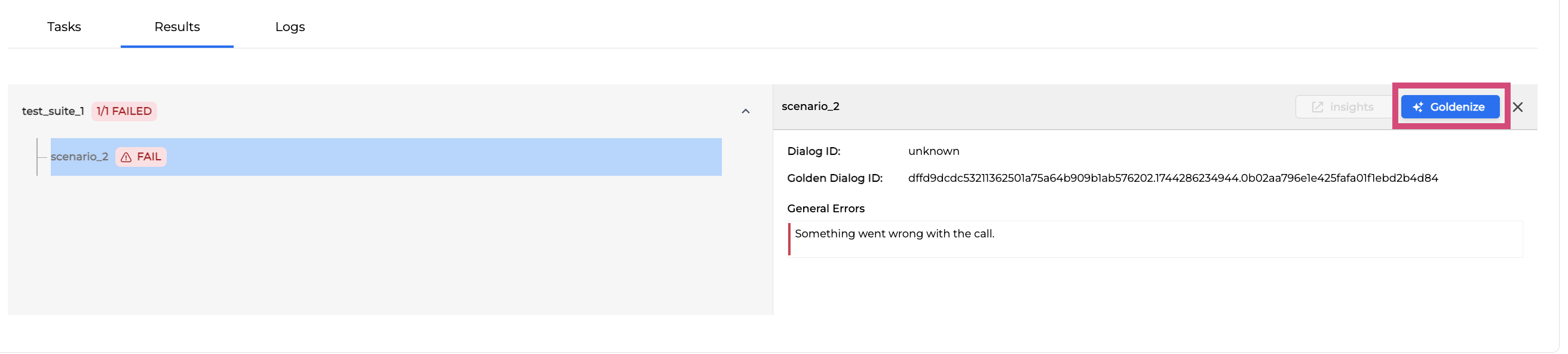
Goldenize Unavailable and Failed Test Cases - You can now goldenize failed or unavailable test cases directly from run results, enabling faster test maintenance and golden dialog updates without requiring successful runs.
Improvements
-
OCP Console Overhaul - UI updates - Phase 1 - Updated the user interface with refreshed colors, typography, icons, spacing, and illustrations as part of the OCP Console® modernization initiative, improving visual consistency and user experience.
-
Include Data Model fields in golden dialogs - Golden dialogs now include data model fields for each dialog step, providing richer test case validation and better alignment with conversational flows.
-
Include Upload Task on Project schema - Project details now include the latest upload task information, allowing you to track the status of test suite uploads and identify any issues with project updates.
-
Refactor Upload Project Tests response - The upload project tests endpoint now returns task details immediately with a 202 Accepted status, enabling asynchronous tracking of upload operations.
-
Add Project detail polling - The interface now automatically polls project status after uploading test suites, providing real-time feedback on project lock status and upload completion.
-
Increase Augmented custom instructions char limit - The character limit for augmented custom instructions has been increased to 200 characters, allowing more detailed guidance for LLM-augmented testing.
-
Full screen admin panel - The admin panel now expands to full screen, providing more workspace for managing projects and configurations.
-
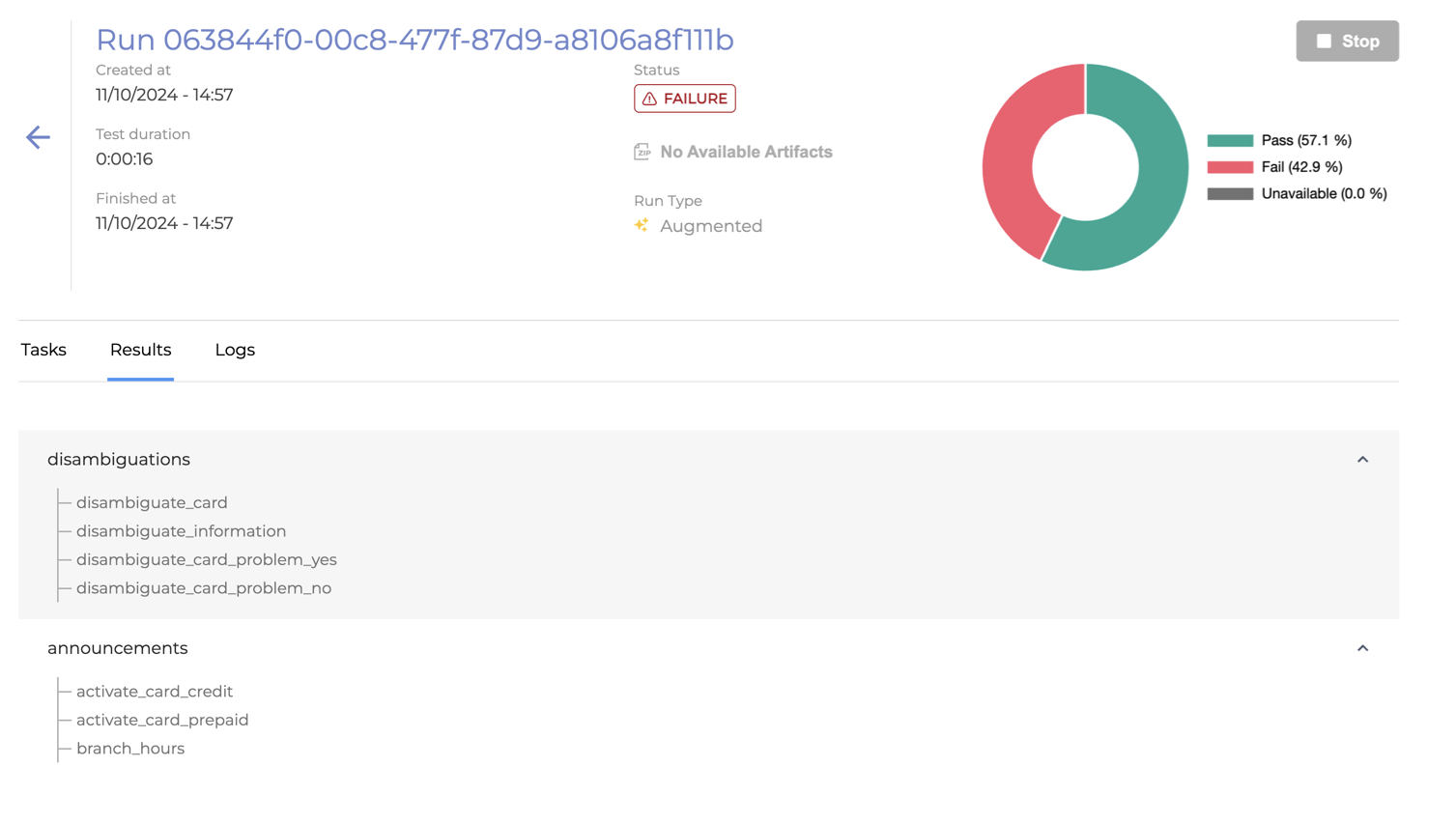
Request to Highlight Failed Test Suites and Cases in Testing Studio® UI - Test suites and test cases with failed or unavailable results are now visually highlighted, making it easier to identify and focus on issues that require attention.
-
Revisit test suite name validation - Test suite name validation now accepts dots and hyphens, supporting naming conventions used in generated test cases from Orchestrator (for example, en-US.Intents).
Fixes
-
LLM-augmented run fails when more than four test suites are uploaded - Fixed an issue where LLM-augmented chat runs would consistently fail when configured with more than four test suites.
-
Change file content focus - Fixed an issue where deleting a folder would incorrectly close the file content panel that was open in the right panel.
For more information, go to Testing Studio+™ User Guide.
Testing Studio 1.17.4
Released: May 2026
|
US1 |
US2 |
EU1 |
|---|---|---|
|
Rolled-forward |
Rolled-forward |
Rolled-forward |
Q&A Agents Unit Testing
What it is
A regression-testing workflow for Q&A agents. Build a suite of question / expected-answer pairs, run them against any version of your agent, and see what changed.
Why it matters
Until now, validating a knowledge base change or a prompt tweak meant ad-hoc chats and finding regressions in production. Q&A Agents Unit Testing lets teams validate a Q&A agent the same way they'd validate any other piece of software: repeatable suites, version-over-version comparisons, and a clear pass/fail signal before the change ships.
What you can do now that you couldn't before
-
Run a regression suite against any agent change - Define what your agent should say. Hit run. Get pass / fail across the whole suite in one place. Repeat after every knowledge base update, every prompt change, every model swap - without an hour of manual chatting.
-
Tell whether a wrong answer is a model problem or a knowledge base problem - This is the part most Q&A testing misses. Every result shows the retrieved knowledge behind the answer, the exact passages the agent pulled from your KB, with links to the source documents.
-
If the right document never made it into context → it's a retrieval problem.
-
If it did and the answer is still wrong → it's a model or prompt problem.
-
Two different fixes, two different teams. Today, you can tell them apart in seconds.
-
Build coverage without writing every test by hand - Bulk-upload an
.xlsxof real customer questions to seed the suite. For questions where you don't have a "correct" answer yet, run them once and promote a good response into the expected answer in one click. Coverage grows alongside the agent instead of blocking the release. -
Show the quality trend over time - Every run is recorded. The Results tab shows pass / fail counts across runs, filterable history, and shareable views. When QA, product, or compliance asks "is the agent getting better?" - there's a real answer, not a vibe.
Testing Studio 1.17.2
Released: March 2026
|
US1 |
US2 |
EU1 |
|---|---|---|
|
April 20, 2026 |
April 21, 2026 |
April 20, 2026 |
-
Apply security patches.
For more information, see the Testing Studio+™ User Guide.
Testing Studio 1.17.1
Released: March 2026
|
US1 |
US2 |
EU1 |
|---|---|---|
|
March 19, 2026 |
Rolled-forward |
March 23, 2026 |
-
Security and Maintenance Updates.
Testing Studio 1.17.0
Released: January 2026
|
US1 |
US2 |
EU1 |
|---|---|---|
|
Rolled-forward |
Rolled-forward |
Rolled-forward |
Updated:
-
Keyboard navigation improvements
-
Audit event logs integration with Console (under the Admin page)
-
Download a project test file
-
Delete a project tets folder
-
Include simulation data on Test Case generation (through Orc/Monitor)
-
Select Test Suite on Test Case generation (through Orc/Monitor) → waiting for Orc/Monitor next release to deliver the UI part
Fixed:
-
Auto generated test cases being overwritten
-
Highlight the content of a file
Testing Studio v1.16.0
Released: November 2025
|
US1 |
US2 |
EU1 |
|---|---|---|
|
December 17, 2025 |
Rolled-forward |
December 18, 2025 |
Added:
-
New UI redesign
-
Support sync & async upload Project tests
Changed:
-
Use Omilia TTS Oliver voice (for en-US)
Fixed:
-
Change Bedrock LLM model
-
Small bug fixes
Testing Studio 1.15.1
Released: January 2026
|
US1 |
US2 |
EU1 |
|---|---|---|
|
Rolled-forward |
Rolled-forward |
Rolled-forward |
Fixed
-
Support sync & async upload Project tests
Testing Studio v1.15.0
Released: October 2025
|
US1 |
US2 |
EU1 |
|---|---|---|
|
November 3, 2025 |
Rolled-forward |
November 5, 2025 |
Fixed
-
Issue where users could paste content into test cases when not in edit mode
-
Improved system reliability by automatically reconnecting to Redis during outages
Testing Studio v1.13.0
Released: July 2025
|
US1 |
US2 |
EU1 |
|---|---|---|
|
August 5, 2025 |
August 11, 2025 |
August 12, 2025 |
Added
-
Automatically create a test case through simulator in Orchestrator
-
Rename a Test Case through the UI
Fixed
-
Minor improvements and fixes
Internal
-
Added test flag for voice testing
Testing Studio v1.12.0
Released: May 2025
|
US1 |
US2 |
EU1 |
|---|---|---|
|
June 16, 2025 |
June 17, 2025 |
June 30, 2025 |
Added
-
View and Edit a Test case through the UI
-
Create/Delete a file through the UI
-
Support DTMF Option in voice runs
Fixed
-
Improve Voice Runs with Long Utterances
-
Minor Improvements and Fixes
Testing Studio v1.11.1
Released: April 2025
|
US1 |
US2 |
EU1 |
|---|---|---|
|
Rolled-forward |
Rolled-forward |
Rolled-forward |
Fixed
-
Security Updates
-
Add Feature Flag For Voice Testing
Testing Studio v1.11.0
Released: March 2025
|
US1 |
US2 |
EU1 |
|---|---|---|
|
Rolled-forward |
Rolled-forward |
Rolled-forward |
Added
-
Support other locales (Languages) in voice testing
-
Support ANI simulation data for voice testing
-
View test suites and test cases in the UI
Fixed
-
Issue with voice run with long utterances
-
Issue with no inputs during voice testing
-
Issue with projects list pagination
-
Minor fixes and improvements
For more information, go to Testing Studio+™ User Guide.
Testing Studio v1.10.0
Released: February 2025
|
US1 |
US2 |
EU1 |
|---|---|---|
|
Rolled-forward |
Rolled-forward |
Rolled-forward |
Added
-
Enhanced LLM sScalability and security
-
Support filtering per Organization
-
Improve search functionality in Testing Studio+ UI
-
Minor improvements and fixes
For more information, go to Testing Studio+™ User Guide.
Testing Studio v1.9.0
Released: December 2024
|
US1 |
US2 |
EU1 |
|---|---|---|
|
Rolled-forward |
Rolled-forward |
Rolled-forward |
Added
-
Support KVPs Assertion
-
Support Dialog Events Assertion
Fixed
-
Minor fixes and improvements
Testing Studio v1.8.0
Released:
|
US1 |
US2 |
EU1 |
|---|---|---|
|
Rolled-forward |
Rolled-forward |
Rolled-forward |
Added
-
Omilia-ci.yml is no longer required; assertions can now be selected through the UI on each run
-
Various internal improvements and fixes
Testing Studio v1.6.0
Released:
|
US1 |
US2 |
EU1 |
|---|---|---|
|
Rolled-forward |
Rolled-forward |
Rolled-forward |
Added
-
Status endpoint for API
-
Minor Fixes and Internal Improvements