
The following sections list every released version of Environments Manager, newest first. Each section comes from the monthly OCP® Release Notes page named in its Released line.
Environments Manager 1.29.2
Released: October 2026
|
US1 |
US2 |
EU1 |
|---|---|---|
|
— |
— |
— |
Fixes
-
Importing an application whose error handlers use an agent as an event source now works. Previously the imported application failed to deploy because the handler still referenced the agent from the source environment.
Environments Manager 1.29.1
Released: October 2026
|
US1 |
US2 |
EU1 |
|---|---|---|
|
— |
— |
— |
New Features
-
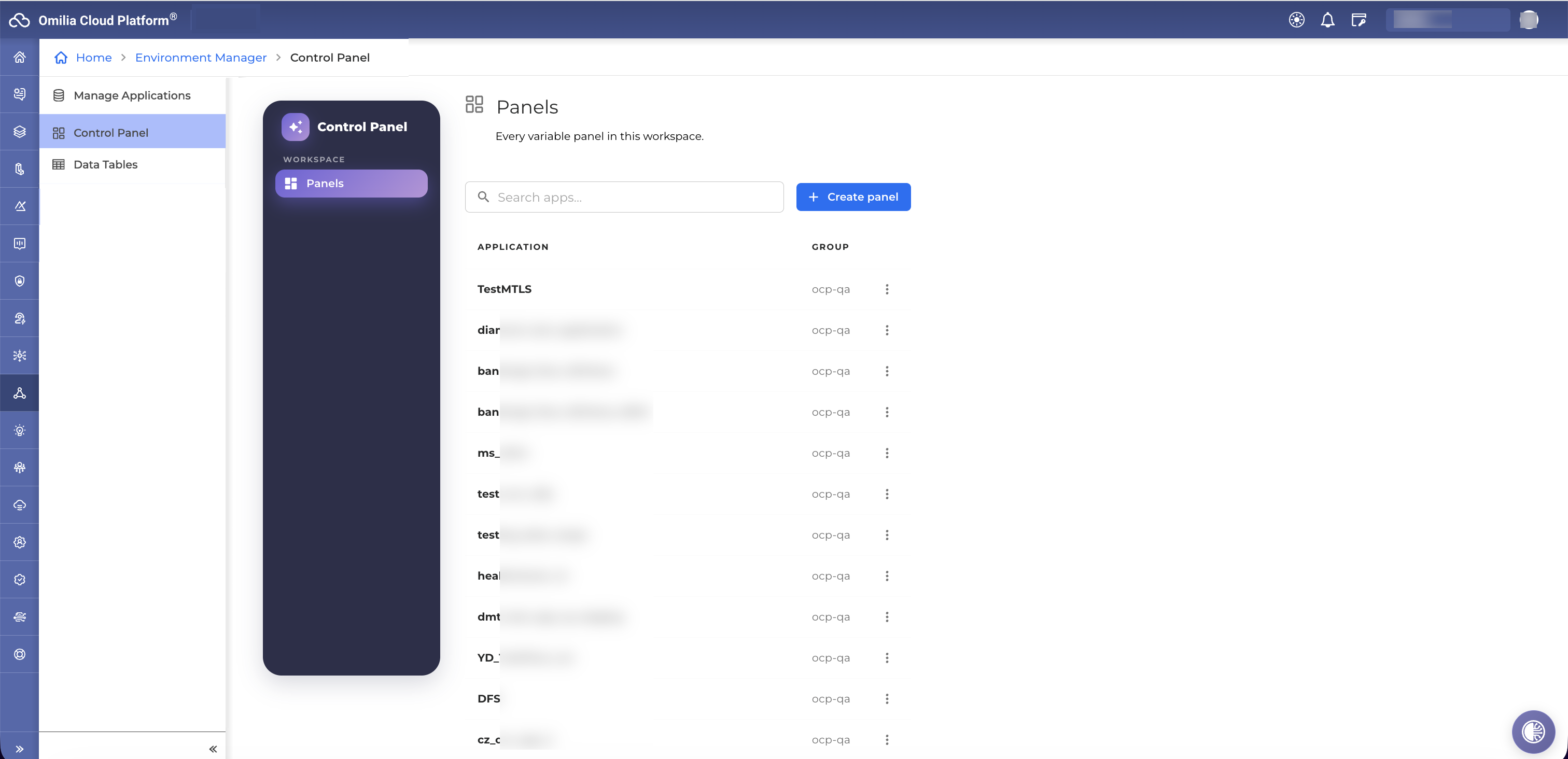
Control Panel for Application Variables — Environments Manager now offers a dedicated Control Panel where business users manage application variables, schedule changes, and preview text-to-speech voices, all without needing separate tools. Turn it on for an environment to replace the previous Variable Collections view with this more complete workspace.
Environments Manager 1.29.0
Released: October 2026
|
US1 |
US2 |
EU1 |
|---|---|---|
|
October 19, 2026 |
Rolled-forward |
Rolled-forward |
New Features
-
Pathfinder Knowledge Base Transfer – The Pathfinder projects an application references are now carried in the export bundle and recreated in the target environment on import, with the application's agents automatically repointed at the newly created knowledge bases. Promoting an agentic application between environments no longer leaves its knowledge bases behind or pointing at the source environment. Requires Pathfinder 1.9.0 or later. Application tags are not covered, because Pathfinder projects are not tagged.
-
Dedicated Database Schema – Environments Manager can now be deployed against a dedicated, non-public PostgreSQL schema, so it can share a database instance with other services without sharing a schema. Existing deployments are unaffected.
-
Control Panel Support – Environments Manager now supports Control Panel, the new business-user variable console in Integrations. Variables can now have optional properties: enabled/disabled, an active-from/active-until window, a fixed list of allowed values, and a grouping label. Existing integrations keep working unchanged. Environments Manager stores the validity window but does not enforce it. Every change made through Control Panel is recorded in an audit history. It can be filtered by user, application and variable, and users only see history for groups they can access. Business users can also preview how a text prompt sounds with the application's configured voice.
Improvements
-
Verified NLU Bindings on Import – When an import creates NLU deployments, the resulting miniApp NLU bindings are read back and verified; if a binding was not applied, the import report names the affected miniApp and languages instead of reporting success. The NLU app ids used during an import are also logged, so the bindings an import applied can be recovered afterwards.
-
Safer Export Validation – An export that references two different NLU apps sharing the same name is now rejected up front, instead of producing a bundle that could only be imported by silently discarding one of them. Exports also verify the caller's permissions on every group that owns a referenced NLU app.
-
Clearer API Documentation for Large Uploads – The chunked upload endpoints now publish their full response schemas, including an explicit note that the reported chunk size is informational and not an enforced constraint.
Fixes
-
Deployment Service Admin Page No Longer Fails – Applications with no group, such as the internal MiniApps record, no longer cause the deployment service admin page to fail; the page loads normally and per-application actions on such records are rejected.
-
Tag Promote With Nested Flows – Promoting a published tag for an application that contains a flow now completes successfully.
-
Rate Limiting Enforced Again – Per-endpoint rate limits, which had silently stopped being applied after a framework upgrade, are enforced again on every endpoint.
Environments Manager 1.28.1
Released: September 2026
|
US1 |
US2 |
EU1 |
|---|---|---|
|
Rolled-forward |
Rolled-forward |
Rolled-forward |
Security
-
This release includes security updates.
Environments Manager 1.28.0
Released: July 2026
|
US1 |
US2 |
EU1 |
|---|---|---|
|
July 15, 2026 |
July 29, 2026 |
August 31, 2026 |
New Features
-
Large File Import Support - Applications and tag packages up to 1Gb in size can now be imported by uploading the ZIP in small chunks, enabling reliable imports that previously failed due to file size limits at the network boundary. Uploads resume automatically from any failed chunk, so large deployments complete without restarting from scratch.
-
Global NLU Configuration Transfer - Global NLU configuration is now included when exporting or importing an application, ensuring the full conversational configuration travels with the app when promoting between environments.
Improvements
-
Streamlined A/B Testing Setup - The A/B agent testing configuration no longer requires selecting backend, provider, and model type, simplifying the setup flow and reducing the risk of misconfiguration.
-
Cache Re-sync Controls in Admin Console - Two Re-sync Cache buttons are now available in the Deployment Service admin console - one for the production environment and one for sandbox - enabling administrators to trigger a full cache refresh directly from the console.
-
Clearer Export Validation - When an export fails due to an invalid configuration, the error is reported immediately with a clear explanation, reducing the time needed to identify and correct the issue.
Fixes
-
Reliable Agent Import with Dependencies - Agentic applications now import correctly when agents reference other agents or flows as components, preventing broken configurations that previously occurred when import order was not respected.
-
Correct Export of Applications with Double Underscores in Names - Applications, flows, and groups whose names contain consecutive underscores now export and import correctly, resolving an issue where the exported archive contained empty folders instead of the expected content.
-
Agentic Group Name Editing - Editing the name of an agentic group in the admin console now works correctly; text no longer resets to a full selection with each keystroke.
Environments Manager 1.27.1
Released: June 2026, July 2026
|
US1 |
US2 |
EU1 |
|---|---|---|
|
June 16, 2026 |
Rolled-forward |
June 25, 2026 |
New Features
-
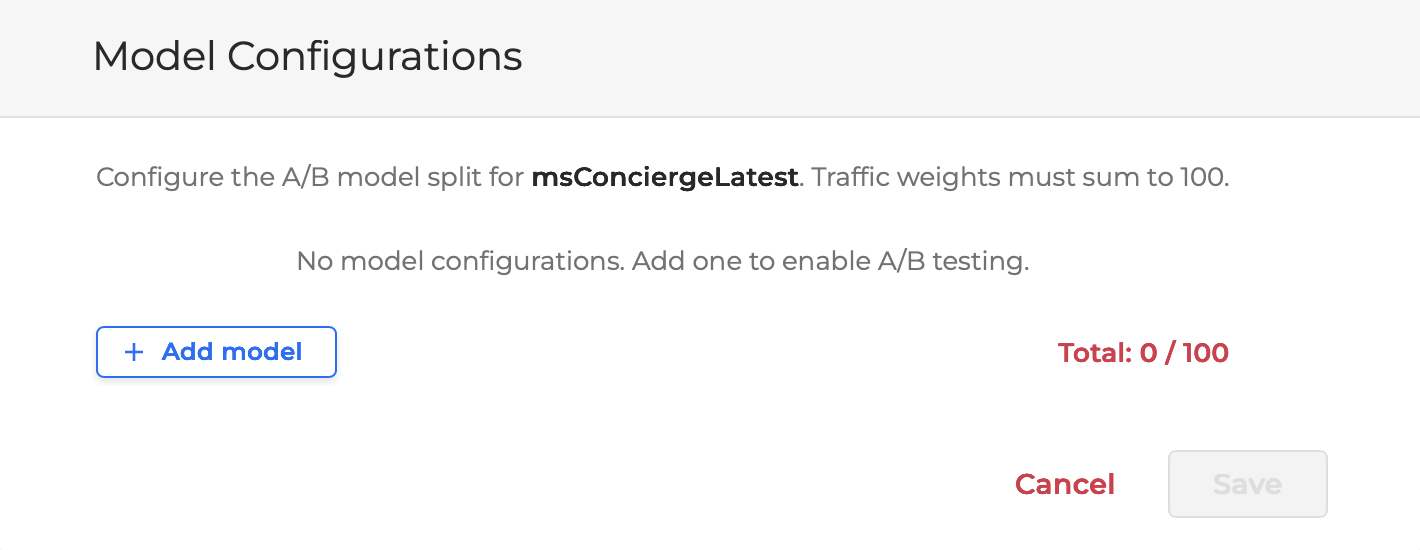
Agent A/B Model Testing Admin Panel - Administrators can now set up A/B model testing for agents from a new Agent Models page in the console admin area. The page lists your agents (searchable and paginated) and lets you add or remove model configurations for each one, choosing the model, backend, and provider from dropdowns and setting how traffic is split between them. The traffic shares must add up to 100% before the configuration can be saved, and clearing an agent's configurations asks for confirmation first. The feature is enabled per environment.
Security Improvements
-
Internal dependencies were updated to address reported security vulnerabilities. These are hardening updates with no change to how the product works.
Environments Manager 1.27.0
Released: May 2026
|
US1 |
US2 |
EU1 |
|---|---|---|
|
May 19, 2026 |
June 3, 2026 |
May 28, 2026 |
New Features
-
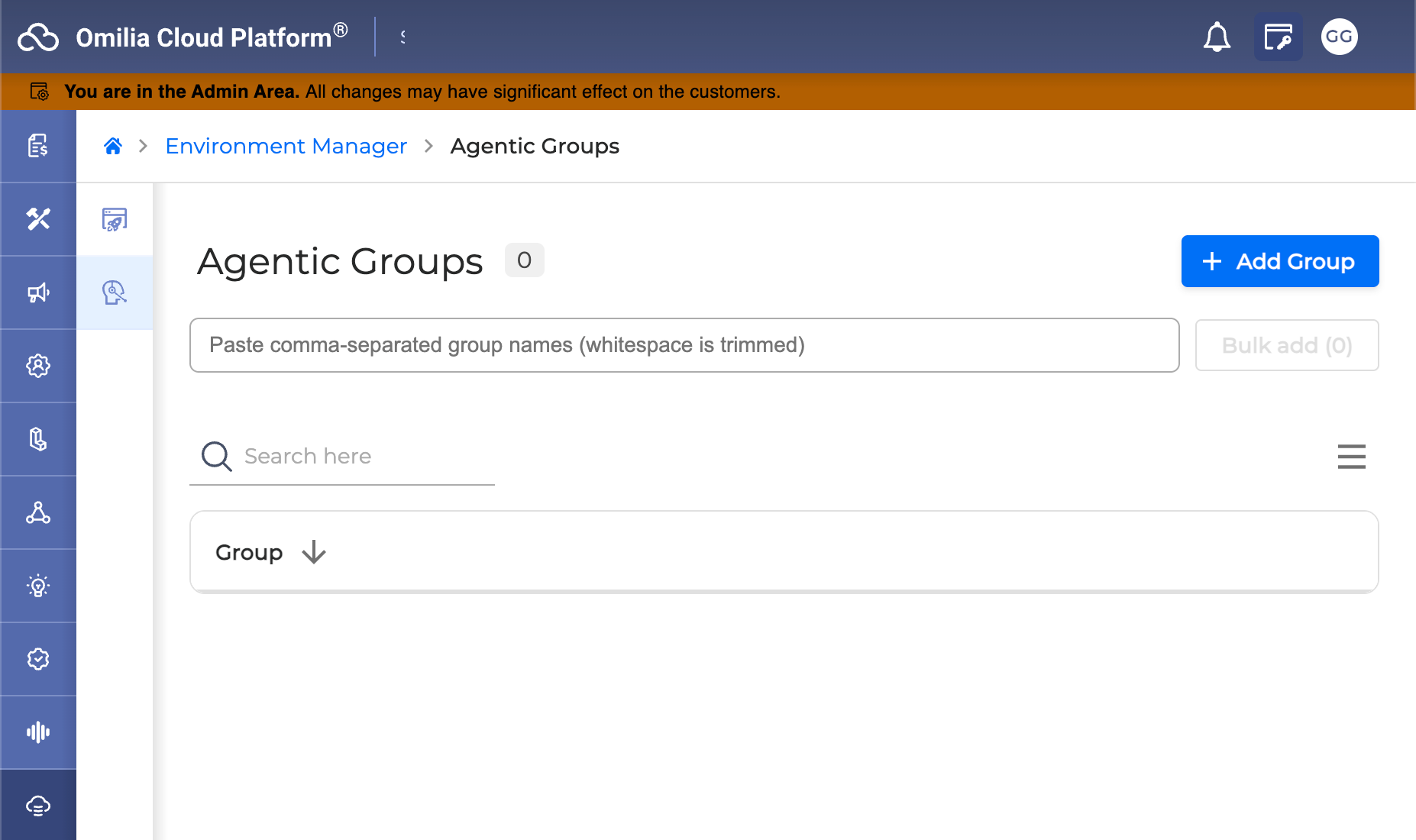
Agentic-Enabled Groups Management - A new Agentic-Enabled Groups section is now available in the Console Admin area, enabling administrators to create, view, edit, and delete agentic-enabled groups for their environment. The section is accessible to users with the Orchestrator Admin role, and all changes take effect immediately without requiring a full page reload.
Improvements
-
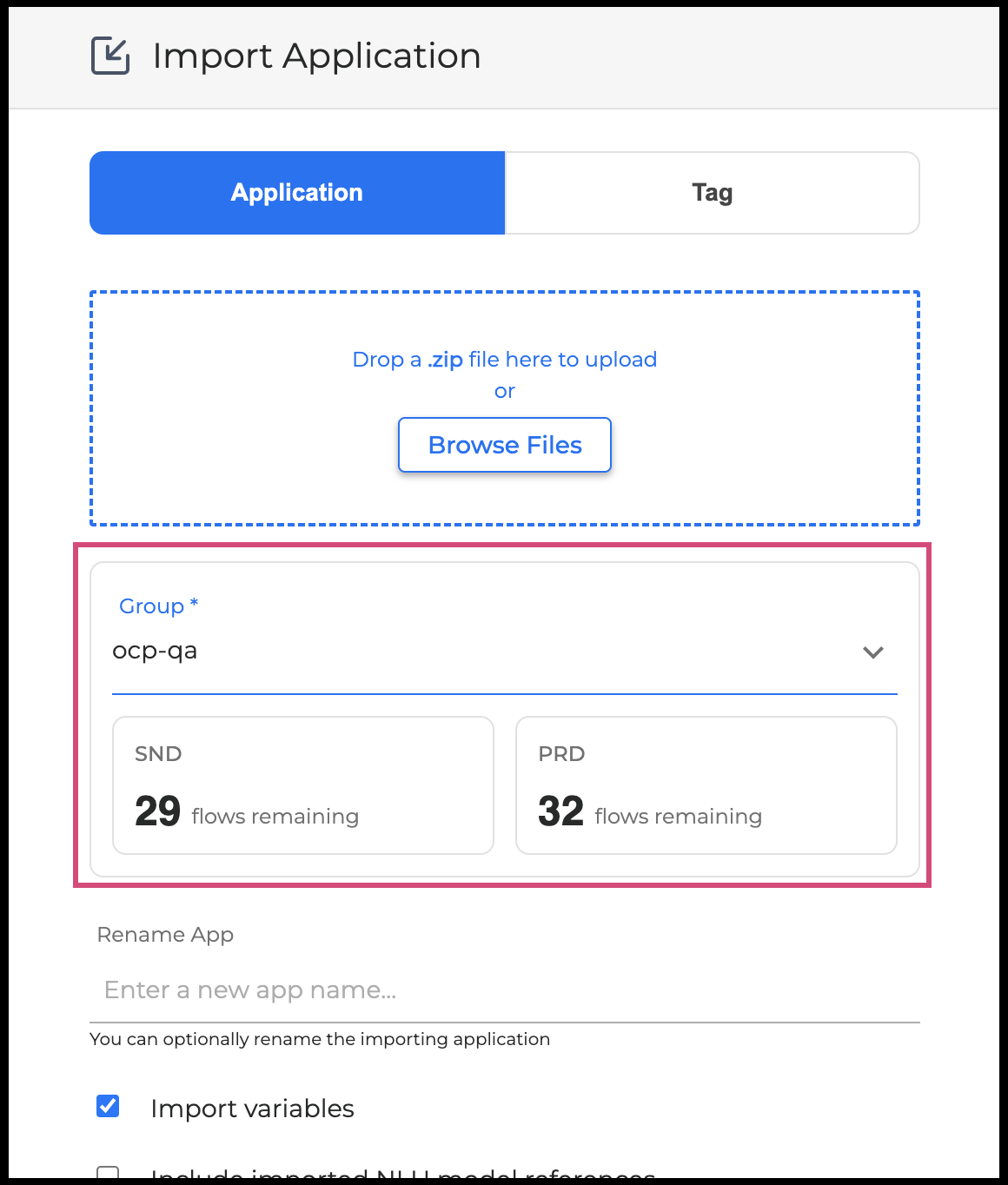
Remaining Flow Slots Visible Before Import - When importing an application, you can now see the number of flow slots remaining in a group before starting the import, helping you decide whether you have enough capacity before committing to the operation. For more information, go to Environments Manager User Guide.
-
Export Support for Agentic Router Applications - Applications that use an orchestrator router agent can now be exported from the Environments Manager, extending full export capability to this category of agentic application.
Fixes
-
Clear Availability Status on Service Errors - When flow availability data cannot be retrieved due to a service error, the interface now displays N/A consistently, so you always see a clear and accurate status rather than an ambiguous or missing value.
Environments Manager 1.26.0
Released: March 2026
|
US1 |
US2 |
EU1 |
|---|---|---|
|
April 8, 2026 |
May 4, 2026 |
April 16, 2026 |
-
Orchestrator now supports Global TTS Configurations. This is set on the application level, and it overrides the TTS settings on each miniApp. Environments Manager now supports this feature, so that Global TTS settings are carried over through application export and import.
-
Audit events produced by Environments Manager are now displayed on the relevant section on Console.
-
As part of the OCP Console Overhaul initiative, the UI of Environments Manager now has updated colors, typography, icons spacing and illustrations.
-
Support was added for exporting, importing and promoting applications of the new 'Agentic' type
-
Security and Maintenance Updates.
For more information, see the Environments Manager User Guide.
Environments Manager 1.25.0
Released: February 2026
|
US1 |
US2 |
EU1 |
|---|---|---|
|
March 17, 2026 |
April 21, 2026 |
March 17, 2026 |
-
Enriched the error toast message in cases of failed application exports, so that it better describes the reason of failure.
-
Implemented keyboard navigation, that is allowing for essential keyboard commands which cover all accessibility requirements of the European Accessibility Act.
-
Added a toast message notifying users that their export will take some time to be completed, so that they can continue their work within OCP while it is in progress.
-
Updated the wording on the export application modal from "Download" to "Export", so that it more accurately depicts the operation.
-
Security and Maintenance Updates.
For more information, see the Environments Manager User Guide.
Environments Manager v1.24.0
Released: November 2025
|
US1 |
US2 |
EU1 |
|---|---|---|
|
December 4, 2025 |
February 2, 2026 |
December 18, 2025 |
Added
-
Asynchronous application exports: Previously, exporting an application was a synchronous process, which led to time-outs in cases of large applications. Now the user clicks on “export” in order to start the process, which takes place asynchronously in the background, and is informed regarding its success/failure through an OCP notification.
-
The View Applications page is now paginated, so that not all apps are loaded each time. This is a quality-of-life improvement since it leads to faster loading times.
-
On the Variable Collections page, when the user wanted to filter with a specific application name or with a specific group, the options presented to them were all applications and groups that they have access to, regardless of whether they have variable collections associated with them. This has been fixed now so that out of all the applications and groups they have access to, only the ones that actually have variable collections associated with them are displayed.
Fixed
-
Fixed import failure for miniApps with the same name: It is possible to have two miniApps with the same name, but with different types within an application. If this were the case, the exports were taking place successfully, but the imports were failing.
-
Fixed issue with Redis Connectivity: In cases of maintenance, fallback in the infrastructure, etc., on the AWS side, Environments Manager appears to connect to the reader endpoint instead of the primary endpoint, due to having cached a node, which changed from master to reader behind the scenes.
-
Added support for the new Agentic type of applications introduced in Orchestrator.
-
Security and Maintenance Updates.
Environments Manager v1.23.1
Released: October 2025
|
US1 |
US2 |
EU1 |
|---|---|---|
|
November 10, 2025 |
Rolled-forward |
November 12, 2025 |
-
Fixed issue with Redis Connectivity
In cases of maintenance, fallback in the infrastructure. On the AWS side, Environments Manager appears to connect to the reader endpoint instead of the primary endpoint, due to having cached a node, which changed from master to reader behind the scenes.
Environments Manager 1.23.0
Released: July 2025
|
US1 |
US2 |
EU1 |
|---|---|---|
|
August 5, 2025 |
August 11, 2025 |
August 6, 2025 |
Fixed
-
Variables Collections are now imported along with legacy Applications
-
Fixed “too many sessions” error
-
Security and maintenance updates
Environments Manager v1.22.1
Released: June 2025
|
US1 |
US2 |
EU1 |
|---|---|---|
|
July 9, 2025 |
July 15, 2025 |
July 29, 2025 |
Fixed
-
Address “File is not a zip file” error
Environments Manager v1.22.0
Released: May 2025
|
US1 |
US2 |
EU1 |
|---|---|---|
|
June 12, 2025 |
Rolled-forward |
Rolled-forward |
Added
-
Export and import OCP collections independently of the application
-
Add search field in OCP Variables view
-
Exclude Variables on Application import
Fixed
-
Fix issue with inability to delete collection when SND is deleted and PRD is not
-
Upgrade Python from 3.11 to 3.12
Environments Manager v1.21.3
Released: April 2025
|
US1 |
US2 |
EU1 |
|---|---|---|
|
May 21, 2025 |
Rolled-forward |
May 26, 2025 |
Updates
-
Security updates
Environments Manager v.1.21.0
Released: March 2025
|
US1 |
US2 |
EU1 |
|---|---|---|
|
Rolled-forward |
Rolled-forward |
Rolled-forward |
-
Exclude empty messages from OCP Variables notifications
Environments Manager v.1.20.0
Released: March 2025
|
US1 |
US2 |
EU1 |
|---|---|---|
|
Rolled-forward |
Rolled-forward |
Rolled-forward |
-
Audit trails for values of OCP Variables
-
Notification regarding changes made to OCP Variables
-
Address token expiration for long running tasks
-
Avoid Double Token Exchange
For more information, go to Environments Manager User Guide.
Environments Manager v1.19.0
Released: February 2025
|
US1 |
US2 |
EU1 |
|---|---|---|
|
Rolled-forward |
Rolled-forward |
Rolled-forward |
Added
-
Add sorting, filtering and search to the UI
-
Introduce new logic for the import of VB profiles
-
Introduce VB profile selection when importing a Tag
-
Add support for organization filtering
For more information, go to Environments Manager User Guide.
Environments Manager v1.18.0
Released: December 2024
|
US1 |
US2 |
EU1 |
|---|---|---|
|
Rolled-forward |
Rolled-forward |
Rolled-forward |
Added
-
Add the ability to skip the logging of specific non-sensitive OCP variables.
-
Expand the Application Tags functionality to OCP Variables: Whenever an application tag is created, an instance of the OCP variables collection is also created that is associated with this specific application tag.
Environments Manager v1.17.0
Released:
|
US1 |
US2 |
EU1 |
|---|---|---|
|
Rolled-forward |
Rolled-forward |
Rolled-forward |
Added
-
Create specific policy for viewing and editing sensitive OCP variables
-
Integrate with new miniApps Spring API
-
Add the ability to export and import OCP Variables
-
Add i18n to Environments Manager
-
[UI] Add release version to console
-
Give users the option to overwrite values of OCP variables on import
-
Filter sidecar logs for non existing envs-manager endpoints
-
Enable Service Account
Improved
-
Upgrade to debian bookworm
-
Update ui components and change root font-size
-
Legacy App As Flow
-
Inform Diamant about changes made to OCP Variables
Fixed
-
Fix for "Token isn't refreshed and can't access page"
-
Disable "eye" and make it not clickable for user without permission
Environments Manager v1.16.0
Released:
|
US1 |
US2 |
EU1 |
|---|---|---|
|
Rolled-forward |
Rolled-forward |
Rolled-forward |
Added
-
Add the ability to view and delete tags
-
Export legacy App
-
Import legacy App
-
Remove NLU token flag
-
Add A-Z for variable keys
-
Adjust to multiple theme setup
-
Improve collection update
-
Rate limiting
-
Handle tag deletion appropriately for miniApps
-
Handle tag deletion appropriately for Orchestrator apps
Environments Manager v1.15.0
Released:
|
US1 |
US2 |
EU1 |
|---|---|---|
|
Rolled-forward |
Rolled-forward |
Rolled-forward |
-
Handling VB upon Export - Import
-
Use specific user for accessing Redis
-
Edit Variables Collection Name
-
Enrich NLU Not Found Error
-
Create OCP Variables in batches
-
Forbid space usage in "Variable Collections" keys
-
Update Promote Modal
-
Description field for each OCP Variable
-
Various fixes and improvements