.svg)
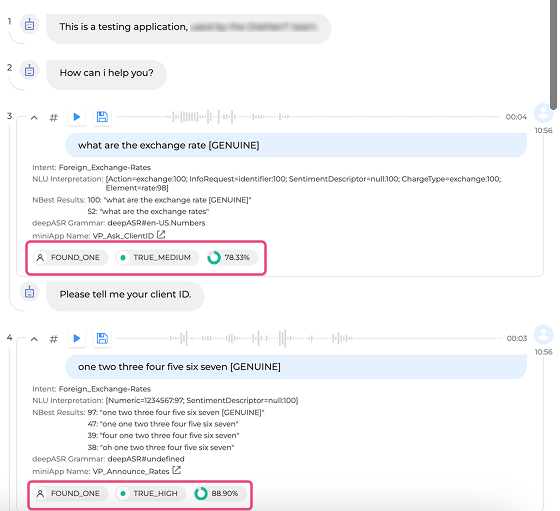
For applications with Voice Biometrics enabled, OCP® Monitor shows the BioSearch, BioResult, and BioScore for each dialog step.
Voice Biometrics Parameters
You can view the report on each step of the dialog in terms of Voice Biometrics. This allows the user to assess the caller's identification level based on the following parameters:
|
Parameter |
Description |
Value |
|---|---|---|
|
BioSearch |
Result of a search by biokey(s) against the users of the database |
FOUND_TOO_MANY NO_USER_FOUND FOUND_ONE FOUND_MANY |
|
BioResult |
A verification label that corresponds to a span of bioscores. |
NO_DATA LOW_DATA ERROR FALSE_HIGH FALSE_MEDIUM FALSE_LOW TRUE_LOW TRUE_MEDIUM TRUE_HIGH |
|
BioScore |
A similarity score generated after comparing two voiceprints, measured in matching percentage. |
0-100% |
Only applicable for IVR applications with Voice Biometrics enabled.
Read more about Voice Biometrics in the Voice Biometrics section.
For an overview of all OCP® Monitor components, see OCP® Monitor User Guide.