
Overview
When transferring a call between applications that receive calls directly over SIP, you can attach session data (such as a customer reference, verified intent, or account ID) so the receiving application has full context.
This feature uses the standard SIP User-to-User header (RFC 7433). When you mark outgoing transfer fields as UUI, OCP automatically packages and encodes them onto the transfer request so the telephony provider carries them onto the new call leg.
Prerequisites and Compatibility
-
Available only for applications that receive calls directly over SIP (both sending and receiving). Not available for applications integrated through NICE CXone or Genesys Cloud.
-
Standard custom headers (
X-headers) remain supported for any fields not marked to send as UUI.
How it works at a glance
-
Sending data: Mark individual data rows in your Transfer block with Send as UUI.
-
Receiving data: The target application extracts the attached fields automatically upon arrival.
-
Third-party PBX calls: External customer telephony systems can send incoming context using the same header format without additional configuration (see Receiving Data from a Third-Party PBX).
Step 1: Choose which data to send with the transfer
To attach data to an outgoing call transfer:
-
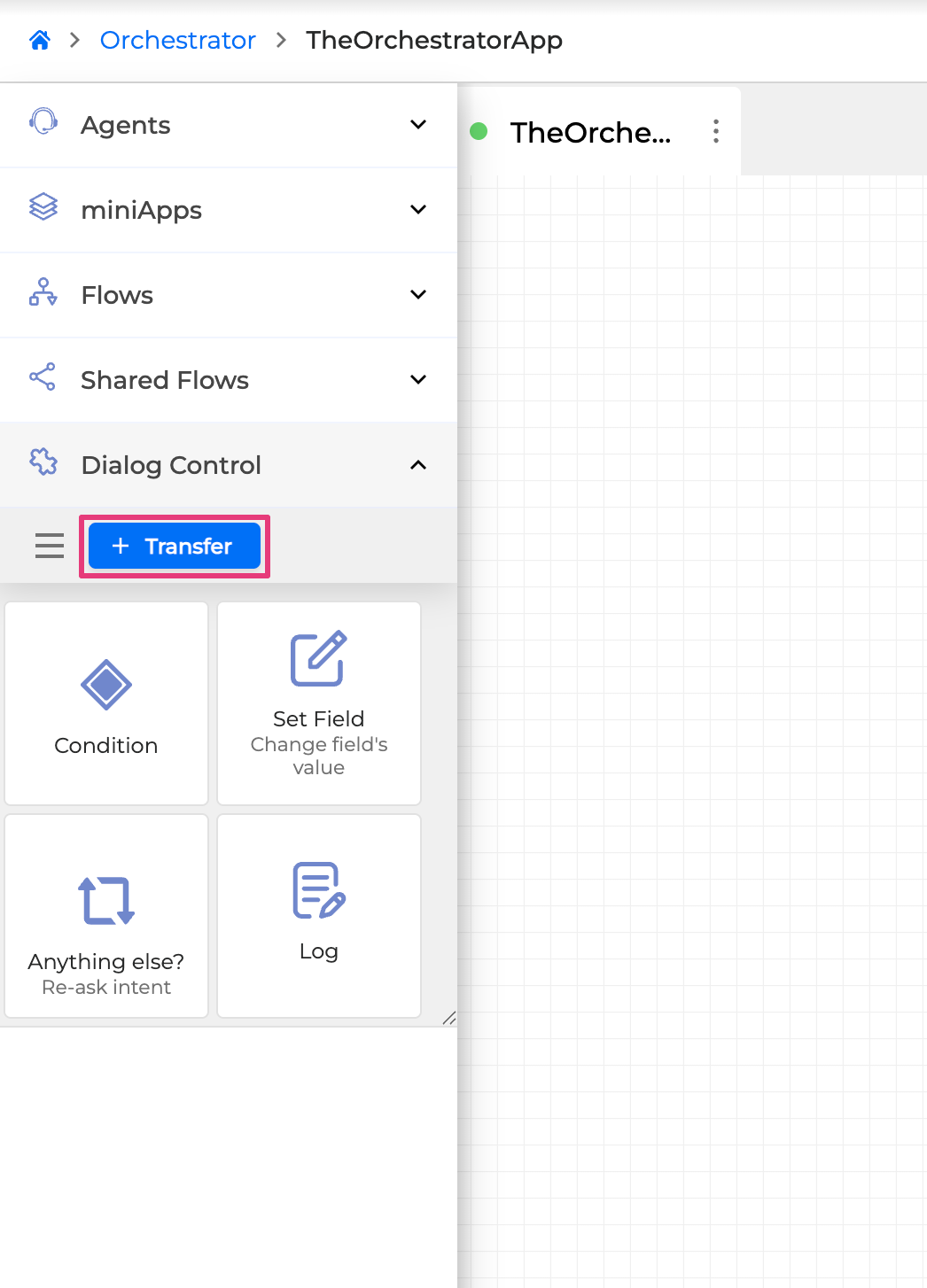
In Orchestrator, open the left panel, expand Dialog Control, and click + Transfer.
-
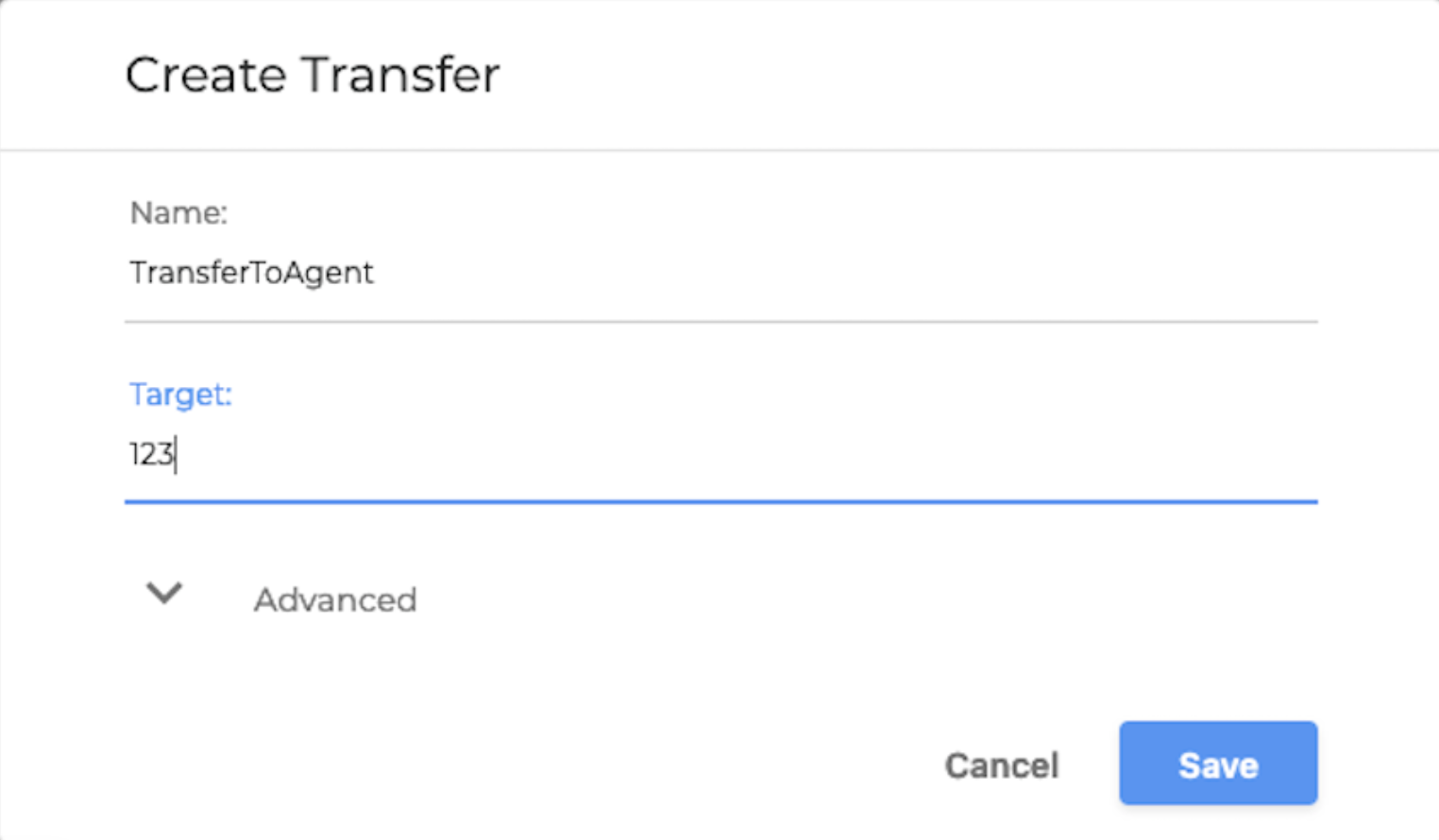
In the dialog box that opens, enter a Name and a Target (for example, the destination phone number).
-
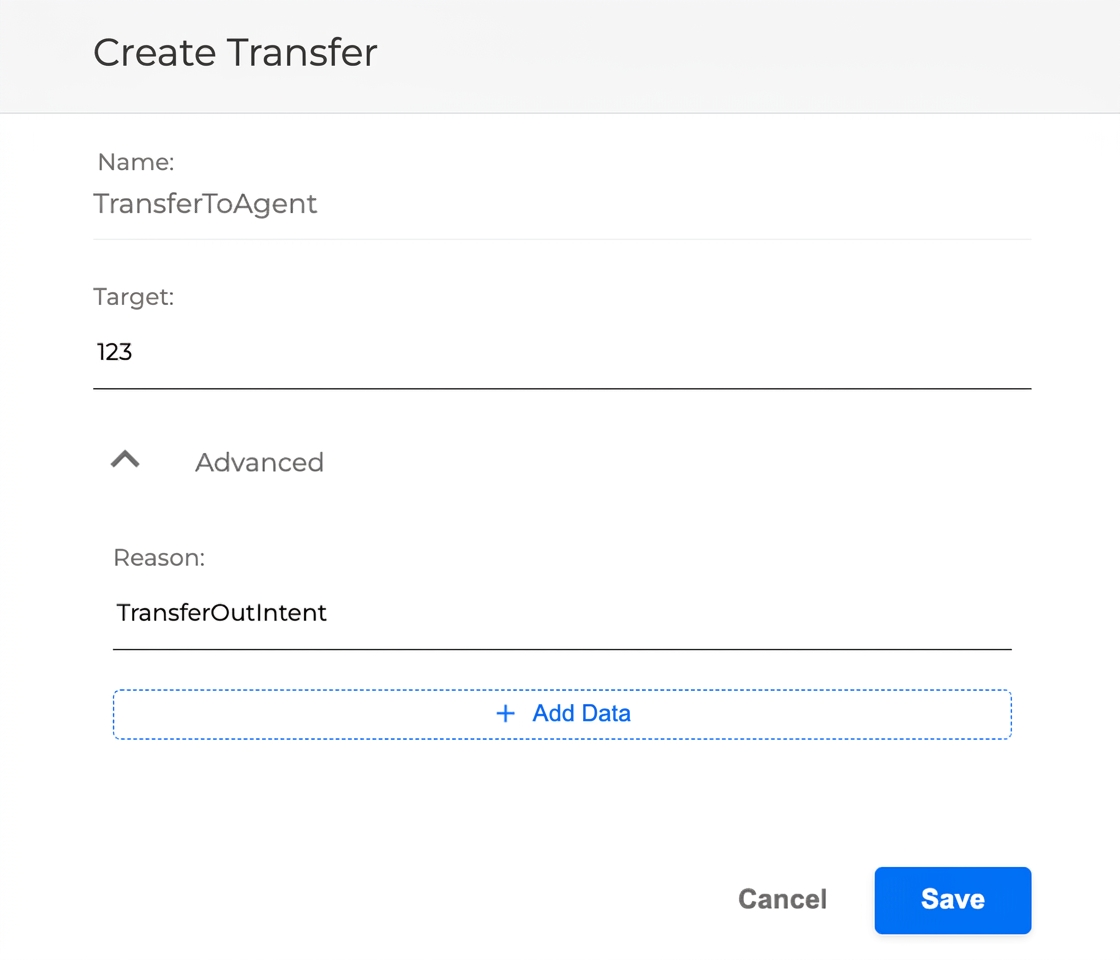
Click Advanced to see more settings.
-
(Optional) Enter a Reason for the transfer. It's used only in reporting logs.
-
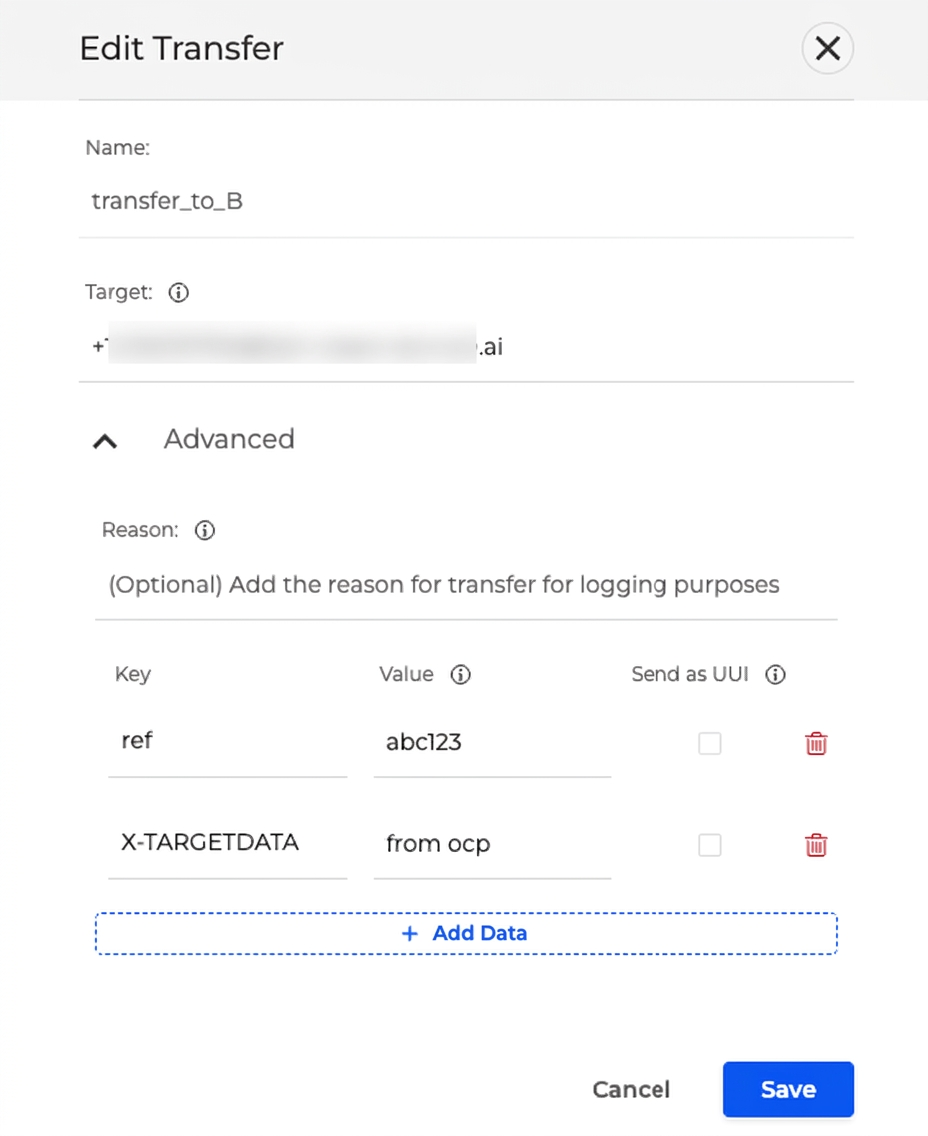
Click + Add Data to add key-value pairs for logging. For more details, refer to Transfer Conversation.
-
Tick Send as UUI on each row you want to pass to the receiving application.
-
Repeat steps 4–6 for any more rows, then click Save and publish the application.
Configuration Notes:
-
Independent settings: You can mark zero, one, or multiple rows. Any row not marked with Send as UUI continues to be sent as an individual custom SIP header (
X-header). -
Transport override: Marked fields travel inside the
User-to-Userheader instead of as separate SIP headers. The same value is never duplicated across both transports. -
Target format: The Target field in the Transfer block represents a destination, not a raw SIP URI. Do not manually type URI parameters (such as
;or=), as the connector constructs the URI automatically.
Step 2: Access Inbound Attached Data in the Target Application
When a call arrives with attached data, OCP processes it automatically. How your application reads the data depends on whether the field is declared in Application Options:
Option A: Declared fields (recommended)
If you declare the incoming field, OCP routes it to context.incoming_data.<OrchestratorField>:
-
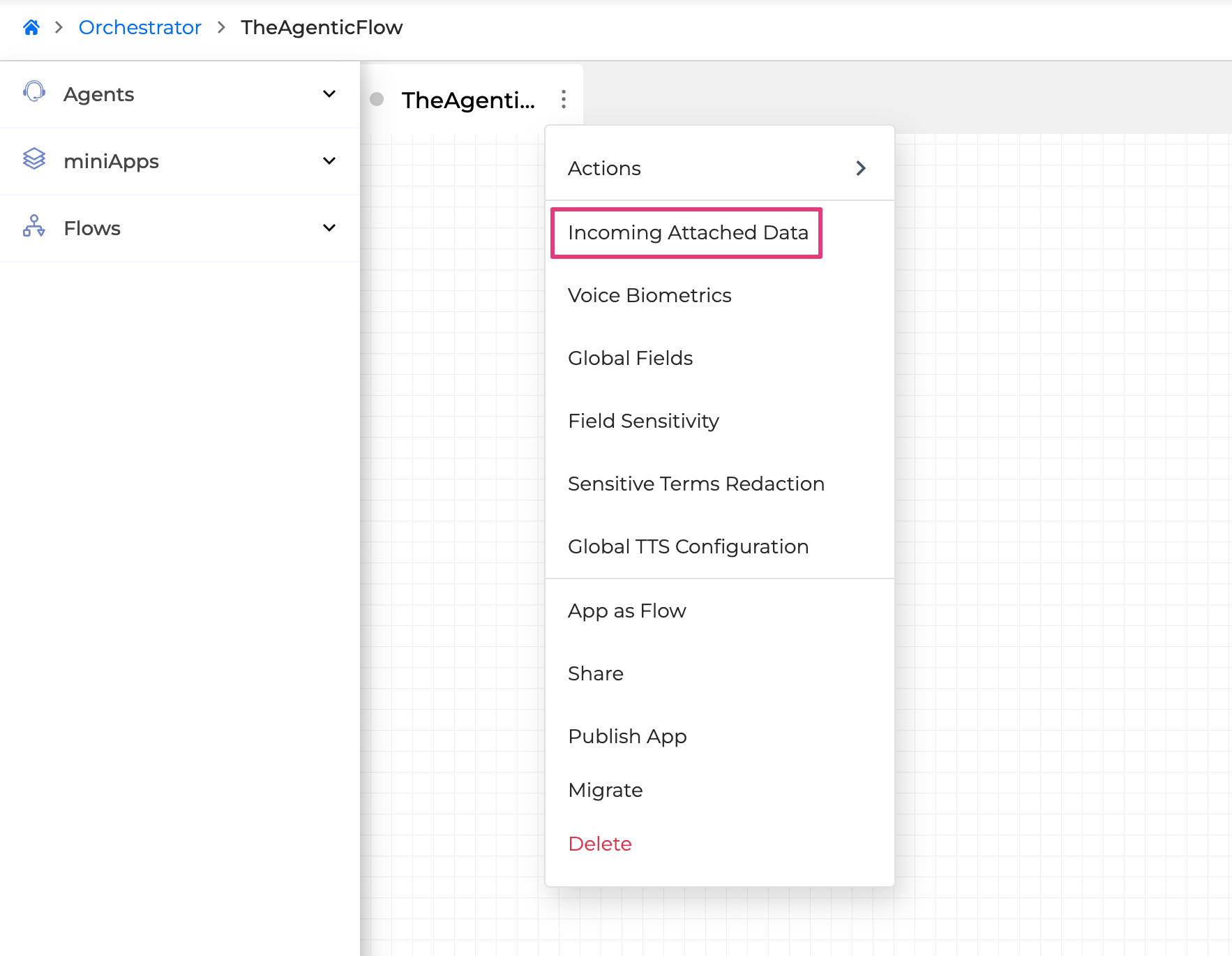
Open Application Options Menu → Incoming Attached Data (for details, see Configure Incoming Attached Data).
-
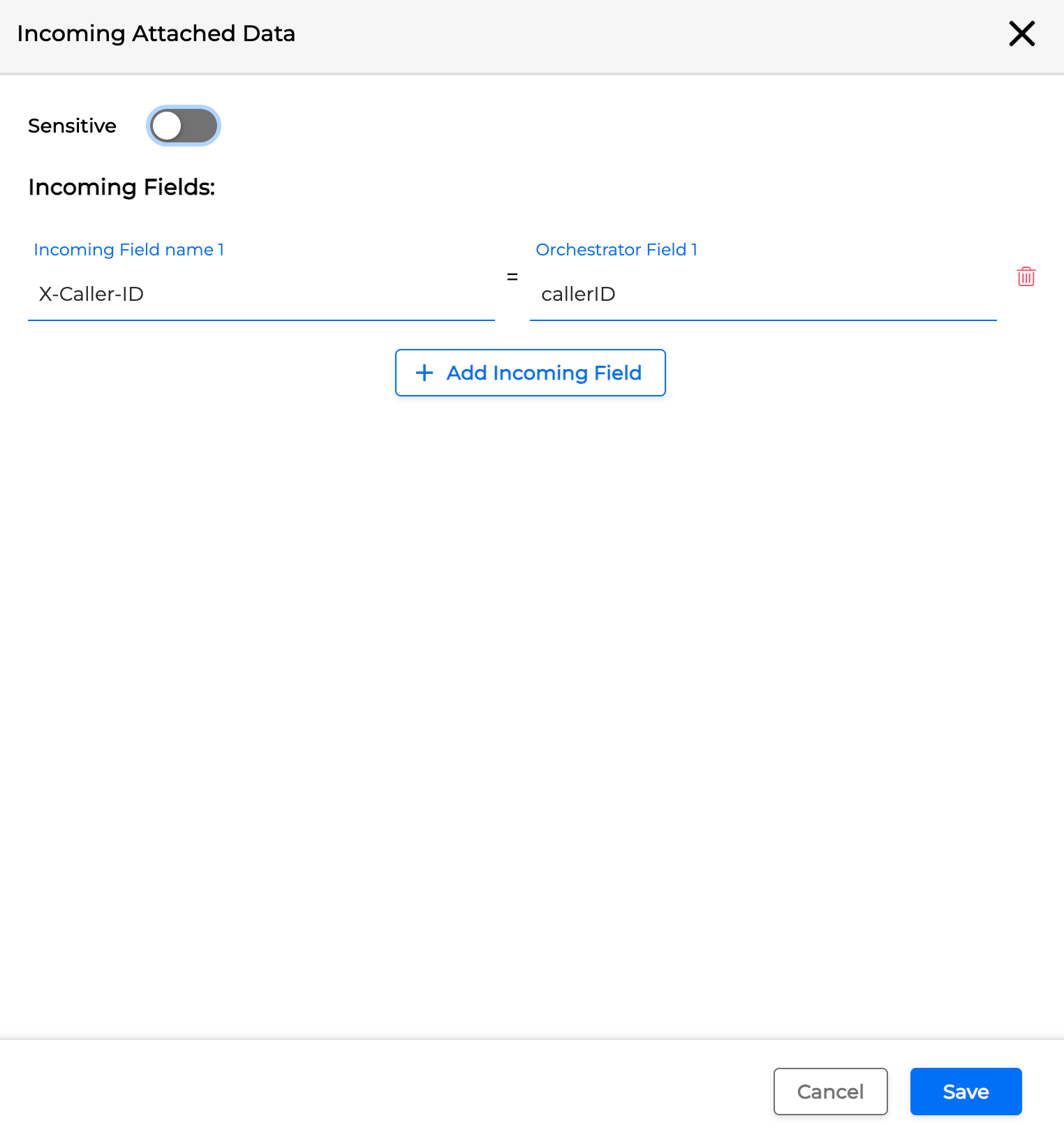
In the Incoming Fields section, configure:
-
-
Incoming Field name: The sender's field name (for example,
X-Caller-ID). -
Orchestrator Field: The variable name your application will use (for example,
CallerID).
-
-
Click Save.
Option B: Undeclared fields
Any field that is not declared under Incoming Attached Data is automatically assigned to:
-
context.flow_input.input_fields
It is treated as a pre-filled input at full confidence, allowing your dialogue flow to read it like any other recognized input field.
In application trace logs, undeclared fields appear under Input fields, not under incoming data. If you test a transfer and cannot find your field under context.incoming_data, verify whether it is listed under flow_input.input_fields or map it under Incoming Attached Data.
Key guidelines and best practices
Keep payloads as small as possible (identifiers only)
-
Pass references, not full records: Send a short identifier (for example, a ticket ID or reference token) and retrieve large customer records from backend services in the receiving application.
-
Why size matters: Telephony networks, Session Border Controllers (SBCs), and carrier switches enforce strict limits on SIP header and URI lengths (some drop data exceeding 128 characters).
-
Encoding overhead: Data is
hex-encoded by default, meaning every byte of JSON consumes two characters on the wire (for example,{"ref":"abc123"}= 16 bytes JSON = 32 wire characters).
Multi-Hop transfers do not chain automatically (One-Hop rule)
-
Attached data is never forwarded automatically across transfer chains.
-
In a multi-hop scenario (App A → App B → App C), App B must explicitly create an outgoing data row referencing the received field (using
#field_name#substitution described in Substitute Field’s Value) and check Send as UUI on that transfer. -
The inbound
User-to-Userheader is deliberately cleared before a new transfer is placed.
Troubleshooting and diagnostics
|
Symptom |
Probable Cause |
Recommended Action |
|---|---|---|
|
Field appears under |
The field was not mapped in the receiving application. |
Expected behavior. Map the field under Application Options → Incoming Attached Data to route it to |
|
Field was sent as an |
The Send as UUI checkbox was not checked, or the application was not republished. |
Verify the checkbox is selected in the Transfer block, save and republish the application. |
|
Field |
A |
Inspect the value of |
|
No data arrived, and no error field is reported |
The carrier dropped the header, did not send a header, or the header belonged to an external PBX (see Receiving Data from a Third-Party). |
|
|
Target application receives an outdated or static value |
A literal value was hardcoded instead of using variable substitution. |
In the Transfer block, reference dynamic fields using |
Understanding ocp_uui_input_error
If an incoming header arrives but cannot be used, OCP never drops the call. Instead, it logs the issue into an application field named ocp_uui_input_error:
|
Error Reason |
Reported Field Value |
|---|---|
|
Decoded and parsed, but carries no fields |
The |
|
Carries fields, but none could be used (all values empty or reserved) |
The |
If no User-to-User header was present on the call, or if the header was an external PBX identifier that did not match OCP format, ocp_uui_input_error is not generated.
Technical reference
Use this section when troubleshooting SIP traces or integrating external telephony systems
Underlying SIP mechanics (RFC 7433)
When an OCP application initiates a transfer, it issues a SIP REFER. Standard headers on a REFER target only the party performing the transfer (the carrier or PBX). Because the transferor is not required to copy headers onto the new call, OCP attaches the User-to-User header directly to the Refer-To URI:
Refer-To: <sip:+19198675309@host?User-to-User=7b22726566223a22616263313233227d%3Bencoding%3Dhex>
Compliant transfer equipment extracts the escaped URI parameter and creates an authentic User-to-User header on the outgoing INVITE:
INVITE sip:+19198675309@host SIP/2.0
User-to-User: 7b22726566223a22616263313233227d;encoding=hex
Inbound header evaluation priority
On inbound calls, OCP checks for attached data in the following order (using the first match found):
-
User-to-UserSIP header. -
X-User-to-UserSIP header (telephony equipment supporting onlyX-prefixes). -
Escaped URI parameters on the
Request-URI(fallback for equipment that copied theRefer-Toverbatim without building the header).
Receiving data from a third-party PBX
Customer platforms can send context to OCP on new inbound calls using User-to-User (or X-User-to-User):
-
Payload Format: Must decode to a flat JSON object (key/value pairs only). Values are read as strings. Nested objects, arrays, or raw text are ignored.
{"ref": "abc123", "businessUnit": "CARD"} -
Encoding:
hex(default if omitted),base64, orascii. The encoding must be specified in the header parameter (for example,;encoding=base64). -
Coexistence with External Telephony Identifiers: If a customer's PBX already generates its own non-JSON tracking string in
User-to-User, OCP leaves it untouched to prevent parsing errors. To capture that raw string, declareUser-to-UserorX-User-to-Userdirectly under Incoming Attached Data.
Carrier and equipment compatibility
-
The party performing the transfer controls whether the header survives. Standard-compliant carriers (such as Bandwidth) and switches (such as Asterisk 22) extract the URI parameter and construct the new header properly.
-
Telephony elements or SBCs that strip parameters when constructing the outbound
INVITEwill discard attached data. Always verify transfer compatibility across your specific carrier path.